RTX 5060 8GB vs RX 9060 XT 16GB – Does the VRAM Gap Actually Matter?

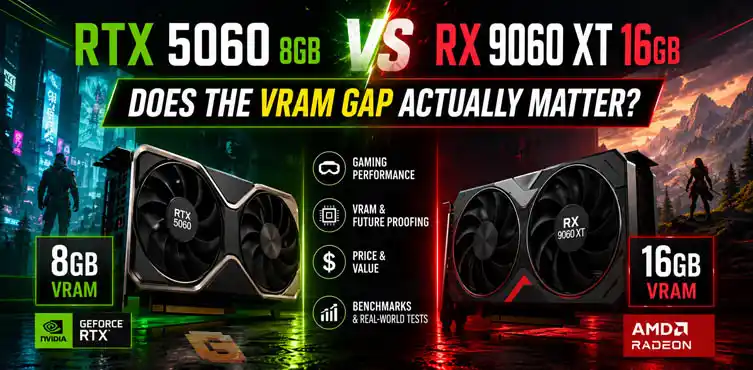

The RX 9060 XT 16GB is generally the stronger gaming GPU, especially for 1440p gaming and long-term ownership. However, the RTX 5060 8GB performs much closer than many gamers expect at 1080p because memory capacity is only one part of overall GPU performance. Architecture, memory bandwidth, compression technologies, PCIe connectivity, and game optimization all play major roles.
If you’re comparing RTX 5060 8GB vs RX 9060 XT 16GB, the biggest surprise isn’t that AMD often wins. It’s how often the gap is smaller than the VRAM specifications suggest. When gamers first see this matchup, the reaction is usually immediate.
One card has 8GB of VRAM.
The other has 16GB.
On paper, it looks like an unfair fight. Yet when benchmark videos and reviews start appearing, many people notice something unexpected. The RTX 5060 often remains surprisingly competitive despite having half the memory.
That raises three important questions:
- Which card performs better in Cyberpunk 2077, Alan Wake 2, and Borderlands 4?
- What changes when moving from 1080p to 1440p?
- Why doesn’t a 16GB frame buffer automatically create a huge performance gap?
Let’s break it down.
RTX 5060 8GB vs RX 9060 XT 16GB Specifications
The RX 9060 XT and RTX 5060 target similar buyers, but they approach the market from very different directions. Before discussing game performance, it’s worth looking at the hardware differences.
| Specification | RTX 5060 8GB | RX 9060 XT 16GB |
|---|---|---|
| Architecture | NVIDIA Blackwell | AMD RDNA 4 |
| VRAM | 8GB GDDR7 | 16GB GDDR6 |
| Memory Bus | 128-bit | 128-bit |
| Memory Bandwidth | 448 GB/s | 322 GB/s |
| PCIe Interface | PCIe 5.0 x8 | PCIe 5.0 x16 |
| Upscaling Technology | DLSS | FSR |
| Frame Generation | Supported | Supported |
| Launch MSRP | $299 | $349 |
| Primary Strength | NVIDIA feature ecosystem, bandwidth efficiency | Larger VRAM capacity |
| Best Target Resolution | 1080p | 1080p–1440p |
The table immediately highlights the biggest talking point. AMD offers double the VRAM. NVIDIA counters with newer GDDR7 memory and a feature-rich ecosystem built around DLSS and ray tracing technologies. The answer isn’t as simple as “more VRAM wins.”
If you want a full breakdown of what DLSS and DLAA actually are, how they differ from TAA, and when to use each, our anti-aliasing techniques guide covers the complete picture — including why AMD users get FSRAA instead.
Why Are So Many Gamers Comparing These Two Cards?
Because they sit in one of the most competitive segments of the GPU market. Most buyers aren’t shopping for flagship GPUs. They’re looking for the best value card that can comfortably run modern games without spending enthusiast-level money. That means these buyers care about three things:
Future-Proofing
Nobody wants to buy a GPU today only to discover that 8GB isn’t enough two years later. The RX 9060 XT immediately attracts attention because 16GB appears safer for future games.
1440p Gaming
A growing number of gamers have upgraded to 1440p monitors. The question becomes whether the RTX 5060’s 8GB frame buffer is enough or if the RX 9060 XT’s extra memory creates a meaningful advantage.
Getting the Best Value
Price matters.
A lot.
A GPU that’s 10% faster but costs substantially more may not actually be the better purchase. That’s why MSRP and street pricing matter just as much as benchmark charts.
1080p Results: Cyberpunk, Alan Wake 2, Borderlands 4
At 1080p, the RX 9060 XT generally performs better overall. However, the gap is often smaller than expected. This is where the VRAM debate becomes most interesting.
Cyberpunk 2077
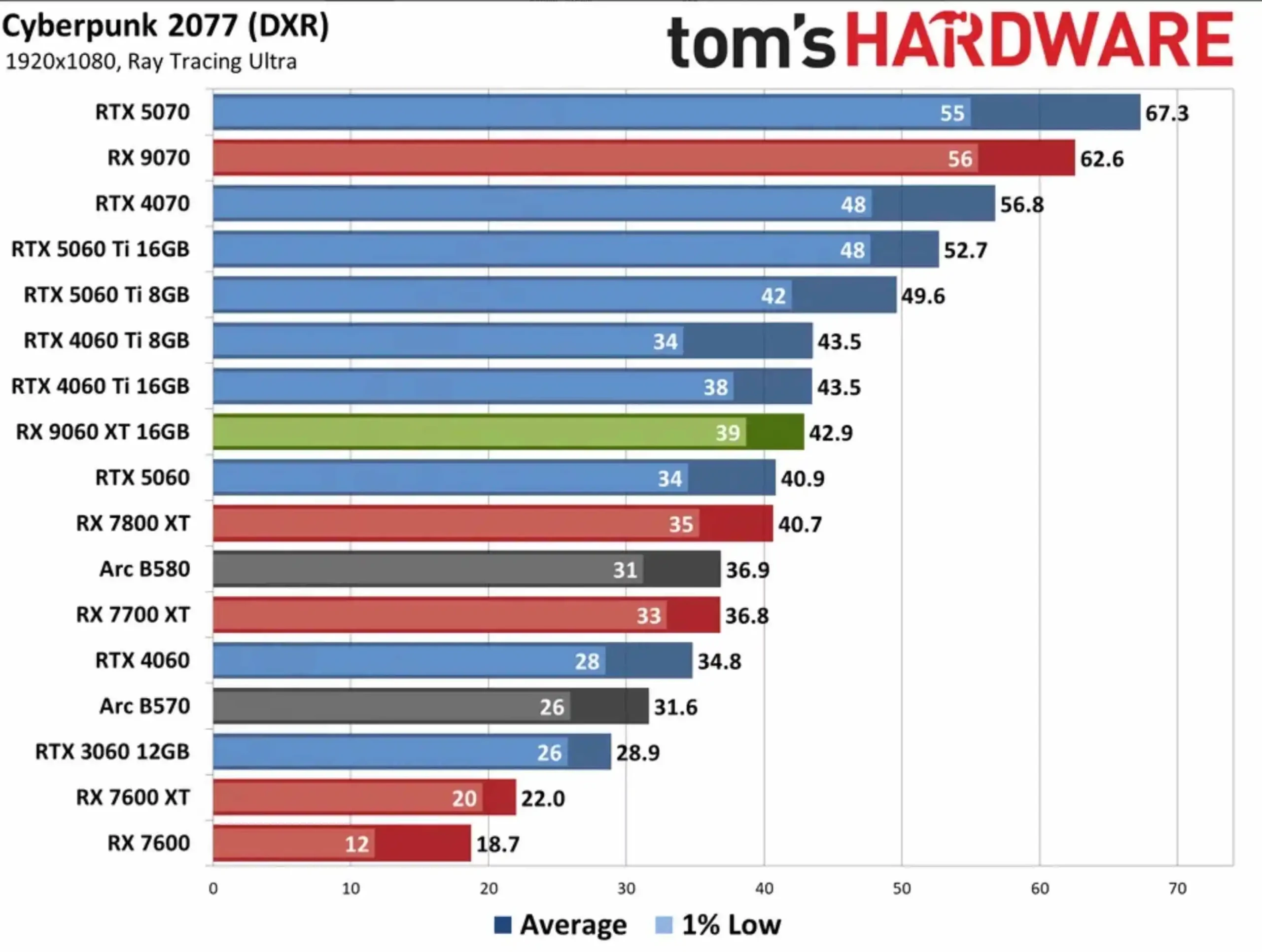
Cyberpunk 2077 remains one of the most demanding games available. The game places heavy demands on both GPU compute power and memory resources. The RX 9060 XT benefits from stronger raster performance and a larger memory pool. Yet the RTX 5060 frequently remains competitive because many 1080p settings combinations do not fully exhaust its available VRAM.
This is an important distinction. Having more memory doesn’t automatically increase frame rates if the game doesn’t need it.
Alan Wake 2 RTX 5060 Benchmark Discussion
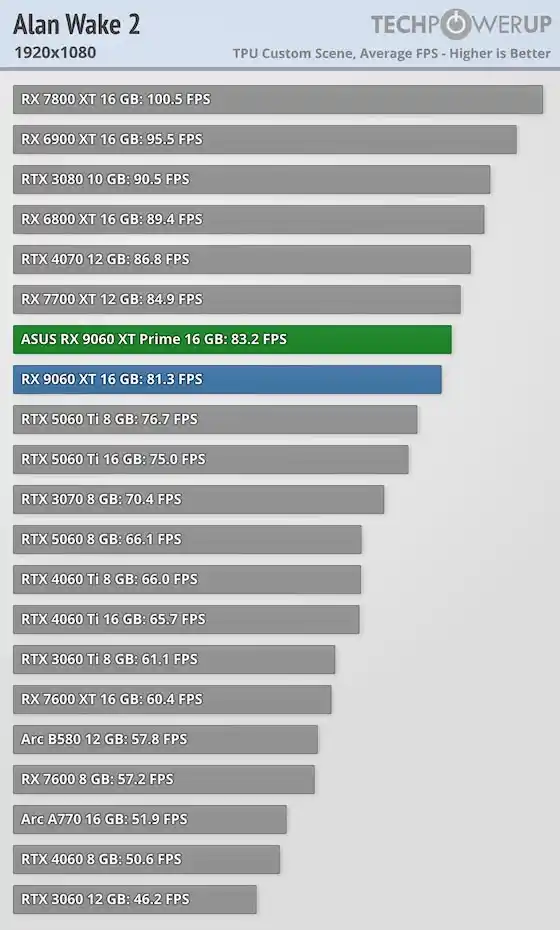
Alan Wake 2 is one of the most VRAM-sensitive modern titles. Its advanced lighting systems, dense environments, and high-quality assets make it a useful test case for memory discussions.
The RX 9060 XT’s 16GB buffer clearly provides more headroom. However, the RTX 5060 does not instantly become unusable because it has 8GB.
- Settings matter.
- Texture quality matters.
- Ray tracing matters.
- Upscaling matters.
The result is often a much closer comparison than raw specifications suggest.
Borderlands 4 RTX 5060 Performance
Borderlands 4 is particularly interesting because benchmark coverage is still relatively limited compared to older titles. What early testing suggests is that AMD’s architecture performs very well in traditional rasterized workloads.
The RX 9060 XT usually benefits. The RTX 5060 remains competitive. More importantly, the gap still isn’t proportional to the VRAM difference. That’s the recurring theme throughout this entire comparison.
RTX 5060 8GB vs 9060 XT 16GB 1440p: Where the Gap Starts to Show
At 1440p, the RX 9060 XT’s memory advantage becomes more meaningful. This is where many reviewers begin seeing a clearer separation between the two cards.
- Higher resolutions increase memory requirements.
- Higher resolutions increase texture demands.
- Higher resolutions increase asset streaming workloads.
All of those factors benefit the larger frame buffer.
Cyberpunk 2077 at 1440p
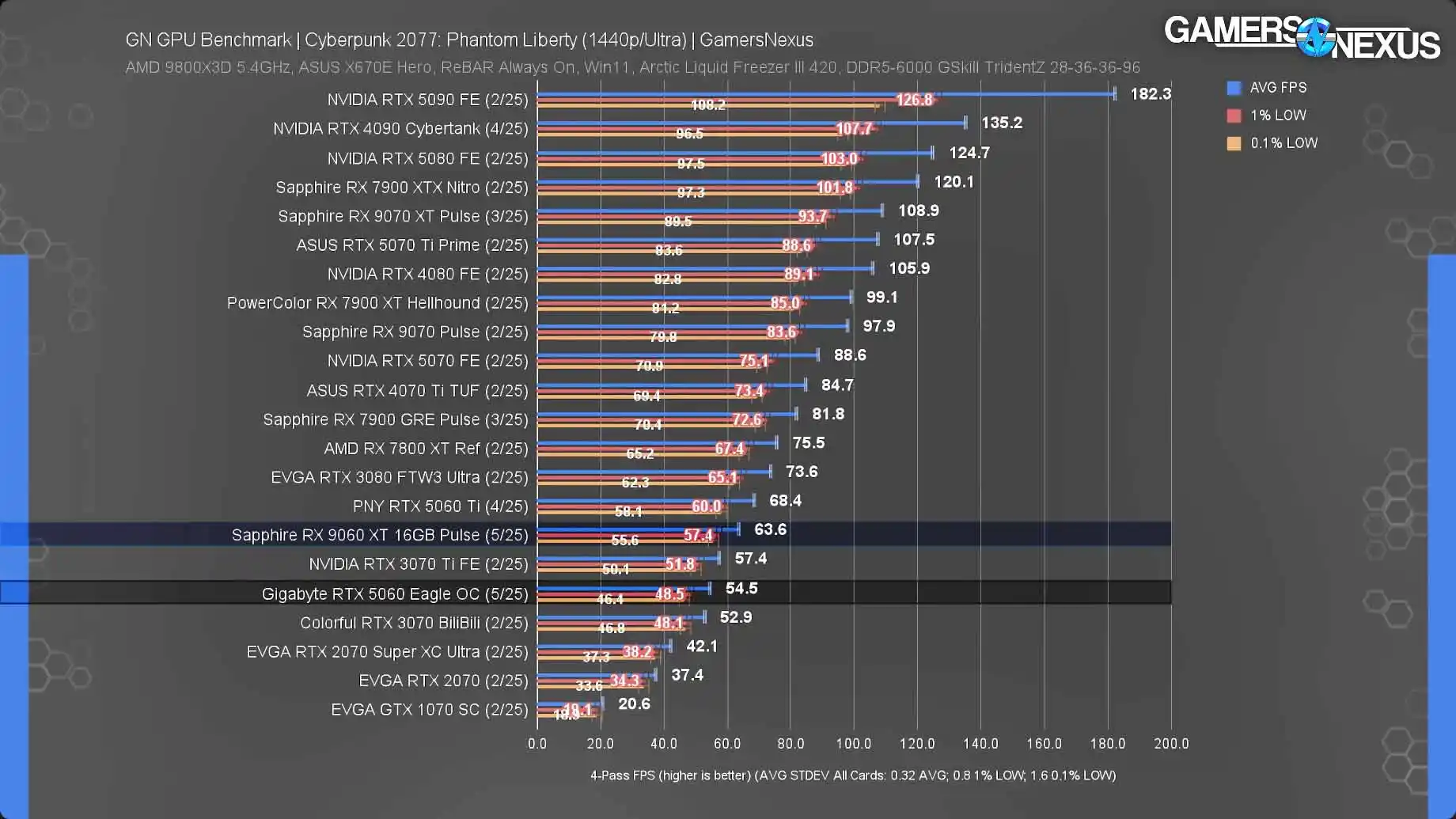
As resolution increases, Cyberpunk 2077 places more pressure on memory resources. The RX 9060 XT’s larger VRAM pool provides additional flexibility for higher texture settings and more demanding visual configurations. The RTX 5060 remains capable.
The difference is that the AMD card has more room to breathe.
Alan Wake 2 at 1440p
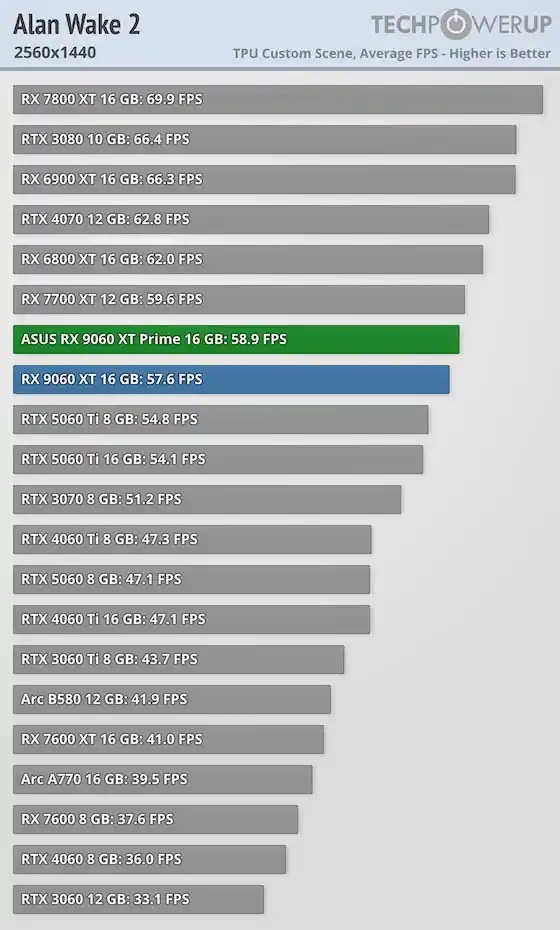
Alan Wake 2 may be the strongest argument for additional VRAM. The game can be exceptionally demanding when visual settings are pushed higher.
The RX 9060 XT’s 16GB allocation helps reduce the likelihood of memory-related limitations. This doesn’t guarantee dramatically higher performance. It simply provides more headroom.
Borderlands 4 at 1440p
Borderlands 4 continues the same trend. As resolution increases, memory capacity becomes more valuable. The RX 9060 XT generally scales more comfortably into higher settings configurations. For gamers planning several years of 1440p ownership, that’s an important consideration.
Does 8GB VRAM Matter in 2026?
Yes. But not always in the way people think. The phrase “8GB is dead” is often repeated online, yet the reality is much more nuanced. The real question isn’t whether 8GB matters.
The real question is, when it becomes a limitation.
Many modern games still run perfectly well within an 8GB budget at 1080p. Problems typically emerge when several factors combine:
- Higher resolutions
- Ultra texture settings
- Ray tracing
- Poorly optimized game engines
- Future titles with larger asset requirements
VRAM limitations are usually gradual rather than catastrophic. Performance doesn’t instantly collapse the moment a game approaches 8GB usage. Instead, users may experience:
- Reduced texture quality options
- Increased streaming activity
- More sensitivity to settings changes
- Greater dependence on upscaling technologies
This distinction is often lost in online discussions.
Why Does 8GB vs 16GB Barely Change the Results?
Because VRAM capacity is only one component of overall GPU performance. This is the most important concept in the entire article.
Most Games Still Don’t Need 16GB
The simplest explanation is that many games simply don’t require 16GB. Unused VRAM provides no direct performance benefit. If a game comfortably operates within an 8GB budget, doubling memory capacity won’t magically double frame rates.
This is why benchmark charts often look closer than expected.
GPU Architecture Matters
The GPU itself still performs the rendering work. Architecture, cache design, scheduling efficiency, and memory management all influence gaming performance. The RTX 5060 isn’t just competing with memory capacity.
It’s competing with an entire GPU architecture.
GDDR7 vs GDDR6 Bandwidth Gaming: The Real Trade-Off
This is where the discussion becomes more interesting.
Most buyers focus entirely on capacity. They see 8GB versus 16GB and assume the larger number automatically wins. But memory capacity and memory bandwidth are two different things.
The RTX 5060 delivers 448 GB/s of memory bandwidth, while the RX 9060 XT 16GB delivers approximately 322 GB/s.
Capacity determines how much data can be stored in memory. Bandwidth determines how quickly that data can be accessed and moved. That distinction helps explain why the RTX 5060 often performs closer to the RX 9060 XT than many gamers expect at 1080p. Even though the AMD card has twice the VRAM capacity, NVIDIA’s GDDR7 memory subsystem can move data significantly faster.
This doesn’t eliminate the benefits of 16GB VRAM. As resolutions rise and texture requirements increase, the RX 9060 XT’s larger frame buffer becomes increasingly valuable. However, at 1080p and moderate settings, the RTX 5060’s bandwidth advantage helps offset some of its capacity disadvantage. That’s one of the key reasons benchmark charts frequently appear much closer than specification sheets suggest.
Compression Technologies Help Stretch Memory
Modern GPUs use increasingly sophisticated compression techniques. These techniques allow memory resources to be used more efficiently. As a result, an 8GB card today is not directly comparable to an 8GB card from several generations ago. Efficiency improvements help smaller memory pools go further than many buyers expect.
The Overlooked Difference: PCIe 5.0 x8 vs PCIe 5.0 x16
Most discussions focus exclusively on VRAM. A surprising number completely ignore PCIe connectivity. The RTX 5060 uses a PCIe 5.0 x8 interface. The RX 9060 XT uses a PCIe 5.0 x16 interface. For users running modern PCIe 5.0 platforms, this usually isn’t a major issue. For users on older PCIe 4.0 motherboards, the story changes.
A PCIe 5.0 x8 card effectively operates with fewer lanes available than a full x16 solution. Depending on the workload, this can create measurable performance losses. The RX 9060 XT avoids this concern because it maintains a full x16 interface. This makes AMD’s card particularly attractive for gamers upgrading older AM4 and Intel systems without replacing the motherboard.
It won’t matter to everyone. But it’s absolutely a factor worth considering.
Pricing and Value Analysis
Pricing changes everything. A GPU comparison without pricing is incomplete.
The RTX 5060 launched with a $299 MSRP. The RX 9060 XT 16GB launched with a $349 MSRP. However, launch-period street prices for many RX 9060 XT models frequently exceeded MSRP. That creates three different buying scenarios.
If the RTX 5060 remains close to MSRP while the RX 9060 XT sells significantly above MSRP, NVIDIA’s value proposition improves considerably. If both cards are available near MSRP, AMD’s stronger performance and larger VRAM allocation become more compelling.
For long-term ownership, the value of the RX 9060 XT’s additional memory may justify the higher purchase price. This is why buyers should compare actual store pricing rather than relying solely on launch announcements.
Which GPU Should You Buy?
The answer depends entirely on your priorities.
Buy the RTX 5060 8GB If:
- You primarily game at 1080p
- You prefer NVIDIA technologies
- You want DLSS support
- You care about ray tracing features
- The RTX 5060 is significantly cheaper in your region
Buy the RX 9060 XT 16GB If:
- You play at 1440p regularly
- You keep GPUs for several years
- You want maximum VRAM headroom
- You prioritize native raster performance
- Pricing is reasonably close to MSRP
Whichever card you land on, the GPU is only one half of the performance equation. The motherboard you pair it with — specifically its VRM quality and thermal management — determines how stable your system runs under sustained load and how much CPU headroom you have left if you want to push your processor alongside it. Our explainer on what a VRM heatsink actually does is worth a read before you finalize your build.
FAQ
Is the RX 9060 XT 16GB faster than the RTX 5060 8GB?
Generally yes. The RX 9060 XT is usually the stronger card overall, particularly at 1440p and in VRAM-heavy workloads.
Does 8GB VRAM matter in 2026?
Yes. It matters most at higher resolutions, with ultra textures, and in demanding modern games.
Why are the benchmark results often closer than expected?
Because GPU architecture, memory bandwidth, compression technologies, and game optimization influence performance alongside VRAM capacity.
Is the RTX 5060 good for 1440p gaming?
Yes. However, some demanding games may require more careful settings choices than a 16GB card.
Is the RX 9060 XT more future-proof?
Generally yes. The larger 16GB frame buffer provides additional headroom for future game requirements.
Conclusion
The RTX 5060 8GB vs RX 9060 XT 16GB comparison is a perfect example of why GPU buying decisions are more complicated than specification sheets.
The RX 9060 XT is generally the stronger gaming card. Its 16GB frame buffer provides additional flexibility for future games, higher resolutions, and demanding texture settings.
At the same time, the RTX 5060 demonstrates why VRAM capacity alone doesn’t determine gaming performance. Modern architecture, GDDR7 memory, compression technologies, and NVIDIA’s software ecosystem allow it to remain surprisingly competitive in many real-world scenarios.
For 1080p gamers, the gap is often smaller than expected. For 1440p gamers, the RX 9060 XT’s advantages become increasingly apparent.
Ultimately, your best choice depends on your monitor resolution, local pricing, upgrade cycle, and preferred game settings. Before buying, compare current retail prices and consult game-specific benchmark reviews for the titles you play most often.