AMD PBO Explained

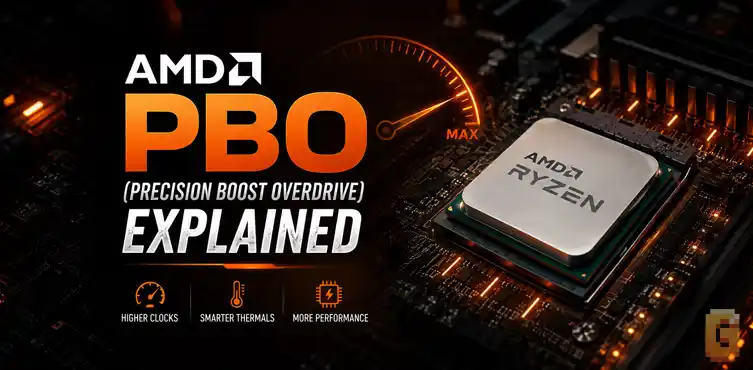

AMD PBO Explained simply: Precision Boost Overdrive is an automatic performance-boosting feature built into modern Ryzen processors. It allows the CPU to use available power, temperature, and current headroom to run faster than stock boost behavior without requiring traditional manual overclocking.
If you have adequate cooling, enabling PBO is usually one of the easiest ways to gain extra CPU performance. For most users, it is safer and simpler than manual overclocking.
If you’ve spent any time in a motherboard BIOS, watched Ryzen tuning videos, or browsed PC-building forums, you’ve probably seen people recommending that you “just enable PBO.”
The problem is that many explanations immediately dive into technical terms like PPT, TDC, EDC, scalar values, voltage curves, and thermal limits. For someone simply trying to understand whether PBO is worth enabling, that information often creates more confusion than clarity.
This guide has AMD PBO Explained in plain English. We’ll cover what Precision Boost Overdrive actually does, how it differs from traditional overclocking, whether it’s safe, and how features like Curve Optimizer fit into the picture.
Along the way, we’ll also answer a common real-world question: if you’re using a strong cooler such as a 360mm AIO, do you actually have enough cooling to benefit from PBO?
What Is AMD PBO?
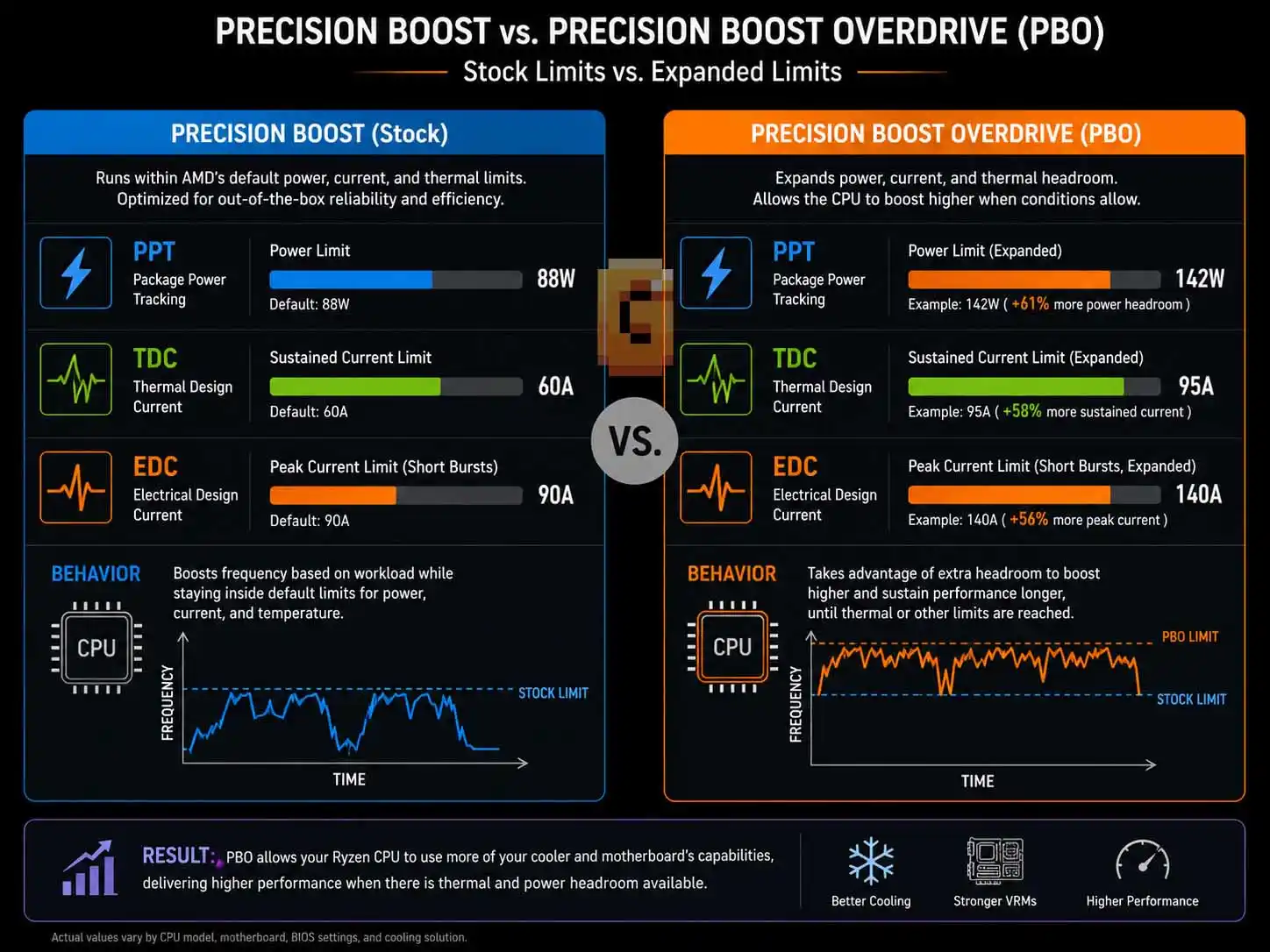
AMD Precision Boost Overdrive (PBO) is an automatic performance enhancement technology for Ryzen processors.
Instead of forcing the CPU to run at one fixed overclocked frequency, PBO allows the processor to intelligently increase performance whenever additional power, thermal, and electrical headroom is available.
Think of it as giving the CPU permission to be more aggressive.
Modern Ryzen processors constantly monitor:
- Temperature
- Power consumption
- Current draw
- Workload intensity
- Available thermal headroom
When conditions allow, the CPU boosts higher. PBO expands those operating limits, allowing the processor to take advantage of additional cooling and motherboard capability.
In simple terms:
Precision Boost = Standard automatic boosting.
Precision Boost Overdrive = Automatic boosting with expanded limits.
This is why many Ryzen users enable PBO immediately after building a new system.
How Does Precision Boost Overdrive Work?
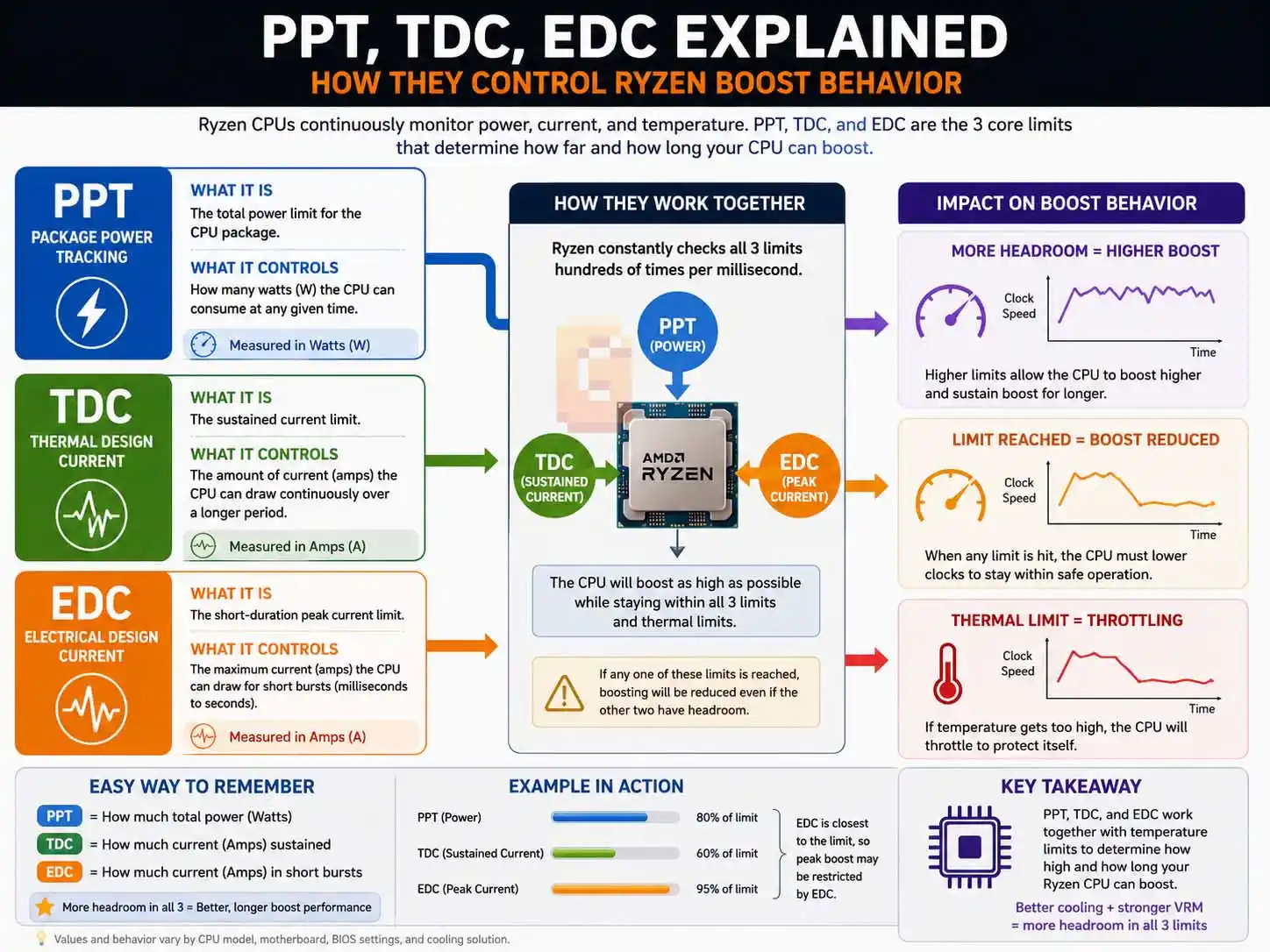
PBO works by adjusting several operating limits that normally restrict CPU boosting behavior.
The three most commonly referenced limits are:
PPT (Package Power Tracking)
PPT determines the maximum amount of power the CPU package can consume.
Higher PPT values allow the processor to draw more power when necessary.
TDC (Thermal Design Current)
TDC controls sustained current delivery.
This affects how much current the CPU can safely use during longer workloads.
EDC (Electrical Design Current)
EDC governs short-duration current spikes.
These spikes often occur during bursty workloads where the processor briefly demands extra power.
Why These Limits Matter
Imagine your CPU is an athlete. Even if the athlete has the strength to run faster, race rules might prevent them from doing so.
PBO effectively relaxes some of those rules. If temperatures remain under control and power delivery is sufficient, Ryzen can boost more aggressively.
Why AMD Created PBO
AMD recognized that not every system is built the same. One person may use a stock cooler. Another may use a premium 360mm liquid cooler.
One motherboard may have basic VRMs. Another may have enthusiast-grade power delivery built to sustain much higher current draw without breaking a sweat. If you’re not sure what that actually means for your board, our guide on what a VRM heatsink does explains why this component matters so much once you start asking your CPU to pull more power.
A fixed boost algorithm cannot fully exploit every possible hardware configuration. PBO allows Ryzen to scale performance based on the capabilities of the entire system.
Better cooling and stronger power delivery often result in more boost opportunities. That scalability is what AMD PBO Explained is really about — a feature that adapts to your specific hardware rather than applying a one-size-fits-all setting.
PBO vs. Manual Overclocking
PBO and manual overclocking pursue the same goal—higher performance—but they achieve it in very different ways.
Manual Overclocking
With traditional overclocking, you typically:
- Set a fixed frequency
- Set a fixed voltage
- Test stability manually
- Adjust settings repeatedly
The CPU then runs at those settings regardless of workload.
Precision Boost Overdrive
With PBO:
- Frequencies remain dynamic
- Voltage remains dynamic
- Boost behavior changes automatically
- The CPU adapts in real time
The processor decides what it can safely achieve based on current operating conditions.
Which Is Better?
For most Ryzen users, PBO is usually the better option. Modern Ryzen CPUs already boost extremely well at stock settings.
Manual overclocking can sometimes reduce single-core boost performance because it replaces AMD’s sophisticated boosting algorithm with a fixed frequency.
PBO preserves the intelligence of Ryzen’s boosting system while allowing additional performance. That combination makes it attractive for both gaming and productivity workloads.
Does PBO Increase Gaming Performance?
Yes, but expectations should remain realistic. PBO does not magically transform performance.
The gains depend on:
- CPU model
- Cooling quality
- Motherboard capability
- Game engine behavior
- GPU bottlenecks
In CPU-limited scenarios, PBO can improve performance by allowing higher sustained boost frequencies. In GPU-limited scenarios, gains may be small or impossible to notice.
Where PBO Often Helps Most
PBO tends to provide the greatest benefit in:
- Competitive esports titles
- High-refresh-rate gaming
- Simulation games
- Strategy games
- CPU-heavy workloads
When paired with powerful graphics cards, CPU performance becomes increasingly important. To check whether PBO is actually improving in-game smoothness, watch your 1% low FPS — it’s a more honest measure of real-world performance than average framerate alone.
Is PBO Safe? Does It Void Your Warranty?
For most users, PBO is generally considered safe when used as intended. AMD designed Ryzen processors to monitor temperature, power consumption, and electrical conditions continuously.
If limits are reached, the processor can reduce performance automatically to protect itself.
The Safety Question
PBO increases power consumption and heat output. That means cooling quality becomes more important. A weak cooler may cause higher temperatures and reduce the effectiveness of PBO. A strong cooling solution gives Ryzen more room to boost.
Does PBO Void Your Warranty?
Technically, yes. AMD’s own warranty terms describe Precision Boost Overdrive as running the processor outside of its factory specifications, and state that using the feature ends AMD’s product warranty coverage — and potentially your motherboard or system warranty too. In practice this mainly applies if a failure is directly traceable to running outside spec; unrelated issues are still generally covered. Users concerned about warranty implications should verify the latest guidance directly from AMD before enabling advanced tuning features.
This is one reason many enthusiasts prefer to understand the trade-offs before making BIOS changes.
How Important Is Cooling for PBO?
Cooling is one of the biggest factors affecting PBO effectiveness. PBO can only take advantage of available thermal headroom. Your motherboard’s power delivery is equally important. If the processor runs hot, boost opportunities become limited. If temperatures remain lower, the CPU can sustain higher performance for longer periods.
Air Coolers
Good tower air coolers can work very well with PBO. Many modern dual-tower coolers provide excellent thermal performance.
240mm AIO Coolers
A quality 240mm AIO generally offers enough cooling for most Ryzen processors.
360mm AIO Coolers
A strong 360mm AIO is often ideal for maximizing PBO behavior. The additional radiator surface area improves heat dissipation and helps maintain lower temperatures under sustained loads.
Example: Is a 360mm AIO Good Enough for PBO?
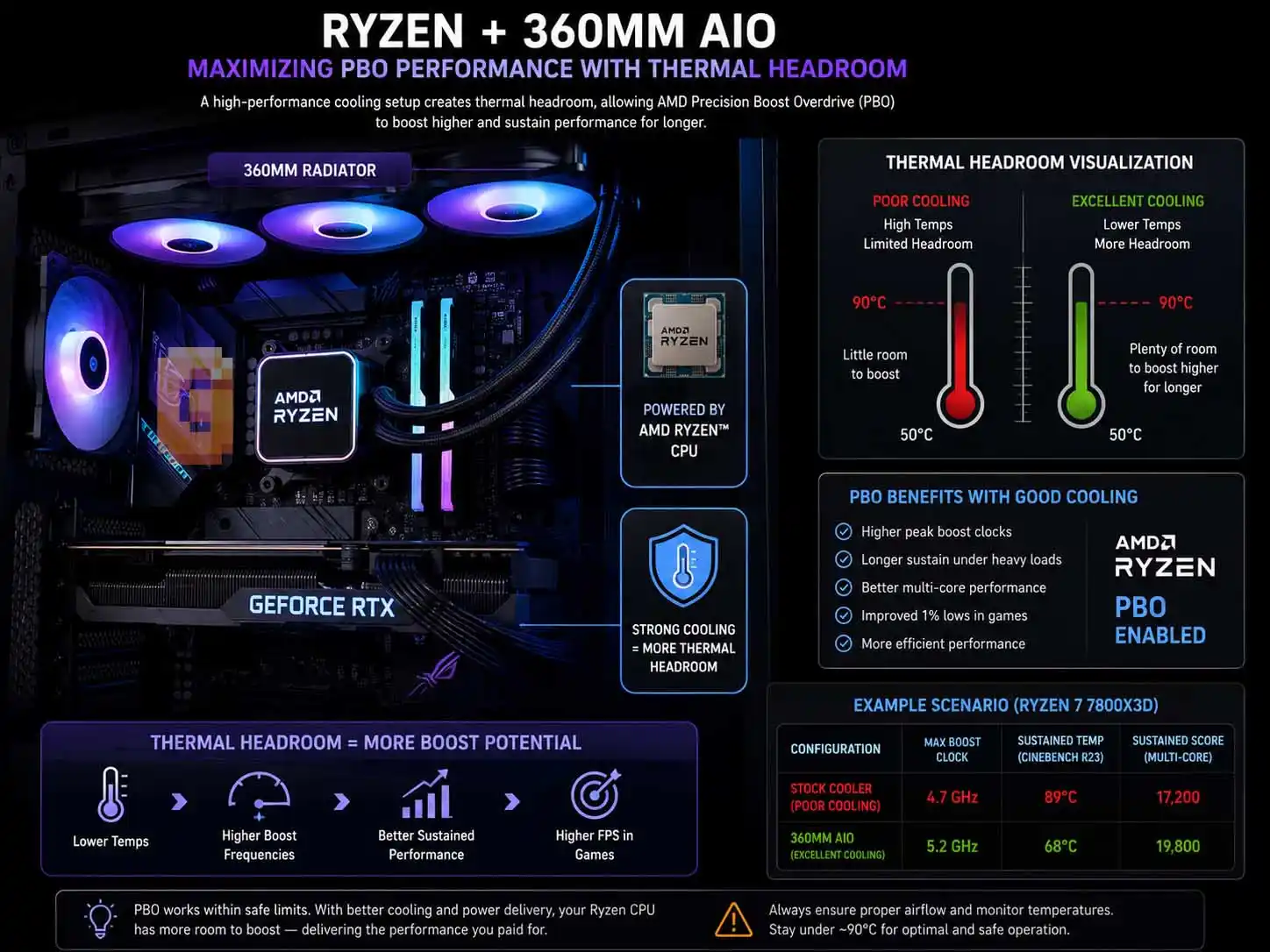
In most cases, yes. A quality 360mm liquid cooler is typically more than sufficient for Ryzen processors running PBO.
As a real-world example, take the ASUS ROG Ryuo III 360 ARGB.
Its specifications include:
- 360mm radiator
- Triple 120mm fans
- Fan speeds up to approximately 2200 RPM
- Static pressure rating of 3.88 mmH₂O
- Airflow rating of 70.07 CFM per fan
These specifications indicate a cooling system designed for radiator performance rather than purely case airflow. High static pressure is especially important because radiator fins restrict airflow.
Fans with stronger static pressure can push air through the radiator more effectively, improving cooling efficiency. For users considering PBO, this type of cooler generally provides ample thermal capacity.
What Is Static Pressure and Why Does It Matter?
Static pressure measures a fan’s ability to push air through resistance. Radiators create resistance because air must pass through tightly packed cooling fins.
Higher static pressure generally means:
- Better radiator performance
- More efficient heat transfer
- Improved cooling under load
When discussing PBO, static pressure matters because lower temperatures create more opportunities for Ryzen to boost. This doesn’t mean static pressure alone determines cooling performance, but it is an important specification for liquid-cooling radiators.
What Is Curve Optimizer (PBO2)?
Curve Optimizer is an advanced tuning feature associated with AMD’s second-generation Precision Boost Overdrive functionality. It allows users to adjust voltage behavior on a per-core basis.
In simple terms:
Curve Optimizer lets the CPU achieve the same performance using less voltage, or potentially achieve higher performance within the same power limits.
Why Enthusiasts Like Curve Optimizer
Many Ryzen processors have voltage headroom.
Reducing voltage requirements can:
- Lower temperatures
- Reduce power consumption
- Improve boost behavior
- Increase sustained performance
This process is commonly called undervolting.
Negative Curve Values
Many enthusiasts use negative Curve Optimizer values.
A successful negative curve can:
- Reduce temperatures
- Improve efficiency
- Increase boost frequency
However, every CPU is different. What works for one processor may not work for another. Testing and stability validation remain important.
Should You Enable PBO on a Ryzen X3D Processor?
In many cases, yes. However, expectations should be adjusted. Ryzen X3D processors already deliver exceptional gaming performance thanks to their large 3D V-Cache.
PBO may still provide benefits, but gains are often smaller than what users expect from traditional overclocking.
What About the Ryzen 7 9850X3D?
The Ryzen 7 9850X3D has generated significant interest because it combines AMD’s Zen 5 architecture with 3D V-Cache technology. Many enthusiasts view it as one of the most attractive gaming CPUs available. PBO can still play a role by allowing the processor to maximize available thermal and electrical headroom.
The exact results depend on cooling, motherboard configuration, and workload. What remains consistent is that strong cooling helps Ryzen make the most of its boosting behavior.
Common PBO Myths
Myth #1: PBO Is the Same as Manual Overclocking
False. PBO remains dynamic and adaptive, while manual overclocking usually uses fixed values.
Myth #2: PBO Always Produces Huge Performance Gains
False. Results vary depending on workload and system configuration.
Myth #3: Better Cooling Doesn’t Matter
False. Cooling is one of the most important factors influencing PBO effectiveness.
Myth #4: PBO Automatically Damages CPUs
False. Modern Ryzen processors continuously monitor operating conditions and include multiple protection mechanisms.
Quick Facts
Here is AMD PBO Explained in three key points. Precision Boost Overdrive is an automatic Ryzen performance feature that allows the CPU to boost more aggressively when thermal, power, and electrical conditions permit.
PBO is different from manual overclocking because it keeps Ryzen’s dynamic boosting behavior instead of forcing a fixed frequency and voltage.
A quality 360mm AIO cooler is generally more than sufficient for running AMD PBO and can help the processor maintain higher boost frequencies.
FAQ
What does AMD PBO stand for?
AMD PBO stands for Precision Boost Overdrive. It is an automatic performance enhancement feature available on many Ryzen processors.
Is AMD PBO better than manual overclocking?
For most users, yes. PBO keeps Ryzen’s intelligent boosting system intact while allowing higher performance when conditions permit.
Does PBO increase CPU temperature?
Yes. PBO can increase power consumption and heat output because the processor is allowed to boost more aggressively.
Should I enable PBO if I have a 360mm AIO?
Usually yes. A quality 360mm AIO typically provides enough cooling capacity to support PBO effectively.
Does Curve Optimizer require PBO?
Curve Optimizer is closely associated with PBO2 features, but exact implementation depends on the motherboard BIOS and processor generation.
Is AMD PBO Explained the same way for every Ryzen generation?
The core concept is consistent — AMD PBO Explained means letting your Ryzen CPU boost beyond default limits using spare thermal and electrical headroom — but exact behavior varies by generation and BIOS. Zen 3 and Zen 5 CPUs generally respond well, while X3D variants benefit less dramatically since their gaming performance comes primarily from 3D V-Cache rather than raw clock speed.
Conclusion
Hopefully this guide made AMD’s Precision Boost Overdrive easier to understand.
The key takeaway is simple:
- PBO is automatic.
- PBO uses available thermal and power headroom.
- PBO is usually easier than manual overclocking.
- Better cooling helps PBO perform better.
- Curve Optimizer can further improve efficiency and boost behavior.
If you’re running a modern Ryzen system with a capable cooler, enabling PBO is often one of the simplest ways to unlock additional performance without diving into traditional overclocking.
As a next step, check your motherboard BIOS, review your cooling setup, and learn how Curve Optimizer can further refine your Ryzen processor’s performance.