Anti-Aliasing Techniques Explained: TAA, SMAA, FXAA and NVIDIA DLAA

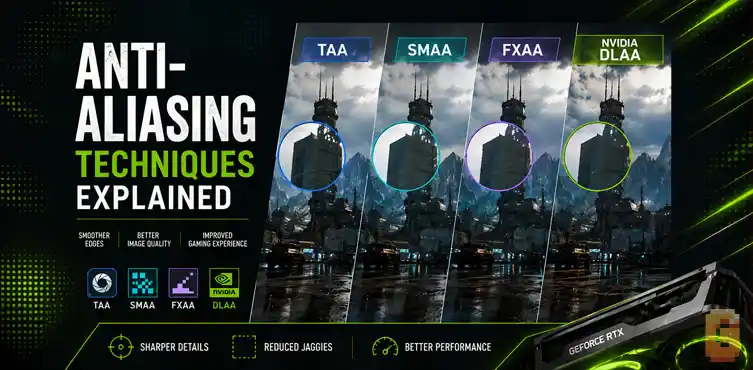

If you only remember one thing, remember this: modern anti-aliasing has split into two categories. Traditional methods like FXAA, SMAA, and TAA rely on shader-based techniques, while AI-powered options like NVIDIA DLAA use dedicated machine learning hardware to improve edge quality at native resolution. Choosing the right option depends on whether you want maximum image quality, maximum performance, or the best balance between the two.
The 3 Common Reader Questions
- Game settings are confusing. Players see FXAA, SMAA, TAA, DLAA, and DLSS in graphics menus without knowing which option to choose.
- Modern games often look blurry. Many gamers blame their monitor or GPU when aggressive temporal anti-aliasing is actually the cause.
- AI-based options create confusion. DLAA, DLSS, FSR, and XeSS are frequently mistaken for the same technology even though they solve different problems.
If you’ve opened a game’s graphics menu recently, you’ve probably been greeted by a long list of anti-aliasing options. FXAA. SMAA. TAA. DLAA. Maybe even DLSS, FSR, or XeSS sitting right next to them.
It’s easy to assume they’re all variations of the same feature. They’re not.
One of the biggest changes in PC graphics over the past few years is that anti-aliasing is no longer a single category of technology. Traditional shader-based techniques still exist, but AI-powered image reconstruction has created an entirely new class of anti-aliasing.
Understanding that split makes every graphics menu much easier to understand.
In my years of testing various graphics cards and tweaking settings files, i have seen anti-aliasing evolve from simple pixel-blurring filters into complex, hardware-accelerated AI networks.
Let’s break down how these technologies work, resolve the biggest graphics setting pain points, and look at the massive technological divide shaping PC gaming.
Traditional vs AI Anti-Aliasing: The Core Split
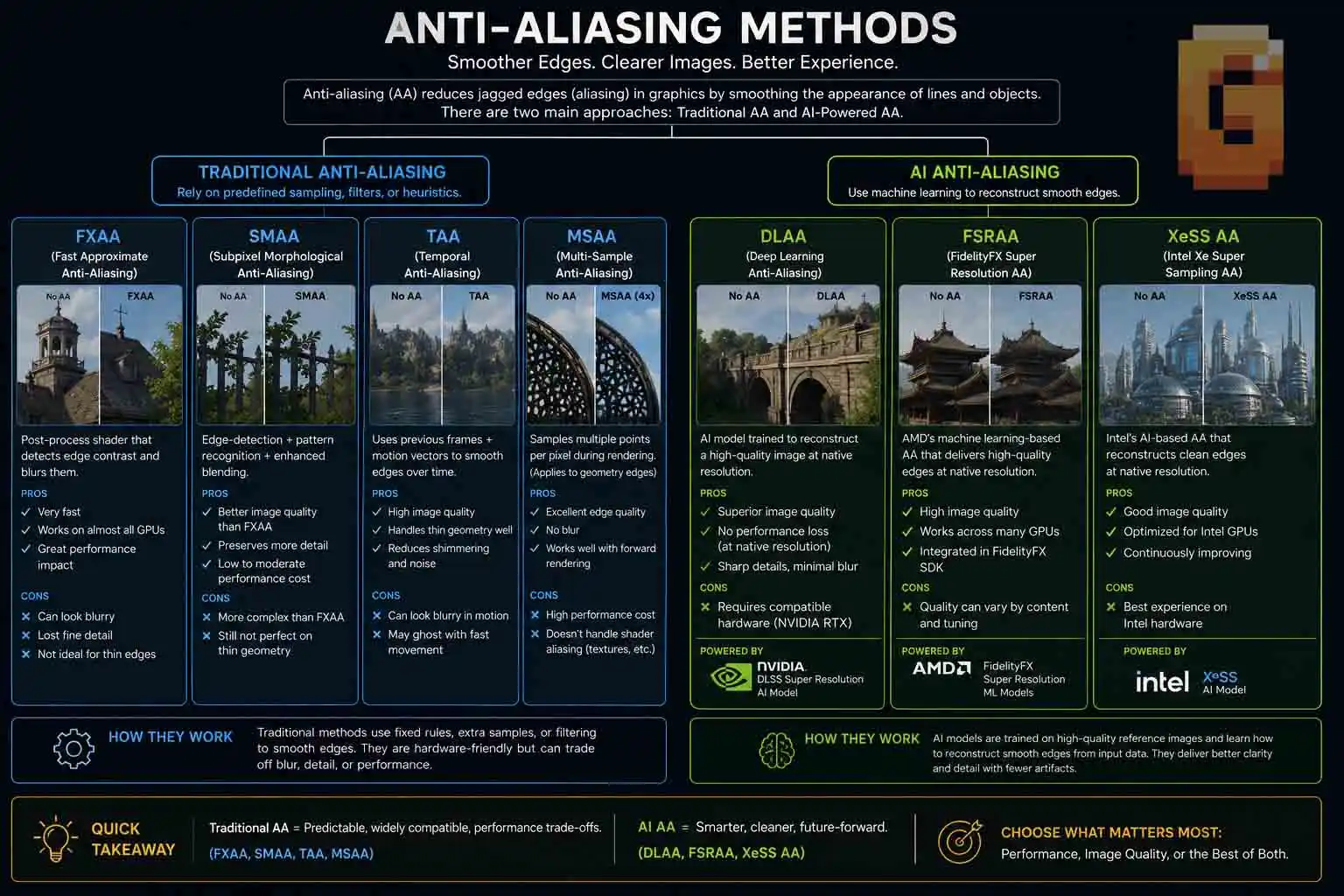
The easiest way to understand anti-aliasing techniques explained is to stop thinking of them as one family of technologies. Instead, think of two completely different approaches.
The first group uses traditional graphics algorithms running as shader-based effects. The second group uses dedicated AI hardware to improve image quality through machine learning.
Traditional Anti-Aliasing
Traditional anti-aliasing has been around for years. These methods look at the image being rendered and try to smooth jagged edges using mathematical techniques instead of artificial intelligence. This category includes:
- FXAA
- SMAA
- TAA
- MSAA (still found in some games)
These techniques work on virtually every graphics card because they don’t require specialized AI hardware. Each method comes with its own strengths and weaknesses. Some prioritize speed, while others produce cleaner edges at the cost of sharpness or performance.
AI Anti-Aliasing
AI anti-aliasing works fundamentally differently.
Instead of relying solely on shader algorithms, it feeds image data into a trained neural network that has learned how clean edges should look. The model combines information from previous frames, motion vectors, depth information, and other rendering data to reconstruct a higher-quality final image.
The most well-known example is NVIDIA DLAA. Unlike traditional techniques, DLAA requires dedicated Tensor Cores found in NVIDIA RTX graphics cards. This difference is important because it changes everything about how the image is processed. Those Tensor Cores run the neural network at reduced numerical precision — specifically INT8 or FP16 rather than the FP32 used in standard shader workloads. If you want to understand why that precision difference matters for AI compute, our FP32, INT32, FP4 and INT4 breakdown explains it in full.
Traditional anti-aliasing tries to smooth the image after rendering. AI anti-aliasing intelligently reconstructs what the final image should look like using a machine learning model trained on high-quality reference images. That makes DLAA fundamentally different from FXAA, SMAA, or TAA—not simply a newer version of them.
What Is FXAA? Fast but Blurry
FXAA is one of the fastest anti-aliasing techniques available. It smooths edges by analyzing the finished image and applying a lightweight post-processing filter. Because it doesn’t require complex geometry analysis or multiple rendering passes, the performance cost is extremely low. That’s why FXAA became popular during an era when graphics cards had far less processing power than they do today.
How FXAA Works
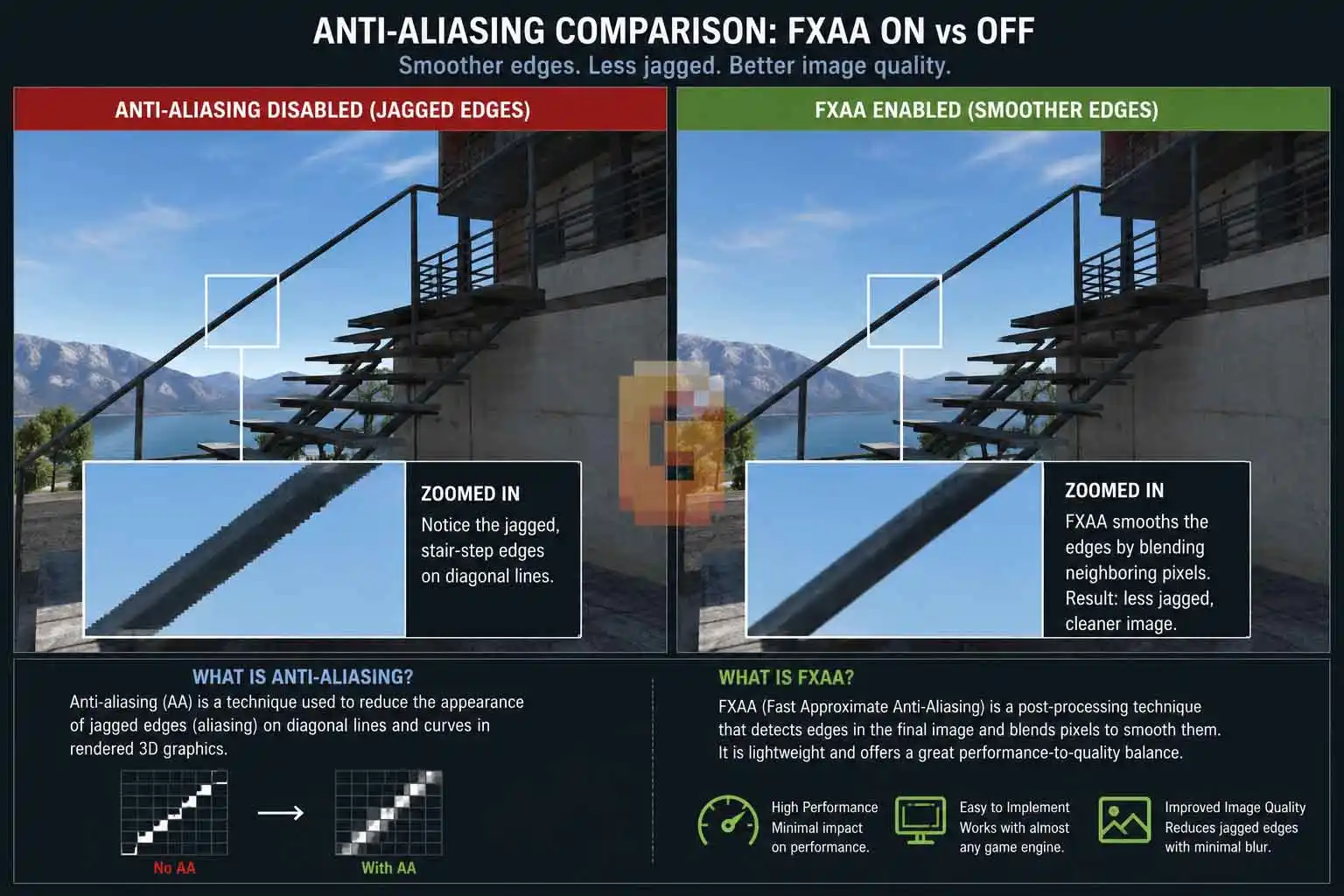
FXAA stands for Fast Approximate Anti-Aliasing. The name tells you almost everything you need to know. Instead of examining every polygon edge in a scene, FXAA detects high-contrast edges in the completed frame and softens them. The process is simple.
- Render the frame.
- Find sharp transitions.
- Blur those transitions slightly.
Display the final image. Because it’s applied after rendering, FXAA works with almost every game engine and graphics API.
If you want to see everything that happens before this final post-processing step, our guide on how video game frames are rendered walks through the full pipeline from CPU draw calls to the frame buffer.
Why FXAA Is So Fast
FXAA’s biggest advantage is speed. Its lightweight shader pass has a minimal impact on frame rate, making it attractive for lower-end hardware or situations where every frame counts.
If you’re playing an esports title and need the highest possible FPS, FXAA is still a viable option. Its low computational cost is exactly why developers continue to include it in many games.
The Biggest Weakness of FXAA
The downside is image clarity.
Since FXAA treats the entire completed image as a flat picture, it can’t distinguish between fine texture detail and jagged edges. As a result, it often softens details that weren’t supposed to be softened.
- Text can lose crispness.
- Small foliage becomes less defined.
- Thin wires and distant objects may appear slightly smeared.
Many players describe the result as looking like a mild blur filter has been placed over the screen. That criticism is largely fair. FXAA solves aliasing quickly, but it often sacrifices image sharpness to do it.
What Is SMAA? Always Pick This Over FXAA
SMAA is generally the better choice whenever both options are available. It delivers cleaner edge detection than FXAA while preserving more fine detail, and the performance difference between the two is usually small enough that most modern gaming PCs won’t notice it.
How SMAA Improves on FXAA
SMAA stands for Subpixel Morphological Anti-Aliasing. Like FXAA, it’s primarily a post-processing technique.
However, SMAA uses significantly more sophisticated edge detection. Instead of broadly softening high-contrast areas, it analyzes edge patterns more intelligently before deciding where smoothing should occur. That extra precision helps preserve textures that FXAA might blur. The result is a noticeably cleaner image.
Better Edge Detection
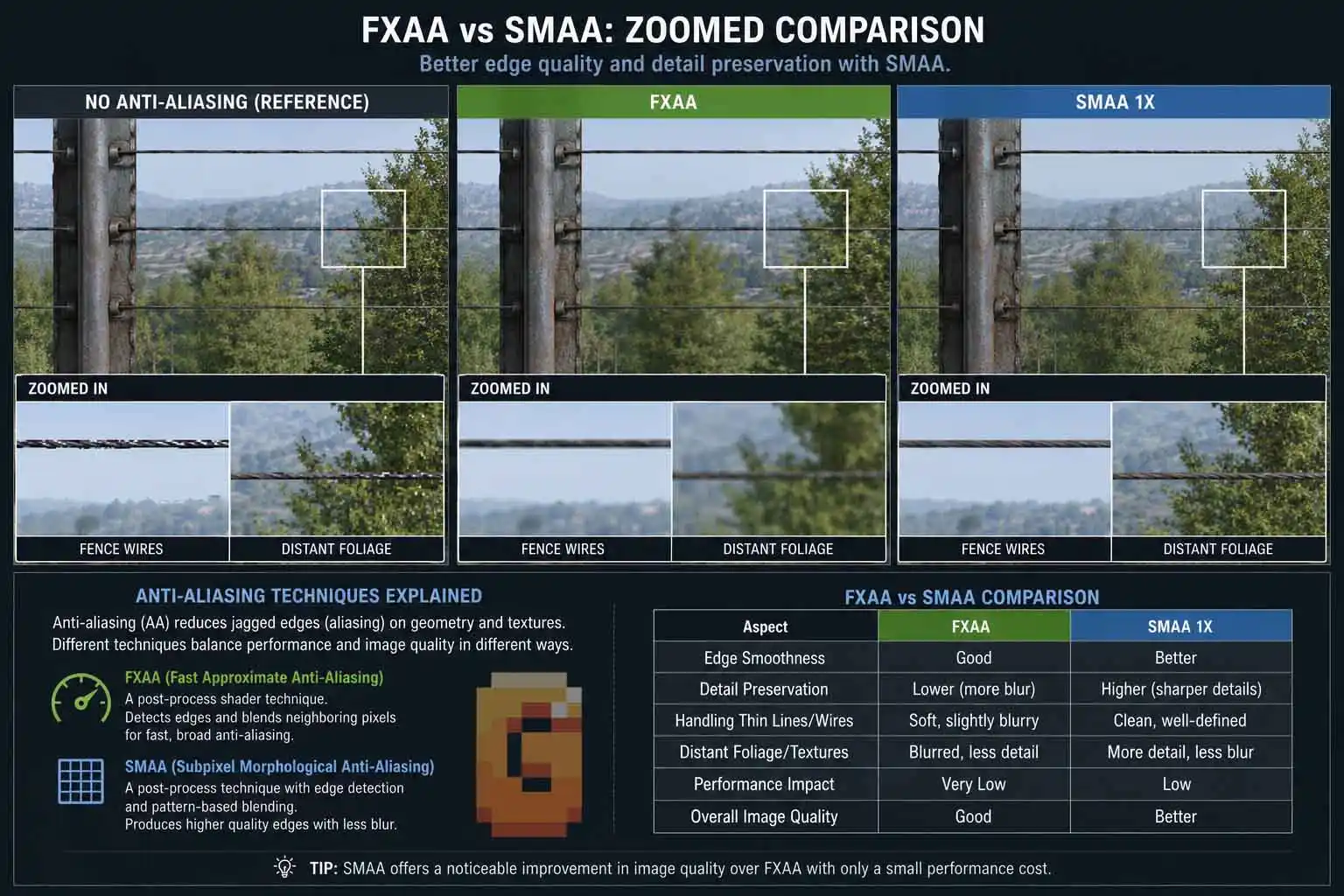
SMAA shines in scenes filled with geometric detail.
- Fences.
- Power lines.
- Railings.
- Thin branches.
- Diagonal architecture.
These are all areas where aliasing becomes especially noticeable. Because SMAA performs more accurate edge detection, those objects usually retain more definition while still reducing visible jagged edges.
Why Many PC Gamers Prefer SMAA
For years, SMAA has earned a reputation as one of the best “free” upgrades over FXAA. You get improved image quality with only a modest increase in processing cost. If your graphics menu presents both FXAA and SMAA—and nothing more advanced—the choice is straightforward; Choose SMAA.
It consistently delivers a sharper image while maintaining excellent performance, making it one of the easiest graphics settings recommendations you can make.
What Is TAA? The Modern Default (and Its Blur Problem)
TAA is the most common anti-aliasing method in modern games because it produces stable images with relatively low performance cost. Its biggest weakness is that it can introduce visible blur and ghosting, especially during movement.
If you’ve ever launched a new AAA game and noticed the image looked softer than expected, there’s a good chance TAA was responsible.
How TAA Works
TAA stands for Temporal Anti-Aliasing. Unlike FXAA or SMAA, TAA doesn’t rely solely on information from the current frame.
Instead, it combines data from previous frames with the current one. It also uses motion vectors provided by the game engine to determine how objects move across the screen.
By accumulating image data over time, TAA can smooth edges that would otherwise shimmer or flicker during motion. This temporal approach is one of the reasons TAA became the default choice in many modern engines.
Why Developers Love TAA
TAA solves several problems at once. Besides reducing jagged edges, it significantly cuts down on shimmering in distant geometry. Fine details like fences, rooftops, vegetation, and thin cables remain much more stable while the camera moves.
Without temporal techniques, these details often sparkle or flicker from frame to frame. That’s why developers frequently choose TAA as the default anti-aliasing solution. It helps create a calmer, more stable image across a wide variety of scenes.
The Blur Problem
The trade-off is softness. Because TAA blends information across multiple frames, the final image can lose fine detail.
- Textures may appear less crisp.
- Small text can become slightly softer.
- Fast camera movement sometimes leaves faint trails behind moving objects, commonly referred to as ghosting.
The severity depends on the game’s implementation. Some engines produce excellent TAA with minimal artifacts, while others lean heavily toward smoothing at the expense of clarity. This is why opinions on TAA vary so much. Two games may both use TAA, yet deliver very different visual results.
TAA Too Blurry? Try This
If TAA makes your game look too soft, there are several practical steps you can try before disabling it completely.
First, check whether the game includes a sharpening slider. Many modern titles allow you to recover some lost detail by increasing image sharpening.
Second, if the game offers SMAA or another anti-aliasing option, compare them directly. Depending on the engine, you may prefer the sharper presentation even if a little more aliasing becomes visible.
Finally, if your hardware supports AI-based anti-aliasing, DLAA may provide a sharper native-resolution image while still reducing temporal artifacts.
The best solution depends on the game, but simply turning TAA off isn’t always the right answer.
What Is NVIDIA DLAA? AI Anti-Aliasing at Native Resolution
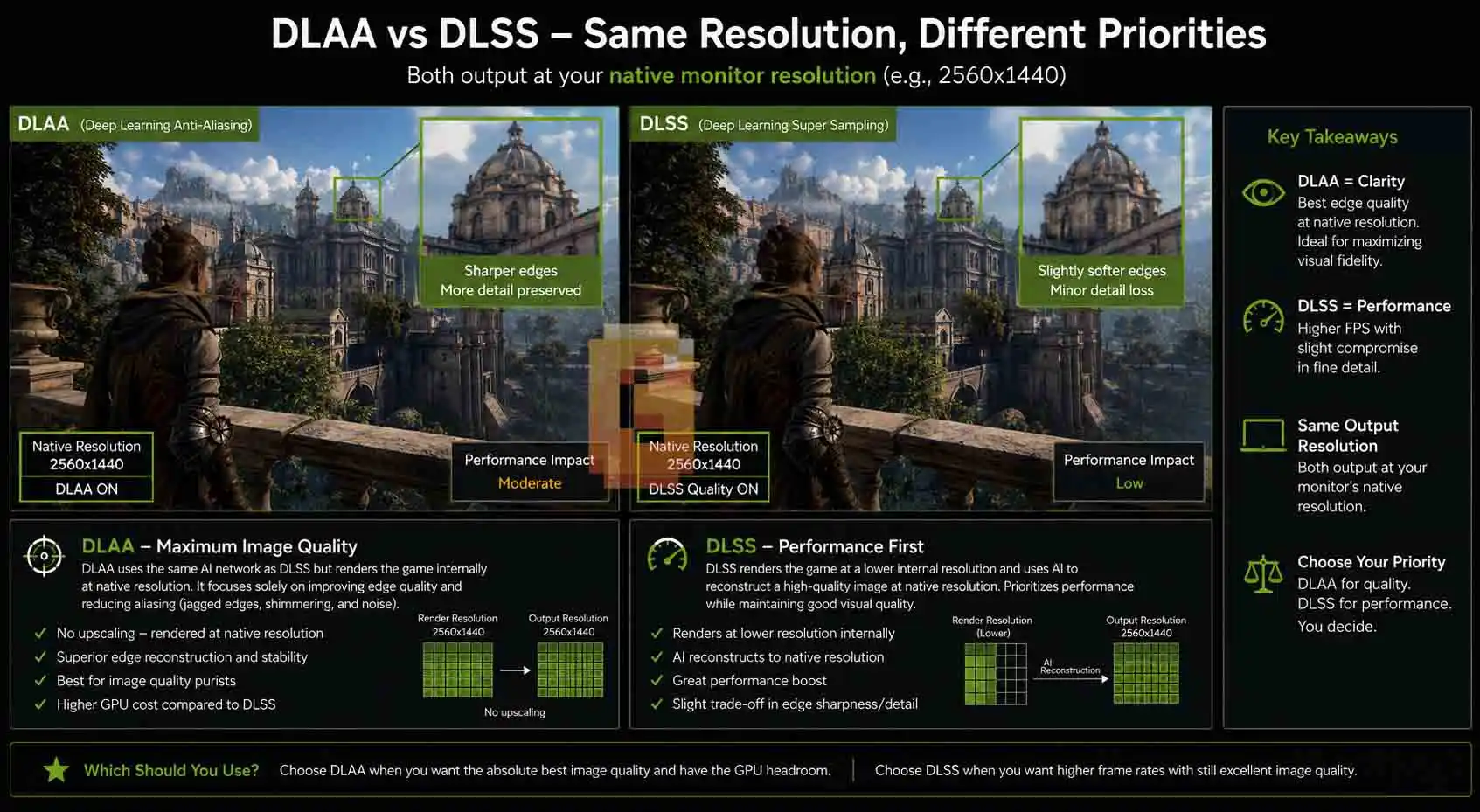
NVIDIA DLAA is an AI-powered anti-aliasing technology that prioritizes image quality instead of higher frame rates. It uses the same deep learning model as DLSS but runs at native resolution rather than upscaling from a lower internal resolution.
This is where modern anti-aliasing truly separates itself from traditional techniques.
NVIDIA DLAA Explained
DLAA stands for Deep Learning Anti-Aliasing. It uses NVIDIA’s Tensor Cores to run a trained neural network that reconstructs the final image using motion vectors, depth information, previous frames, and other rendering data.
The important difference is that DLAA does not reduce the rendering resolution. The game is rendered at your monitor’s native resolution from the start. The AI model then focuses entirely on improving edge quality, reducing shimmering, and preserving fine detail rather than increasing performance through upscaling. That makes DLAA fundamentally different from FXAA, SMAA, and TAA.
Those techniques rely on shader algorithms. DLAA relies on dedicated AI hardware.
Why DLAA Looks Different
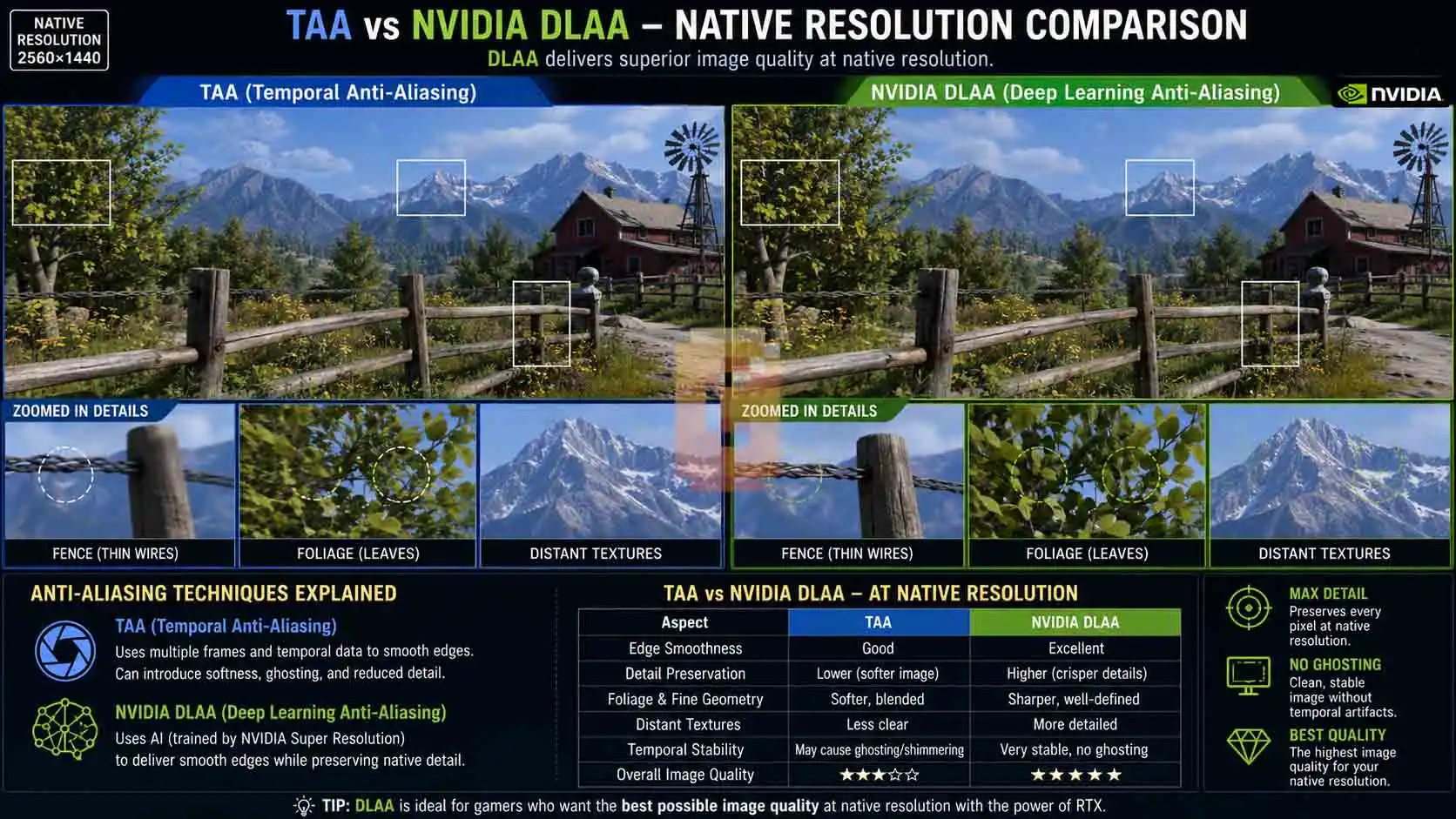
Because DLAA starts with a full native-resolution image, the neural network has more visual information to work with than it would during an upscaling pass. Instead of reconstructing missing pixels from a lower-resolution render, it refines an already detailed image.
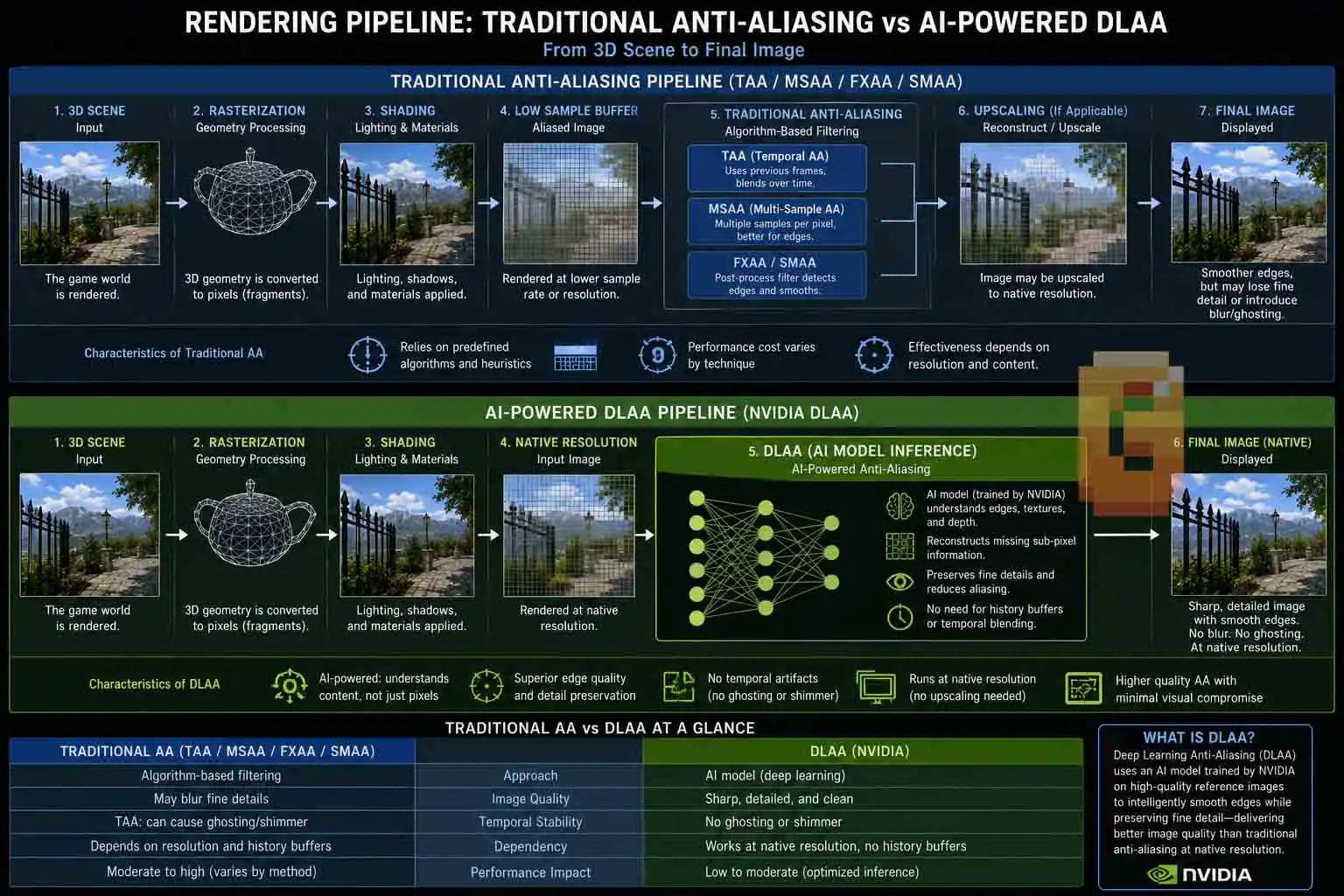
The result is often cleaner edge quality, improved stability during movement, and better preservation of fine textures compared with traditional temporal anti-aliasing.
Image quality—not performance—is the primary goal.
Does DLAA Improve FPS?
No.
DLAA should generally be viewed as an image-quality feature rather than a performance feature. Since the game still renders at native resolution, the GPU performs roughly the same amount of rendering work as it would without an upscaler.
Running the AI model also introduces additional processing. The result is that DLAA typically has a higher performance cost than enabling DLSS in an upscaling mode.
If your graphics card already delivers the frame rate you want, DLAA can be an excellent way to maximize visual quality. If you’re struggling for performance, DLSS is usually the more appropriate choice.
DLAA vs DLSS: What’s the Difference?
The simplest way to understand the difference is this:
DLAA improves image quality at native resolution. DLSS improves performance by rendering fewer pixels and reconstructing the final image using AI.
Although they use the same underlying deep learning technology, their goals are different.
- DLSS renders the game internally at a lower resolution before reconstructing it to your target resolution.
- DLAA skips that step entirely. Instead, it keeps the rendering resolution locked at native resolution and applies the AI model only for anti-aliasing and image refinement.
One technology prioritizes performance. The other prioritizes image quality. This distinction is one of the most common points of confusion among RTX users because both options often appear together in the same graphics menu.
AI Anti-Aliasing Is Bigger Than DLAA
NVIDIA popularized AI-based anti-aliasing, but DLAA isn’t the only implementation of the concept. Native-resolution AI anti-aliasing is becoming a broader category rather than a feature tied to one company.
AMD FSRAA
AMD has introduced FSRAA as its native-resolution AI anti-aliasing solution. Like DLAA, the goal is to improve edge quality without relying on traditional shader-based anti-aliasing techniques. This software divide has real hardware implications at the mid-range price point. If you’re deciding between an RTX card with DLAA access and an AMD card limited to FSRAA, our RTX 5060 8GB vs RX 9060 XT 16GB comparison shows how that split plays out in practice. Because this technology is still evolving, game support and implementation details vary.
Intel XeSSAA
Intel has also introduced XeSSAA, extending the same idea to the XeSS ecosystem. Instead of treating AI only as an upscaling solution, XeSSAA applies machine learning at native resolution to improve image quality.
The broader trend is clear. Modern graphics technology is moving toward AI-assisted image reconstruction rather than relying exclusively on traditional post-processing filters. DLAA is simply NVIDIA’s version of that larger shift. That shift is already shaping next-generation GPU design. The Rubin architecture behind the RTX 6090 is being built around AI rendering as a first-class feature rather than an add-on — not just for anti-aliasing, but for the full image pipeline.
Should You Turn Off Anti-Aliasing When Using DLSS, FSR, or XeSS?
Yes—in most games, you should not enable a separate anti-aliasing method alongside DLSS, FSR, or XeSS. These upscaling technologies already include their own temporal anti-aliasing stage as part of the image reconstruction process.
Leaving TAA or FXAA enabled on top of an active upscaler can reduce image clarity by applying additional smoothing to an image that’s already being reconstructed.
That said, implementation varies from game to game. Some games automatically disable the separate anti-aliasing menu when you enable an upscaler. Others leave the option visible but ignore it internally. A few titles still allow multiple anti-aliasing methods to run simultaneously.
Because of these differences, it’s worth checking the game’s documentation or graphics guide if the behavior isn’t clear.
Why Double Anti-Aliasing Can Make Games Look Softer
Temporal upscalers already perform edge reconstruction. Adding another anti-aliasing filter afterward may soften the reconstructed image even further. This is one reason some players report that a game looks “blurry” after enabling both DLSS and TAA.
In many cases, the issue isn’t DLSS itself—it’s that multiple smoothing techniques are being applied together. If your game supports DLAA, that’s often the better choice when your GPU already delivers the performance you need and your goal is maximum native-resolution image quality.
Which Anti-Aliasing Technique Should You Use?
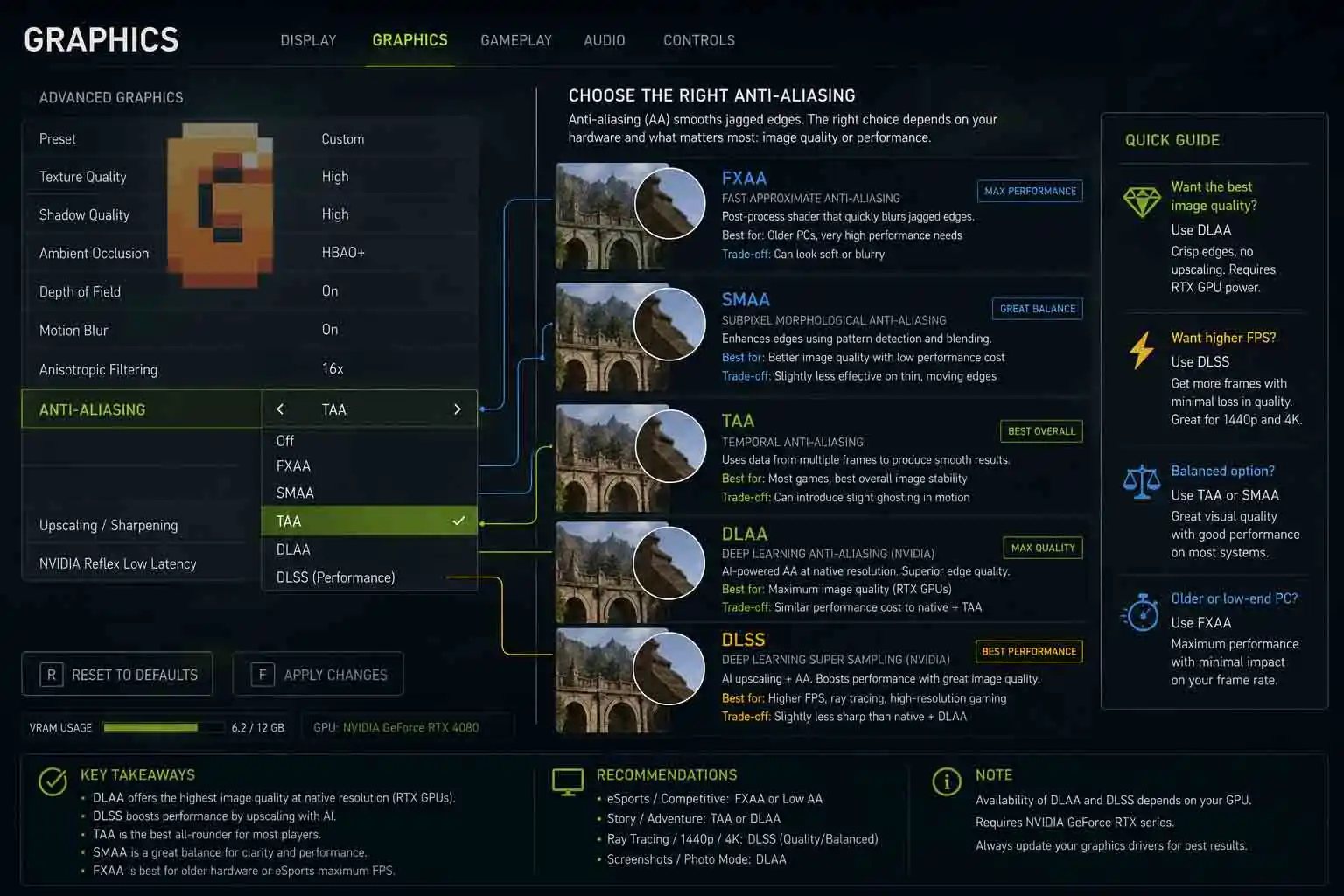
The best anti-aliasing method depends on your hardware, your performance target, and what you value most. There isn’t a universal winner. Instead, each technique excels in a different situation.
Choose FXAA if…
- You’re using older or entry-level hardware.
- You need the lightest possible performance impact.
- You don’t mind sacrificing some image sharpness.
Choose SMAA if…
- Both FXAA and SMAA are available.
- You want a sharper image without a major performance penalty.
- You’re looking for the best traditional post-processing option in many games.
For most situations where only these two choices exist, SMAA is the better option.
Choose TAA if…
- The game world contains lots of fine geometry and distant detail.
- You want to reduce shimmering during camera movement.
- The particular game’s implementation doesn’t introduce objectionable blur.
Choose NVIDIA DLAA if…
- You own a compatible NVIDIA RTX graphics card.
- Native-resolution image quality matters more than higher FPS.
- Your system already performs well enough that you don’t need upscaling.
Choose DLSS Instead if…
- Your priority is increasing frame rate.
- You’re gaming at high resolutions like 4K.
- Your GPU benefits from rendering fewer pixels while maintaining strong image quality.
The right answer isn’t always about choosing the newest technology. It’s about choosing the one that best matches your hardware and your expectations.
Quick Comparison Table
| Technique | Main Goal | Hardware Requirement | Biggest Strength | Biggest Weakness |
| FXAA | Reduce jagged edges | Any modern GPU | Extremely fast | Can blur fine details |
| SMAA | Better edge quality | Any modern GPU | Sharper than FXAA | Doesn’t eliminate all shimmering |
| TAA | Stable image over time | Any modern GPU | Excellent temporal stability | Blur and ghosting can occur |
| DLAA | Maximum native image quality | NVIDIA RTX GPU | Outstanding edge quality using AI | Doesn’t improve performance |
| DLSS | Higher performance | NVIDIA RTX GPU | AI upscaling with major FPS gains | Not native-resolution rendering |
Key Takeaways
Here’s the short version;
- Traditional anti-aliasing includes FXAA, SMAA, TAA, and similar shader-based techniques.
- AI anti-aliasing represents a separate category built around machine learning instead of conventional image filters.
- NVIDIA DLAA is designed for image quality at native resolution, while DLSS is designed to improve performance through AI upscaling.
- SMAA is generally preferable to FXAA when both options are available.
- TAA remains the most common modern solution but can introduce blur depending on the game’s implementation.
- In most games, you shouldn’t stack traditional anti-aliasing on top of DLSS, FSR, or XeSS because the upscaler already performs temporal anti-aliasing as part of its reconstruction pipeline.
FAQ
Is DLAA better than TAA?
Generally, yes, for image quality. DLAA uses AI running on NVIDIA Tensor Cores to improve edge quality at native resolution, while TAA relies on traditional temporal filtering that may introduce blur depending on the implementation.
Is SMAA better than FXAA?
Yes, in most situations. SMAA usually preserves more detail while delivering cleaner edge detection with a similar performance cost.
Does DLAA increase FPS like DLSS?
No. DLAA focuses on improving image quality at native resolution rather than increasing performance through upscaling.
Why does TAA sometimes make games look blurry?
Because it combines information from multiple frames. While this reduces shimmering, it can also soften textures and introduce ghosting in some implementations.
Should I disable anti-aliasing when using DLSS?
Usually, yes. Most games already include temporal anti-aliasing within DLSS, FSR, or XeSS, making an additional AA option unnecessary or potentially detrimental to image clarity.
Conclusion
Modern anti-aliasing techniques explained isn’t just about memorizing acronyms anymore.
The biggest shift in PC graphics is the move from traditional shader-based anti-aliasing to AI-assisted image reconstruction. Understanding that distinction makes graphics settings far less intimidating and helps you make smarter choices for your hardware.
If your goal is maximum performance, technologies like DLSS can dramatically improve frame rates through AI upscaling.
If your goal is the best possible native-resolution image quality, NVIDIA DLAA represents a fundamentally different approach from FXAA, SMAA, and TAA by using dedicated AI hardware instead of conventional post-processing.
For traditional methods, SMAA remains an excellent all-around choice when available, while TAA continues to dominate modern game engines thanks to its ability to reduce shimmering—despite its well-known blur trade-offs.
The next time you open a game’s graphics menu, don’t think of anti-aliasing as a random list of settings. Think of it as two distinct categories: traditional anti-aliasing and AI-powered anti-aliasing. Once you understand that split, choosing the right option becomes much easier.
Anti-aliasing is only one half of the graphics-settings equation. Pairing your AA choice with the right adaptive sync configuration is equally important — our guide on when to enable G-Sync covers exactly how to set it up alongside your quality settings for the smoothest overall result.
References
- NVIDIA. Deep Learning Super Sampling (DLSS) Technology Overview. https://developer.nvidia.com/rtx/dlss
- PCGamingWiki. Anti-aliasing (AA). https://www.pcgamingwiki.com/wiki/Glossary:Anti-aliasing_(AA)
- Intel Developer Documentation. Intel XeSS Overview. https://www.intel.com/content/www/us/en/developer/tools/oneapi/xess.html
- Techpowerup. DLAA Review for performance cost. https://www.techpowerup.com/review/nvidia-dlaa-anti-aliasing/