FP32, INT32, FP4 and INT4 Explained

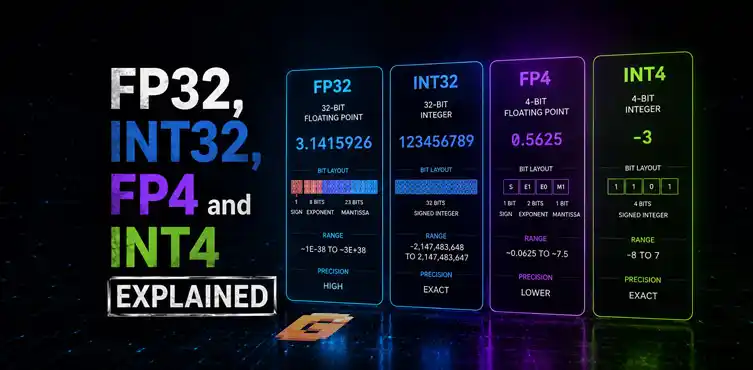

FP32 and INT32 are traditional GPU data formats used for graphics, physics, and general computing. FP4 and INT4 are ultra-low-precision formats designed mainly for modern AI workloads. Understanding the difference helps you make sense of GPU specifications, CUDA core performance, Tensor Core ratings, and AI acceleration claims.
If you’ve ever looked at a modern GPU specification sheet and wondered why it lists FP32, INT32, FP4, and INT4 performance separately, you’re not alone.
Many PC enthusiasts understand concepts like VRAM, clock speeds, and ray tracing, but GPU precision formats often seem like a wall of confusing technical jargon.
The reality is much simpler than it appears.
At their core, FP32, INT32, FP4, and INT4 are just different ways a GPU stores and processes numbers. The difference comes down to two things:
- Whether the number contains decimals
- How much precision is required
Understanding these formats makes it much easier to understand GPU specifications, AI performance claims, and why newer architectures increasingly focus on low-precision computing.
This guide breaks everything down in plain English.
Why Do GPUs Use Different Number Formats?
GPUs perform billions or even trillions of calculations every second. Not every calculation needs the same level of precision.
Imagine writing measurements:
- 3.14159265 meters
- 3.14 meters
- 3 meters
All three describe roughly the same thing, but each uses a different amount of precision. Computers work similarly. Some tasks require extremely accurate decimal values. Others only need rough approximations.
Using less precision reduces memory usage, lowers power consumption, and allows the GPU to process more calculations simultaneously. That is the fundamental reason these formats exist.
What Is FP32? What Is INT32?
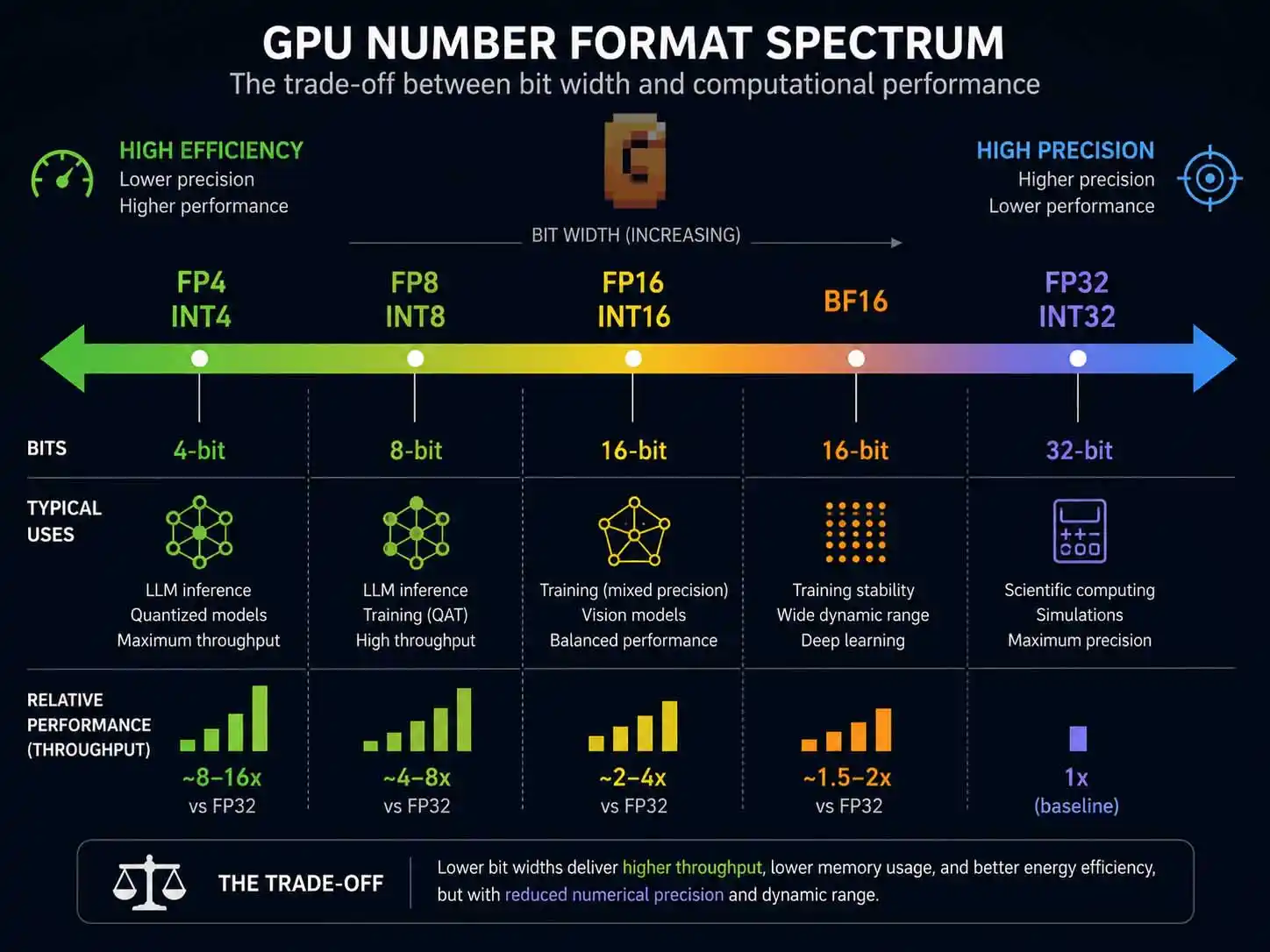
FP32 and INT32 are the traditional workhorses of GPU computing. They have been used for years in gaming, graphics rendering, scientific workloads, and general-purpose GPU computing.
What Does FP Mean?
FP stands for Floating Point. A floating-point number can contain decimal values.
Examples include:
- 3.14
- 0.25
- 125.75
- -7.83
Floating-point formats are ideal when precision matters.
What Does INT Mean?
INT stands for Integer. Integers contain only whole numbers.
Examples include:
- 1
- 25
- 1000
- -5
Integer calculations are useful when exact values matter more than decimal precision.
What Is FP32?
FP32 stands for 32-bit Floating Point. It uses 32 bits of storage for each number and provides a large range of values along with good precision.
FP32 has traditionally been the primary format used for:
- 3D graphics rendering
- Lighting calculations
- Shader operations
- Physics simulations
- Scientific computing
- Professional visualization
For decades, FP32 has been considered the standard precision level for GPU graphics workloads. When people compare gaming GPU performance, FP32 throughput is often one of the specifications being discussed.
What Is INT32?
INT32 stands for 32-bit Integer. It also uses 32 bits of storage but stores whole numbers instead of decimal values.
Common INT32 uses include:
- Object counters
- Indexing operations
- Memory addressing
- Certain game logic calculations
- AI preprocessing tasks
Many modern GPU architectures can process FP32 and INT32 workloads simultaneously, improving overall efficiency.
FP32 vs INT32
The simplest way to understand FP32 vs INT32 is this:
FP32 is for decimal math. INT32 is for whole-number math.
For example:
FP32:
- 3.14159
- 8.25
- 0.001
INT32:
- 3
- 8
- 1
Both are important, but they serve different purposes.
What Is a CUDA Core?
One reason people encounter FP32 and INT32 specifications is because of CUDA Core performance ratings. A CUDA Core is a processing unit found in NVIDIA GPUs that handles general-purpose arithmetic operations.
Historically, CUDA Cores have been heavily associated with FP32 performance. However, modern architectures also execute INT32 operations and other data types through different execution paths. When a GPU manufacturer advertises FP32 throughput, they are usually describing how much floating-point math those cores can perform under ideal conditions.
Why Did AI Create a Need for Lower Precision?
AI changed everything. Traditional graphics rendering often requires significant numerical accuracy. Large language models and neural networks work differently.
In many cases, AI does not need perfect mathematical precision. Instead, it needs to process enormous amounts of data as quickly as possible. Researchers discovered that many AI models could maintain useful accuracy even when calculations used fewer bits. That discovery led to a rapid industry shift toward lower-precision formats.
The benefits were huge:
- Faster processing
- Lower power consumption
- Reduced memory requirements
- Larger models fitting into existing hardware
This is where FP4 and INT4 enter the picture.
What Is FP4? What Is INT4?
FP4 and INT4 are ultra-low-precision number formats primarily used for AI acceleration. They dramatically reduce memory usage and increase computational density compared to traditional formats.
What Is FP4?
FP4 stands for 4-bit Floating Point. Instead of using 32 bits like FP32, it uses only 4 bits. That means dramatically less precision. However, it also means dramatically higher efficiency.
FP4 is primarily used in:
- AI inference
- Neural networks
- Large language models
- Generative AI workloads
The goal is not perfect numerical accuracy. The goal is achieving useful results with minimal computational cost.
What Is INT4?
INT4 stands for 4-bit Integer. Like FP4, it uses only four bits per value.
INT4 is commonly used for:
- Quantized AI models
- AI inference
- Edge AI devices
- Efficient model deployment
Many AI models can be compressed from higher precision formats into INT4 while retaining acceptable output quality.
Why Are FP4 and INT4 So Fast?
The answer is simple. Smaller numbers require fewer resources.
Imagine moving boxes. A truck can carry far more small boxes than large boxes. The same principle applies to GPUs. When each value occupies only four bits instead of thirty-two, more calculations can be packed into the same hardware resources. This is why modern AI GPUs often advertise enormous FP4 and INT4 performance figures.
How AI Quantization Makes FP4 and INT4 Possible
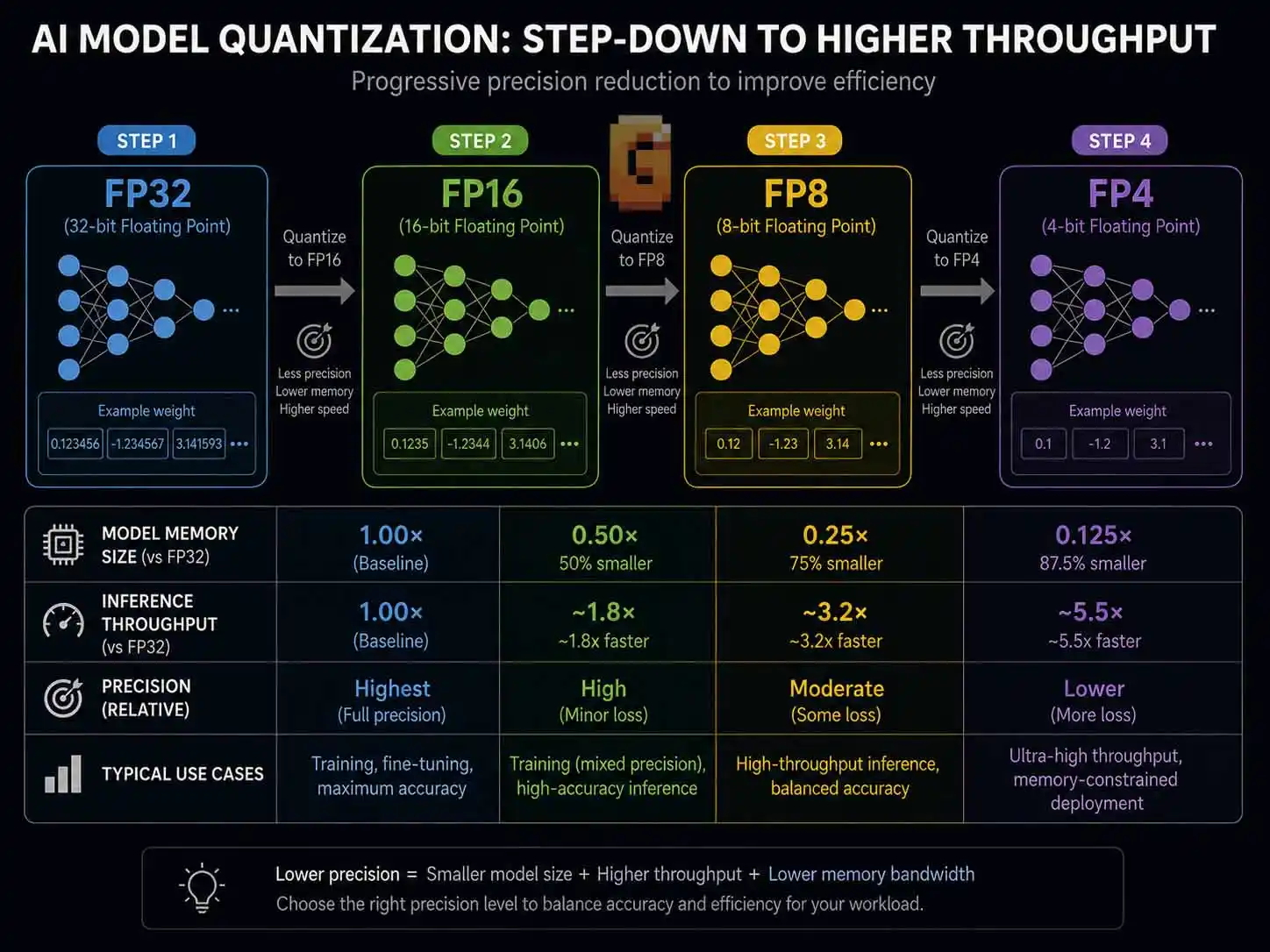
Quantization is the process of converting a model from higher precision to lower precision.
For example:
- FP32 → FP16
- FP16 → FP8
- FP8 → FP4
- INT8 → INT4
The objective is reducing model size while maintaining useful accuracy. This process allows AI developers to run larger models using less memory and less computational power.
Not every workload benefits equally. Some models lose accuracy when precision becomes too low. Others remain surprisingly effective. This balance between efficiency and accuracy is one of the most active areas of AI research today.
Why Modern NVIDIA GPUs Replaced INT4 With FP4
NVIDIA’s move away from INT4 actually started one generation before Blackwell — Hopper (H100) was the first to drop dedicated INT4 Tensor Core support, and Blackwell continues that direction rather than introducing it.
The real reason comes down to math, not just ‘flexibility.‘ INT4 is a fixed-range integer format with no exponent, so it can only represent 16 discrete values. FP4 keeps a floating-point structure with a shared exponent, giving it a much wider dynamic range at the same 4-bit budget. Neural network weights and activations vary across many orders of magnitude, so that extra range typically preserves more useful information than INT4 at the same memory cost. That’s why NVIDIA’s own NVFP4 format, introduced with Blackwell, has effectively replaced INT4 as the headline ultra-low-precision format.
Tensor Cores Have Become More Flexible
Modern Tensor Cores are designed to support multiple numerical formats. Rather than focusing on a single fixed precision level, they increasingly support a wide range of formats such as:
- FP16
- BF16
- FP8
- FP4
- INT8
- Other optimized AI formats
The architecture is designed around flexibility and throughput. This shift toward flexible, multi-format Tensor Cores isn’t just a Blackwell-era detail — it’s also exactly what’s shaping expectations for NVIDIA’s next consumer flagship. If you’re weighing whether to upgrade now or wait, our breakdown of whether the RTX 6090 will be better than the RTX 5090 looks at how Rubin’s AI throughput gains stack up against Feynman’s more transformative roadmap.
AI Workloads Are Changing Rapidly
AI models evolve faster than traditional graphics workloads. A format that dominates today may not dominate tomorrow. GPU designers increasingly build hardware capable of handling multiple precision types rather than dedicating resources exclusively to one format.
The Focus Has Shifted Toward Overall AI Throughput
Modern AI performance discussions increasingly focus on:
- Tokens per second
- Memory efficiency
- Model size support
- End-to-end inference speed
Tokens per second is the number most people actually encounter, since it’s what AI products advertise when describing how fast a model responds. If you’re not sure what a token actually is, it helps to take a step back: every token a model generates is the output of FP4, INT4, or similar low-precision math running on the GPU underneath it. For the full picture of what tokens are and why they drive AI speed, pricing, and context limits, see what AI tokens are.
Raw INT4 capability is only one piece of a much larger performance puzzle. As a result, modern architectures emphasize broader low-precision support rather than marketing a single format as the defining feature.
Why Your GPU’s Spec Sheet Lists All Four
| Format | Bits | Type | Best For | Example |
|---|---|---|---|---|
| FP32 | 32 | Floating point | Traditional graphics & compute | Shaders, physics, scientific computing |
| INT32 | 32 | Integer | Whole-number operations | Indexing, addressing, counters |
| FP4 (NVFP4) | 4 | Floating point | Large-scale AI inference | LLM weights/activations on Blackwell GPUs |
| INT4 | 4 | Integer | Legacy quantized inference | Pre-Hopper architectures, some edge AI |
GPU specification sheets list FP32, INT32, FP4, and INT4 because each measures a different type of workload capability. No single number tells the whole story.
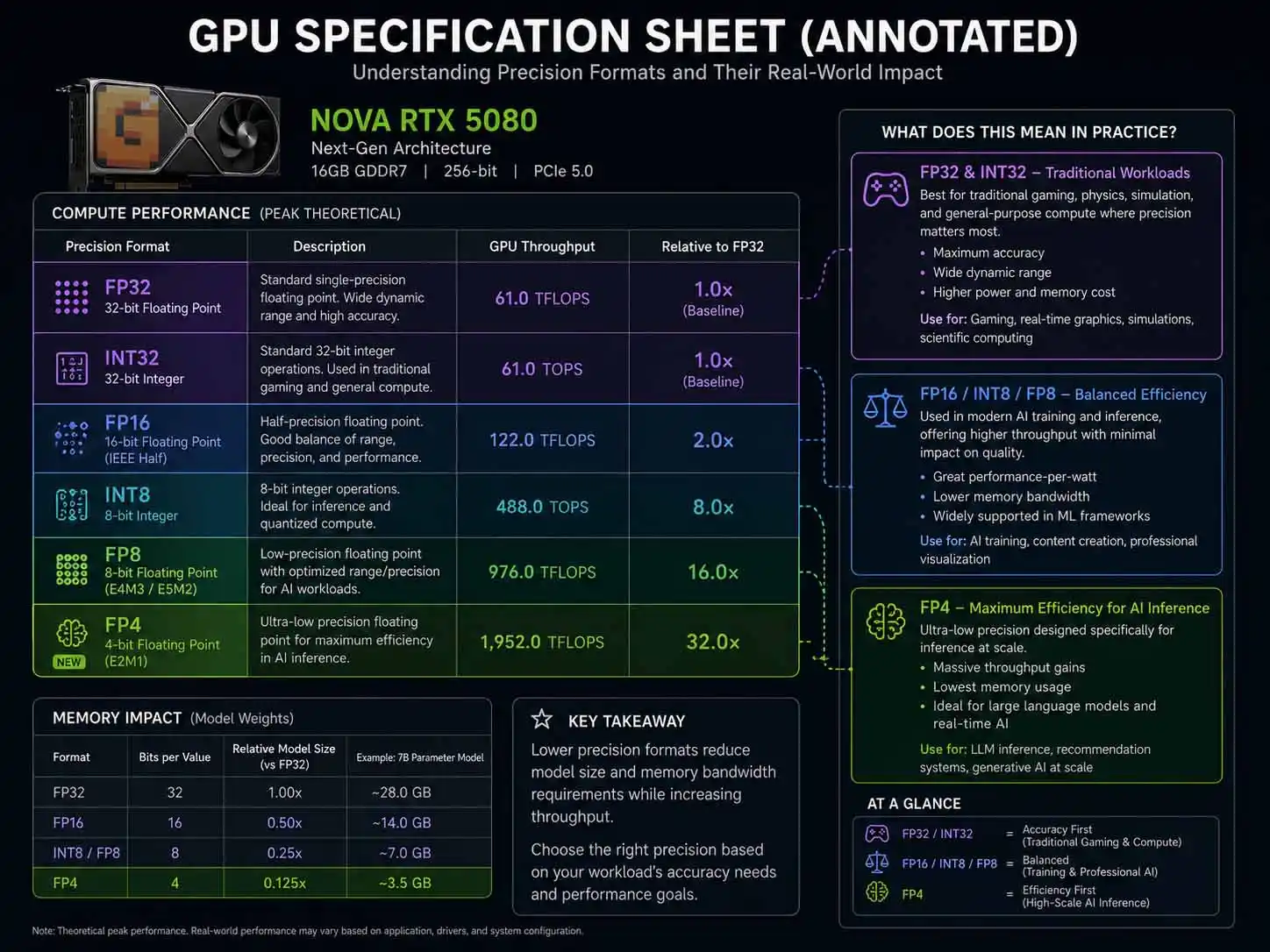
FP32 Represents Traditional Compute Performance
FP32 remains important for:
- Gaming
- Rendering
- Simulation
- Scientific applications
This specification gives insight into traditional floating-point performance.
INT32 Reflects Integer Processing Capability
INT32 matters for:
- Address calculations
- Logic operations
- General-purpose compute
Many workloads rely heavily on integer operations.
FP4 Highlights AI Efficiency
FP4 numbers are increasingly important in AI-focused hardware. They indicate how efficiently a GPU can process low-precision AI workloads.
INT4 Reflects Quantized AI Performance
INT4 performance often appears in AI accelerator specifications. It helps estimate performance when running heavily quantized neural networks.
Why Comparing Only FP32 Is No Longer Enough
A decade ago, many buyers focused primarily on FP32 performance. Today, that approach can be misleading. A GPU optimized for AI may deliver extraordinary FP4 or INT4 performance while having relatively modest gains in traditional FP32 workloads. Understanding all four metrics provides a more complete picture.
How These Formats Relate to Gaming
Most gamers rarely interact directly with FP4 or INT4. Traditional game rendering still relies heavily on FP32 calculations. However, AI-powered gaming features increasingly use lower-precision formats behind the scenes. For the full picture of where these calculations happen in the pipeline, see our breakdown of how video game frames are rendered.
Examples include:
- AI upscaling
- Frame generation
- AI-assisted rendering
- Image reconstruction
The most visible place this shows up in gaming is AI-based anti-aliasing. DLAA and DLSS both run on Tensor Cores using these reduced-precision formats — our anti-aliasing techniques guide explains how that translates into actual image quality differences versus traditional methods like TAA and FXAA.
Which Precision Format Is Most Important?
The answer depends entirely on the workload.
For Gaming
FP32 remains highly important. Most core rendering tasks still depend heavily on floating-point calculations.
For AI Inference
FP4 and INT4 are increasingly valuable. They enable higher throughput and better efficiency.
For Scientific Computing
Higher precision formats typically remain essential. Accuracy often matters more than raw speed.
For General Computing
A mixture of FP32 and INT32 is common. Different workloads use different execution paths.
This kind of format-switching isn’t unique to GPUs, either. CPUs do something conceptually similar by dynamically scaling their own behavior to available headroom — AMD’s Precision Boost Overdrive, for example, lets a Ryzen processor push past its stock boost limits automatically whenever power and thermal conditions allow. If you’re curious how that works on the CPU side, see our guide to AMD PBO Explained.
Real-World Analogy: Pen vs Crayon
A simple analogy helps make sense of all this. Think of FP32 as writing with a fine technical pen. You get excellent detail and accuracy.
Think of FP4 as sketching with a crayon. You lose detail, but you can work much faster. For many AI workloads, the crayon is perfectly good enough. That is why low-precision computing has become such a major focus in modern GPU design.
FAQ
Is FP32 better than FP4?
No. FP32 is more accurate, while FP4 is more efficient. The better choice depends on the workload.
Why do AI models use INT4?
INT4 reduces memory usage and increases processing efficiency. Many quantized AI models can run effectively with INT4 precision.
Do games use FP4?
Yes, indirectly. Some AI-powered gaming technologies can use low-precision formats, although most traditional rendering still relies heavily on FP32.
What is the difference between FP32 and INT32?
FP32 stores decimal numbers while INT32 stores whole numbers. Both use 32 bits but serve different purposes.
Why do GPU specifications list multiple precision ratings?
Different workloads use different data formats. Listing multiple ratings helps show how a GPU performs across gaming, compute, and AI applications.
Conclusion
FP32, INT32, FP4 and INT4 explained in simple terms comes down to one key idea: different tasks need different levels of precision.
FP32 remains the foundation of traditional graphics and compute workloads.
INT32 handles whole-number operations efficiently.
FP4 and INT4 power the next generation of AI acceleration by sacrificing precision in exchange for massive gains in speed and efficiency.
When reading a modern GPU specification sheet, don’t focus on just one number. Look at the complete picture:
- FP32 for graphics and traditional compute
- INT32 for integer workloads
- FP4 for low-precision AI
- INT4 for quantized neural networks
Understanding these formats makes it easier to evaluate GPUs, compare architectures, and separate marketing claims from meaningful technical information.
If you’re researching GPU technology, AI hardware, or next-generation graphics architectures, your next step should be learning how CUDA Cores, Tensor Cores, and AI accelerators work together to execute these different precision formats.
References
- NVIDIA CUDA Programming Guide – https://docs.nvidia.com/cuda/cuda-programming-guide/index.html
- IEEE Standard for Floating-Point Arithmetic – https://en.wikipedia.org/wiki/IEEE_754
- NVIDIA Tensor Core Documentation – https://www.nvidia.com/en-us/data-center/tensor-cores/