1% Low FPS Explained: The Hidden Truth Behind Game Stutters

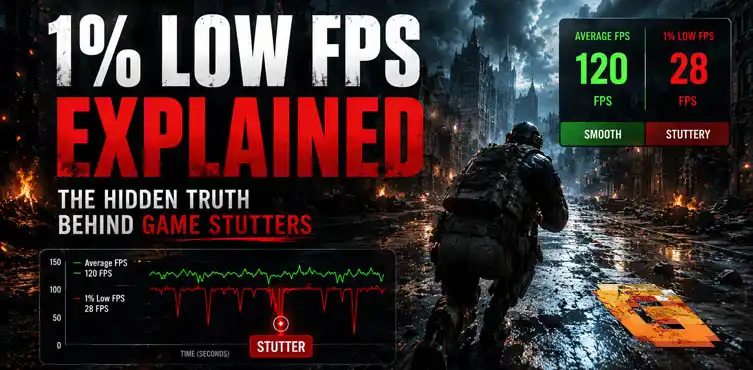

Average FPS shows overall speed, but 1% low FPS and 0.1% low FPS reveal the real stutters that ruin your experience. 1% low FPS explained simply means it measures the worst 1% of moments, while 0.1% lows catch the absolute roughest spikes. Strong lows need more than just a powerful GPU — they depend on balanced hardware for consistent, enjoyable gameplay.
Average FPS, 1% Low & 0.1% Low FPS Explained
1% low fps explained is one of the most useful things you can learn if you care about how games actually feel. Most people only look at average FPS and think that’s the full story. It isn’t.
High average FPS can hide annoying stutters and frame drops that make gameplay feel inconsistent. That’s where 1% and 0.1% lows come in. They show the true smoothness — or lack of it — during demanding moments.
What Is Average FPS?
Average FPS is exactly what it sounds like: the typical number of frames your system delivers per second across an entire test or play session.
It gives you a general sense of performance. A higher average usually feels better, especially in fast-paced games. But it can be misleading because it averages out all the good and bad moments.
For example, your system might run beautifully in open areas but struggle heavily when lots of effects or enemies appear. The average still looks decent because the smooth parts pull it up.
This is why many gamers feel disappointed after buying new hardware based only on average FPS numbers. The real-world feel often doesn’t match the headline figure.
Reviewers calculate average FPS by adding up all frame times and dividing them. It’s useful as a starting point but never the complete picture.
1% Low FPS Explained: What It Really Means
1% low FPS explained comes down to this: it looks at the worst 1% of all frames during a benchmark and tells you the minimum performance level you stayed above for 99% of the test.
It highlights those annoying dips that make the game feel stuttery even when the average looks strong. These are the moments you actually notice while playing.
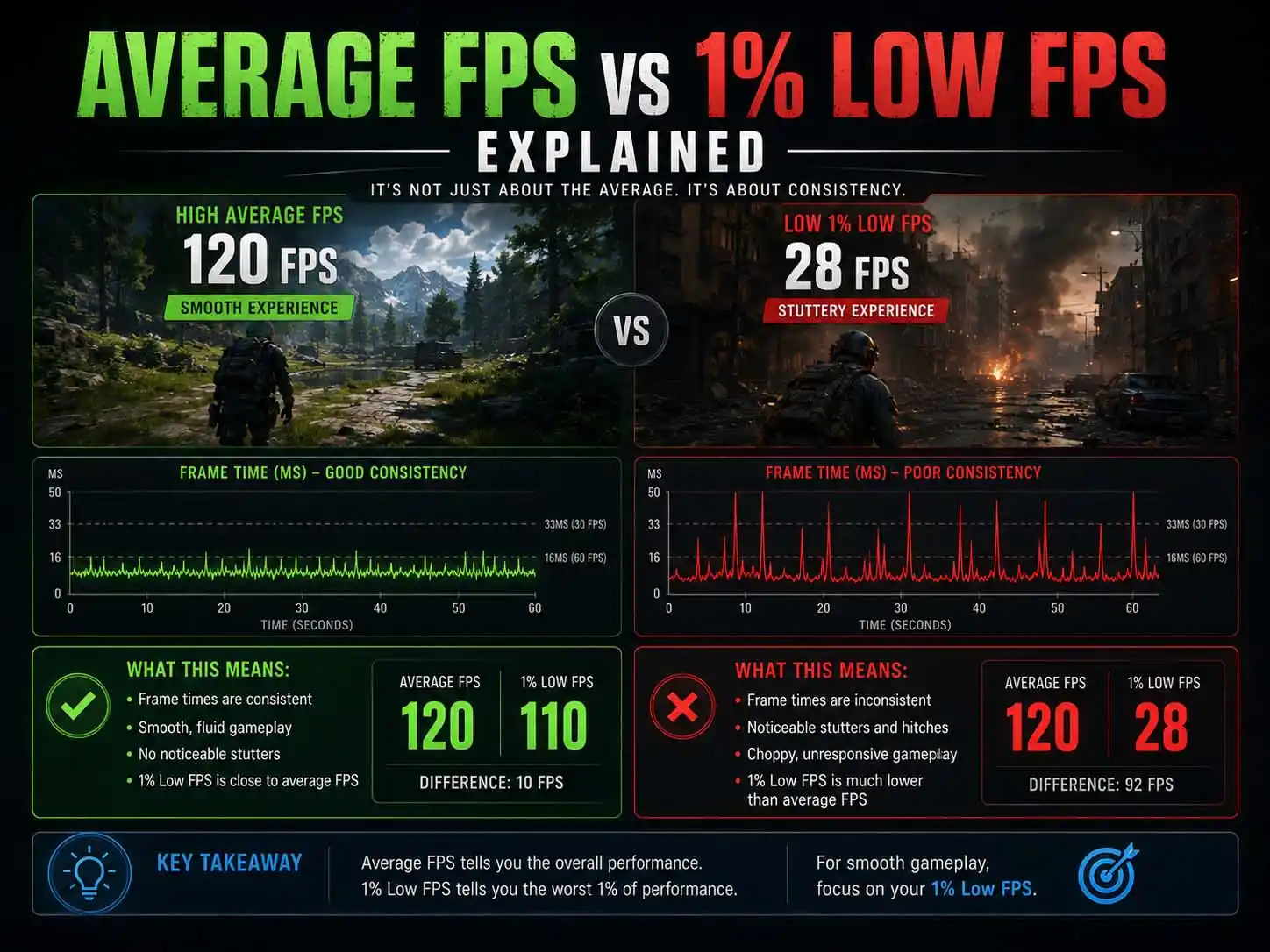
When the 1% low is close to the average, the experience feels consistent and pleasant. When there’s a big gap, you get hit with occasional hitching that breaks immersion.
This number became popular because modern games have complex scenes that suddenly demand more from your hardware. A brief CPU overload or memory hiccup shows up clearly here.
Storage is worth checking too, especially in open-world games. A DRAM-less SSD can exhaust its host memory buffer under sustained streaming load, causing hitches that show up directly in 1% low readings while average FPS stays perfectly normal. It’s one of the harder bottlenecks to catch because nothing looks wrong in GPU-Z or Task Manager.
Many players now consider 1% lows more important than raw average FPS for judging how enjoyable a game will feel day-to-day.
Frame Times: Why Consistency Matters More Than Raw Numbers
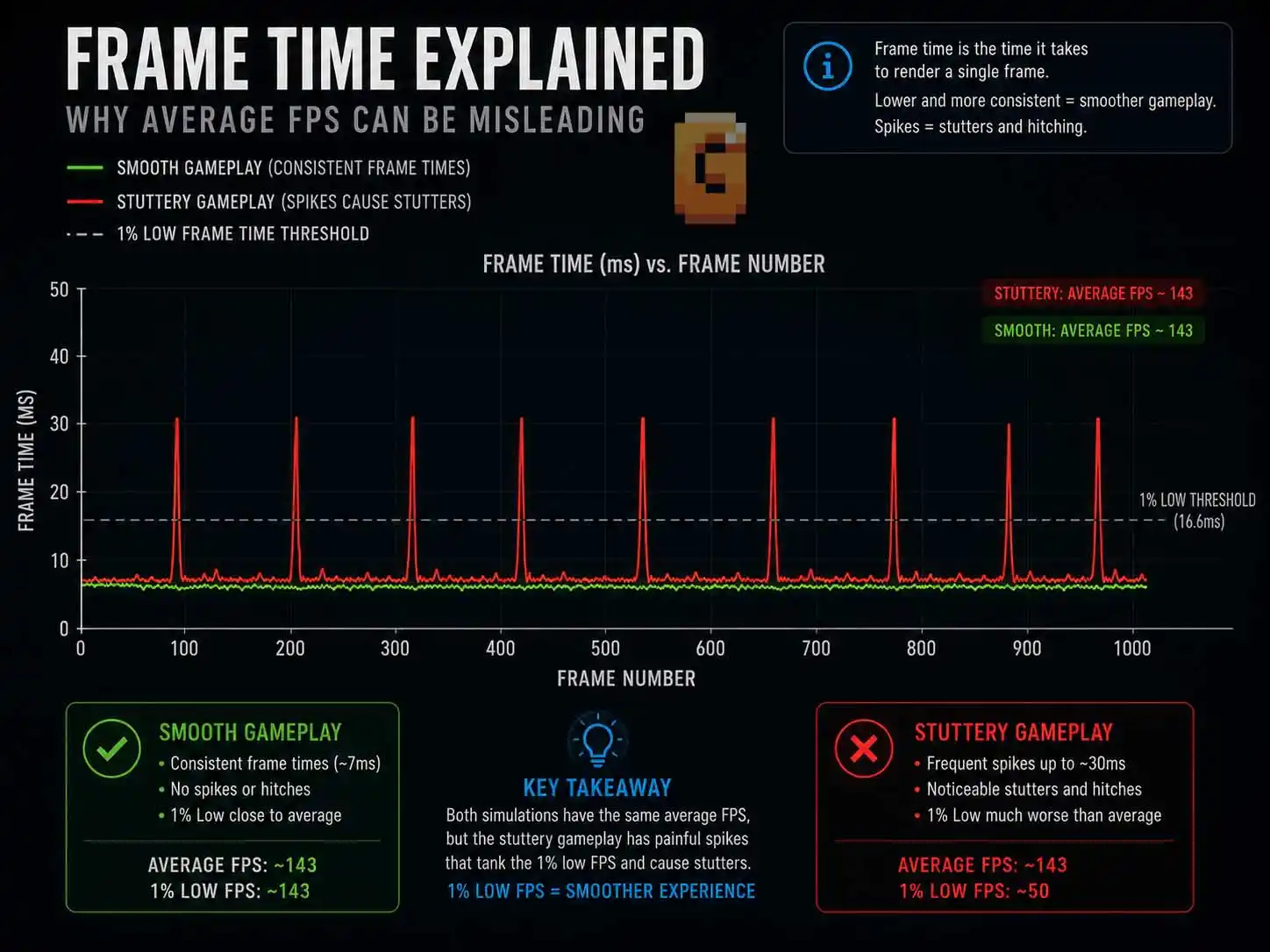
Here’s a concrete way to understand why lows hurt so much. Frame time is the number of milliseconds each frame takes to render. At a steady 144 FPS, each frame takes roughly 7 milliseconds.
If every frame arrives at a nice, even 7ms, the game feels buttery smooth. But if you have ten frames at 7ms followed by one frame that suddenly takes 30ms, you feel a visible stutter or hitch even though the average FPS still looks high.
That single 30ms frame creates a noticeable pause — your brain registers it as lag. This is exactly what 1% and 0.1% lows are warning you about. They expose these inconsistent frame times that averages hide. A system with slightly lower average FPS but rock-steady frame times will almost always feel better than one with high peaks and sudden spikes.
Getting adaptive sync configured correctly is also part of the picture. If frame pacing is the culprit rather than raw rendering performance, our guide on when to enable G-Sync covers how to set it up alongside NVIDIA Reflex to keep both latency and smoothness as low as possible.
What Does 0.1% Low FPS Mean?
By now, 1% low fps explained should feel pretty intuitive — and 0.1% lows are simply the same idea taken to its most extreme. 0.1% low FPS takes it one step further. It focuses on only the very worst 0.1% of frames — the absolute roughest moments in the entire run.
These are the big stutters or micro-freezes you feel instantly, even if they’re short. They often happen during explosions, heavy particle effects, or when the game loads new assets.
While 1% lows give a good overall view of consistency, 0.1% lows warn you about the rare but very noticeable problems. A decent 1% low paired with a poor 0.1% low still means occasional frustrating dips.
Together, these three numbers — average FPS, 1% low, and 0.1% low — paint the full performance story.
Why Most Gamers Get Frustrated With Frame Rates
One big pain point is games feeling stuttery despite high average FPS. You see impressive benchmark numbers, buy the hardware, and still experience annoying hitches.
1% low fps explained solves much of this confusion. Once you understand it, you stop blaming the wrong component.
Another common frustration is not knowing which upgrade will actually improve smoothness. Many people keep upgrading their GPU expecting better results, but the CPU, RAM, or storage is the real limiter.
The third pain point is misunderstanding benchmarks entirely. Shoppers focus only on the biggest average FPS number and feel disappointed later. Learning to read all three values leads to much smarter decisions.
Hardware Factors That Hurt Your 1% and 0.1% Lows
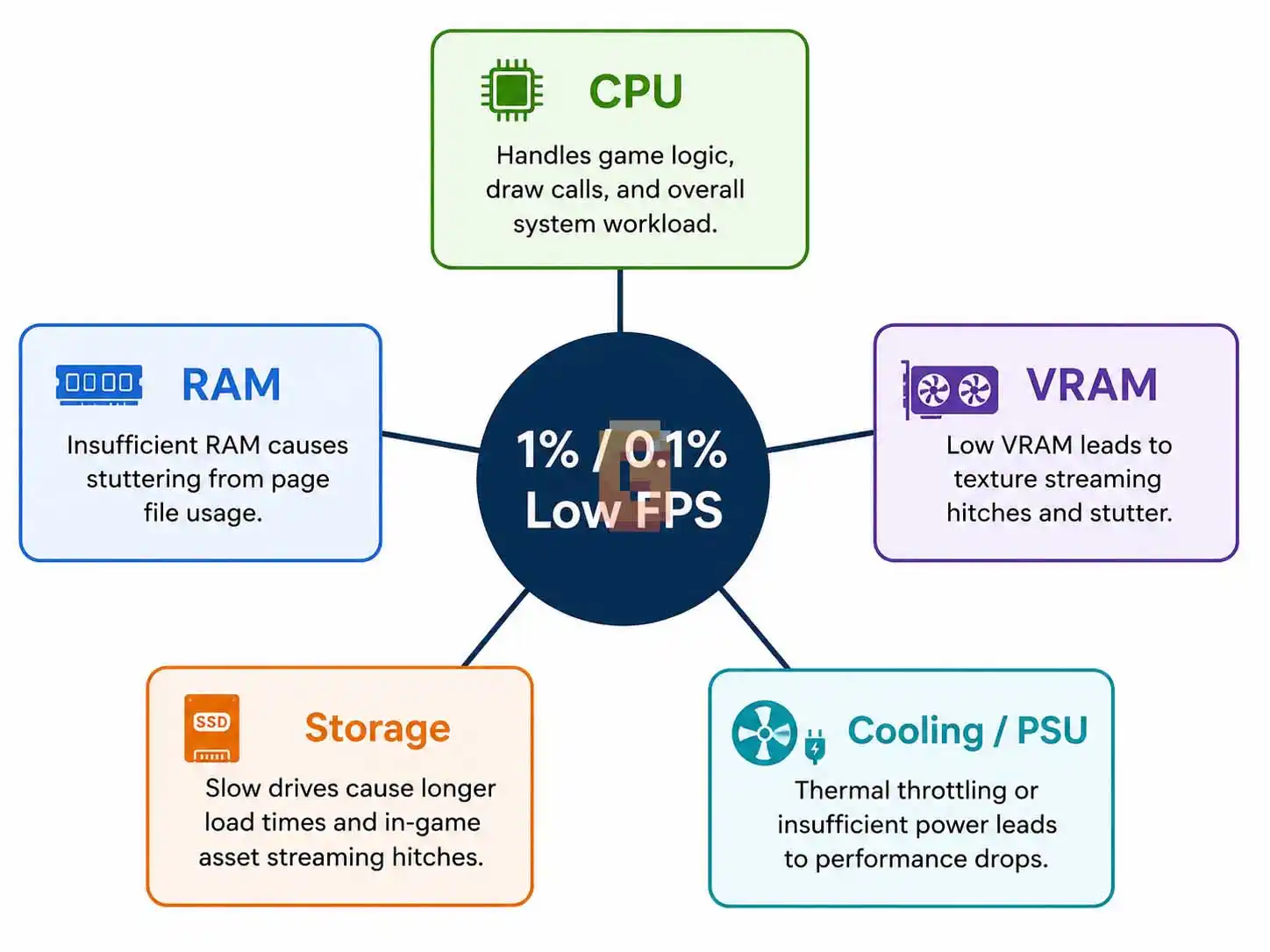
Your GPU drives the average FPS higher, but several other components have bigger influence on the lows.
CPU Role in Smooth Gaming
The CPU manages game logic, artificial intelligence, physics calculations, and preparing work for the GPU. When it struggles even briefly, frame times spike and lows drop.
Processors with large cache and strong single-thread performance tend to deliver much better 1% lows. This is why certain gaming-focused CPUs feel noticeably smoother even at similar average frame rates. On AMD Ryzen systems, how aggressively the CPU is allowed to boost matters too. Features like Precision Boost Overdrive can push frequencies higher when thermal and power conditions allow, but an unstable or overly aggressive configuration can introduce the exact kind of brief hiccups that hurt your lows instead of helping them. Our complete PBO guide covers how to set it up the right way.
RAM Capacity and Speed
Not having enough fast system memory forces the game to pull data from slower places. This creates sudden stutters visible in both 1% and 0.1% lows.
Running 32 GB or more at proper speeds (with XMP or EXPO enabled) gives the system headroom and helps maintain steadier frame delivery.
VRAM Limitations on Graphics Cards
When your graphics card runs out of video memory, it starts using system RAM as a backup. This swap is slow and destroys low FPS values, sometimes dramatically.
Higher resolution textures and modern game features eat VRAM quickly. Having enough prevents those desperate performance drops.
Storage Drive Impact
Slow storage makes the game wait while loading textures, models, or effects. These loading pauses appear as clear dips in the low FPS metrics.
A fast NVMe SSD keeps data flowing quickly and supports better consistency.
Cooling and Power Delivery
Overheating or unstable power causes thermal throttling. Even short periods of reduced clocks create visible spikes in frame times that hurt your 0.1% lows.
Good cooling and a quality power supply help everything run steadily. On the motherboard side specifically, this is where VRM heatsinks come in — a small component that plays a surprisingly direct role in keeping power delivery, and therefore your lows, stable under sustained load.
These components work together. A powerful GPU paired with weak supporting hardware often shows great average FPS but disappointing lows.
How to Read Game Benchmarks Properly
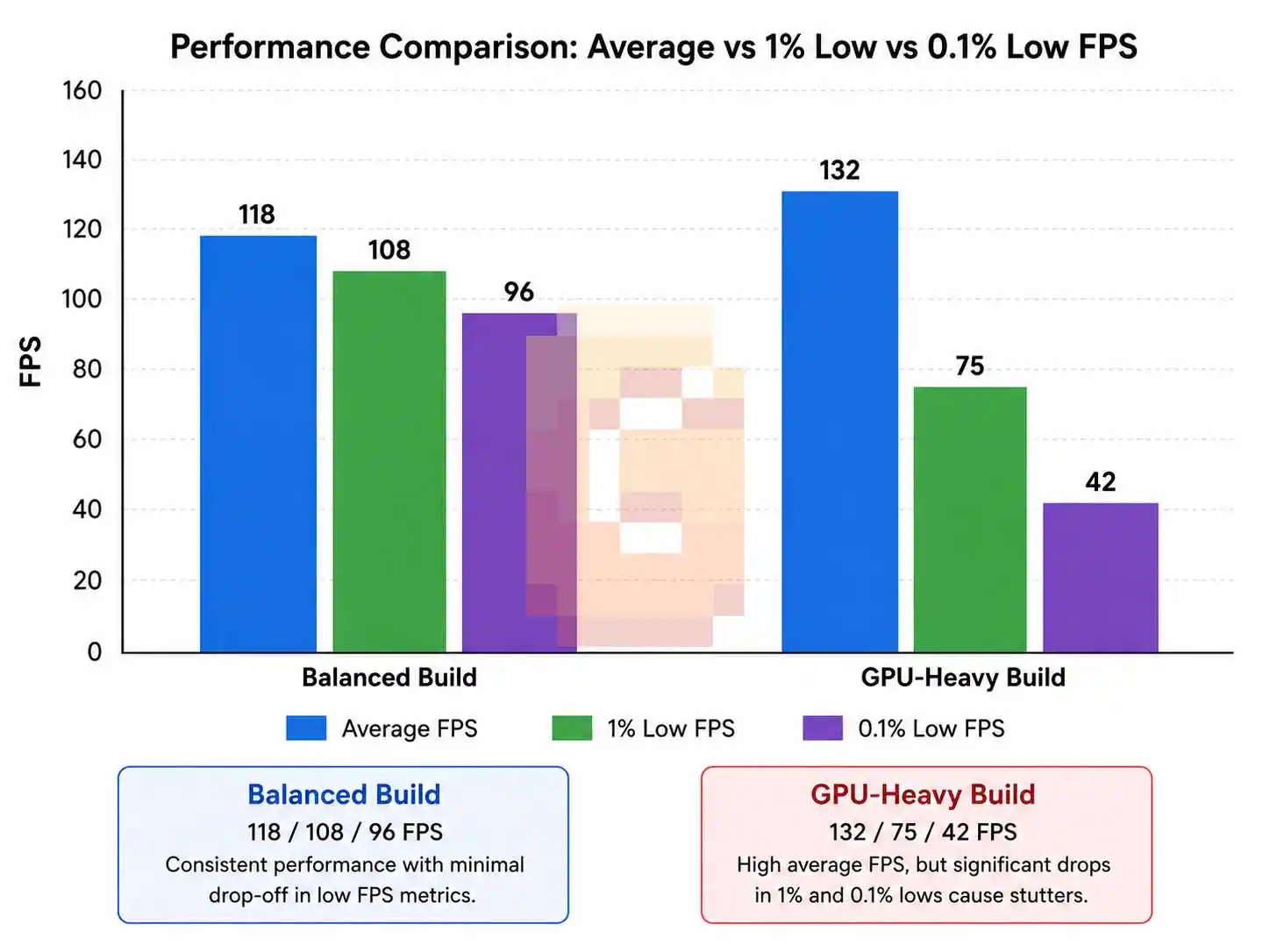
With 1% low fps explained fresh in mind, reading a benchmark chart becomes a different exercise — you stop hunting for the single biggest number and start looking at how three numbers relate to each other. Always look at all three numbers together. Check how close the 1% low sits to the average — the smaller the gap, the more consistent the experience.
Compare results at your target resolution and settings. Behavior changes significantly between 1080p, 1440p, and 4K.
Use monitoring tools like MSI Afterburner with RivaTuner Statistics Server in your own games. You can see live FPS, lows, CPU usage, VRAM, and RAM usage to identify bottlenecks.
Practical Tips to Improve Your Lows
Start by enabling XMP or EXPO in your BIOS so your RAM runs at its rated speed. Many systems leave this disabled by default and lose easy performance.
Install games on a fast NVMe SSD instead of slower drives. Close unnecessary background applications that consume RAM.
Keep temperatures in check with proper case airflow and clean fans. Sometimes small tweaks like updating drivers or optimizing in-game settings lift lows noticeably.
When upgrading, aim for balance rather than maxing out only one area. A well-matched system almost always delivers better real-world smoothness.
Choosing the Right Hardware for Consistent Performance
Focus on CPUs known for strong gaming performance and large cache when smoothness matters most. Pair them with fast, sufficient RAM and a GPU that has enough VRAM for your resolution.
Don’t overlook storage speed or cooling. These supporting pieces prevent the random dips that hurt 0.1% lows.
Understanding 1% low fps explained helps you avoid wasting money on the wrong upgrades. You can target actual bottlenecks instead of chasing bigger average numbers alone.
Real Impact on Your Daily Gaming
In story-driven games, sudden stutters break immersion during important moments. In competitive titles, inconsistent frame delivery can cost you precious reaction time.
Stable 1% and 0.1% lows create that buttery-smooth feeling that makes gaming truly enjoyable. It’s not just about high numbers on paper — it’s about responsive, consistent gameplay.
This knowledge changes how you evaluate new hardware and tune your current setup.
Why This Matters More Than Ever
Modern games are becoming more demanding with bigger worlds, advanced effects, and complex simulations. These conditions make 1% and 0.1% lows even more relevant.
Gamers who understand these concepts make better purchasing decisions and enjoy their systems more fully. They spend less time frustrated and more time having fun.
FAQ
Does higher average FPS always mean better 1% lows?
No. Average FPS can look strong while 1% and 0.1% lows remain poor, causing noticeable stutters.
What hardware improves 1% low FPS the most?
A strong CPU with large cache, fast system RAM, sufficient VRAM, and quick SSD storage have major impact on lows.
Is 0.1% low FPS important for casual gaming?
Yes. It reveals the worst stutters that break immersion even in single-player games.
How much difference do good 1% lows make?
They make gameplay feel much more consistent and responsive compared to systems with big dips.
Can I improve lows without buying new hardware?
Yes — enable proper RAM speeds, use fast storage, close background apps, and maintain good temperatures.
Wrapping It Up
We broke down average FPS, 1% low FPS, and 0.1% low FPS so you can finally understand what really matters for smooth gaming. 1% low fps explained helps you see past marketing numbers and focus on real playability.
Remember the key hardware pieces that support strong lows: balanced CPU, fast RAM, enough VRAM, quick storage, and solid cooling. Use this knowledge to build or upgrade smarter.
Ready for the next step? Check your current system with monitoring tools or explore recommended component combos. Tell us in the comments what your biggest frame rate frustration is — We are reading every comment.
References:
– TechSpot GPU Benchmarking Methodology