AGESA Importance for AMD Users: Why BIOS Updates Matter

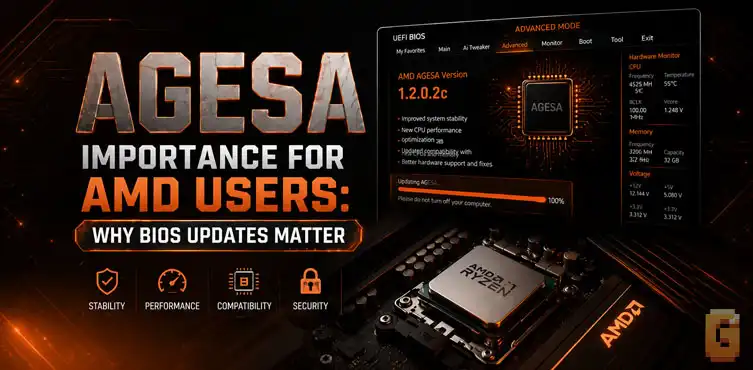

AGESA is AMD’s low-level firmware code that motherboard manufacturers integrate into BIOS/UEFI updates. It can change CPU compatibility, memory behavior, performance features, and even security functionality, which is why an AMD BIOS update can sometimes matter far more than the version number suggests.
If you use an AMD Ryzen processor, you have probably encountered the word AGESA while reading motherboard BIOS update notes. It usually appears alongside a version number such as AGESA ComboAM5 PI 1.2.0.2 or 1.2.7.0, followed by a vague statement about “system stability” or “compatibility.”That can make AGESA sound like another technical detail that only motherboard manufacturers need to care about. It isn’t.
The AGESA importance for AMD users becomes obvious once you understand what actually sits underneath your motherboard’s BIOS. AGESA is part of the firmware layer responsible for initializing and configuring important parts of an AMD platform before Windows even starts. And sometimes, an AGESA update can change what your processor is capable of doing.
It can add support for a new CPU. It can improve memory compatibility. It can expose a new power mode. And, as a remarkable 2026 example demonstrated, a firmware update can even remove a security feature that users previously had access to. That is why AGESA deserves more attention than the tiny line in a BIOS changelog might suggest.
What AGESA Actually Is
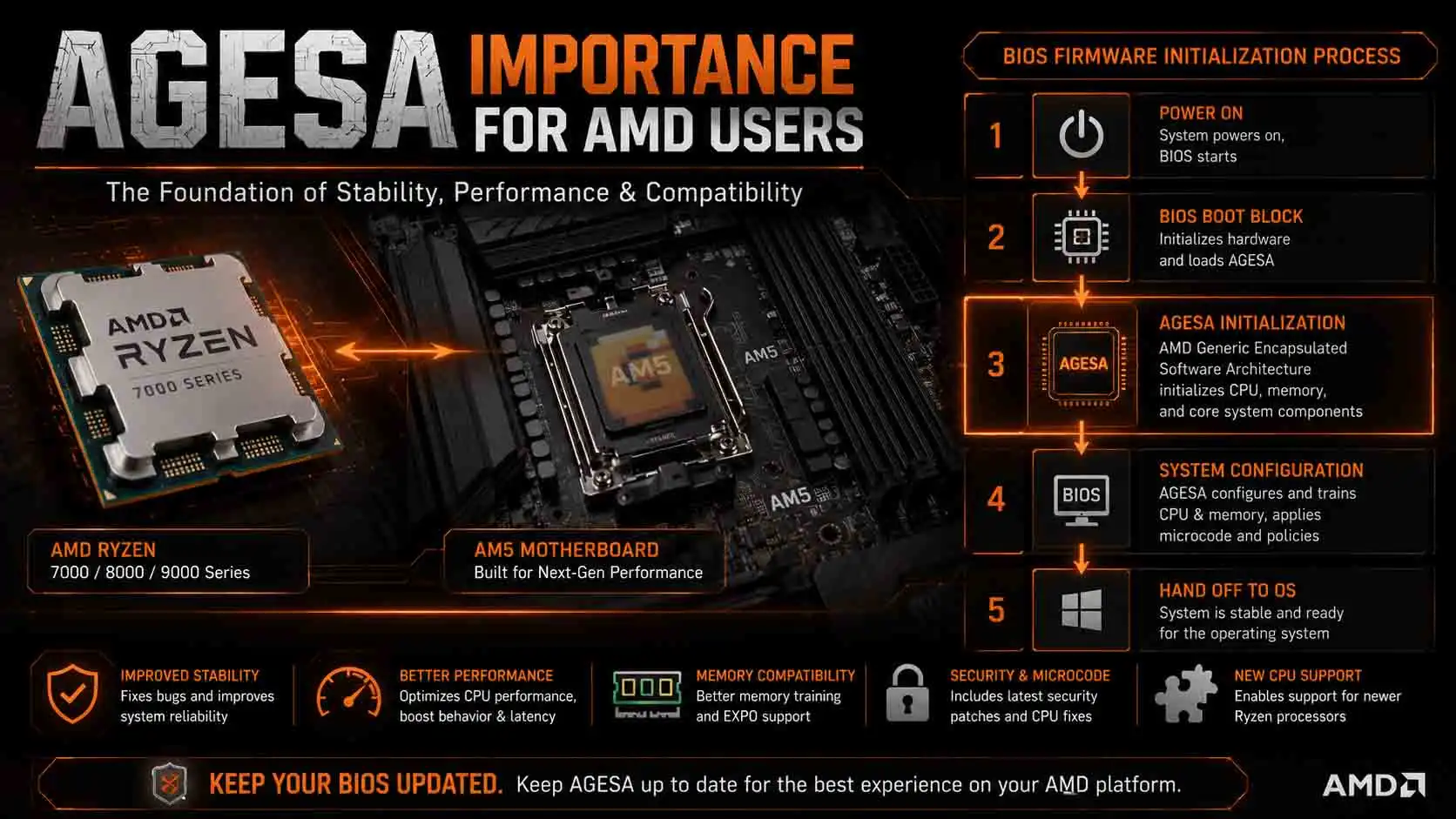
AGESA stands for AMD Generic Encapsulated Software Architecture. In simple terms, it is AMD’s low-level firmware software that motherboard manufacturers integrate into their BIOS/UEFI firmware to initialize and configure AMD platforms.
Think of your motherboard BIOS as the overall firmware package and AGESA as one of the important AMD-provided components inside it. When you press the power button, the operating system isn’t immediately running the show. The firmware first has to bring the processor, memory, fabric, I/O and other platform components into a usable state.
AGESA provides code that helps the motherboard perform this early platform initialization. AMD itself describes AGESA as a BIOS procedure library designed to help its customers implement AMD technologies in their products.
AGESA is not the same thing as your BIOS
This distinction is important. You don’t normally download “AGESA” separately and install it like a graphics driver. Instead, ASUS, MSI, Gigabyte, ASRock and other motherboard manufacturers integrate AMD’s AGESA releases into their own BIOS/UEFI updates.
So when you flash a new motherboard BIOS, you may also be updating the AGESA code underneath it. That’s why two BIOS versions can look like relatively minor revisions while containing meaningful changes to how the AMD platform behaves. In other words, AGESA is one of the reasons an AMD BIOS update can change things that Windows software cannot.
Why Does AGESA Matter So Much to AMD Users?
AGESA matters because it sits unusually close to the hardware. Changes made there can affect CPU initialization, memory training, platform compatibility, power behavior, performance features and other low-level functions. This is also why simply thinking of a BIOS update as “a motherboard update” can be misleading.
For an AMD Ryzen system, the BIOS is effectively one of the mechanisms through which AMD can deliver new platform behavior after the processor has already reached consumers.
It can change capabilities without changing the CPU
Your physical processor obviously doesn’t change when you flash a BIOS. The silicon remains exactly the same. But the firmware controlling and initializing that silicon can change. That’s the interesting part.
A processor can contain hardware capabilities that aren’t exposed, configured or supported in exactly the same way by every firmware revision. This doesn’t mean every AGESA update magically unlocks hidden performance. Most updates are much less dramatic. But it explains why firmware deserves to be treated as part of the AMD platform rather than as an afterthought.
How a Firmware Update Silently Removed a Security Feature (The TSME Story)
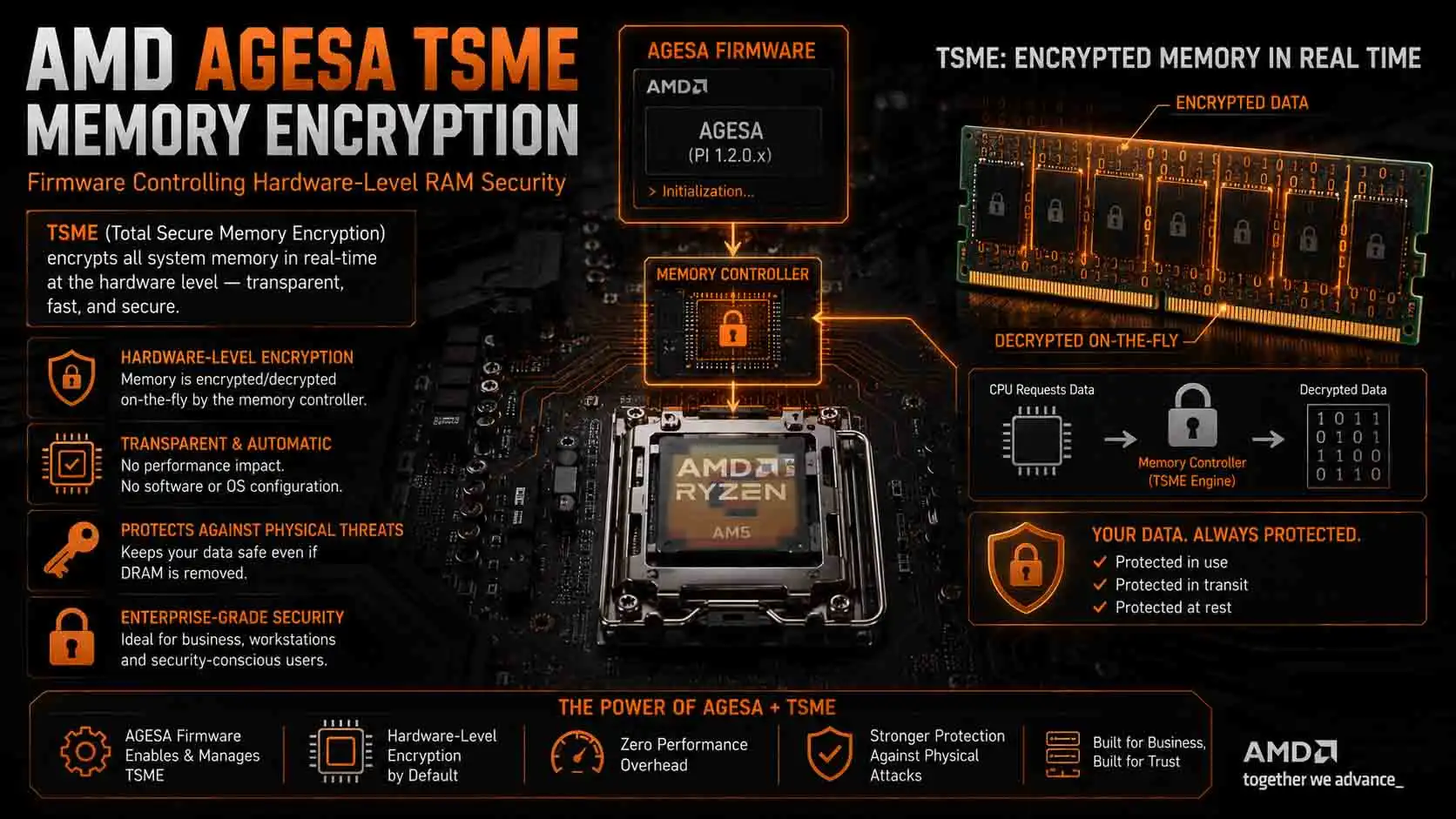
The 2026 TSME episode is one of the clearest demonstrations of why AGESA matters. Ars Technica’s Ben Kilpatrick discovered that Transparent Secure Memory Encryption (TSME) — a hardware feature that encrypts data stored in system memory to protect against physical attacks on RAM — was no longer available on a Ryzen 7 9700X after a BIOS update built on AGESA 1.2.7.0, even though it had worked on earlier firmware. The finding was reproduced with an MSI motherboard, ruling out a simple Windows configuration issue.
The processor hadn’t physically lost the feature. The firmware had changed what the platform allowed it to do — and that’s the part that really matters: users could update their BIOS with no indication that their CPU’s security behavior had just changed underneath them.
AMD subsequently confirmed that the TSME/Memory Guard option had been removed from certain non-PRO Ryzen 9000 desktop processors in a recent update, then announced it would restore the option following community feedback. ASUS went on to release beta BIOS versions based on AGESA 1.3.0.1b Patch A that restored TSME support on select AM5 boards.
This story is especially useful because it destroys the idea that AGESA is merely about “better RAM compatibility.” It can affect security policy at the firmware level too.
Does updating BIOS AGESA affect security?
Yes, an AGESA-containing BIOS update can affect security functionality. The 2026 TSME incident demonstrated that firmware changes can alter whether certain hardware security features are available, even when the physical CPU itself has not changed. That does not mean BIOS updates are inherently dangerous. It means you should read their release notes rather than treating every update as a completely risk-free housekeeping task.
When AGESA Delivers Free Performance: The Ryzen 7 9700X Example
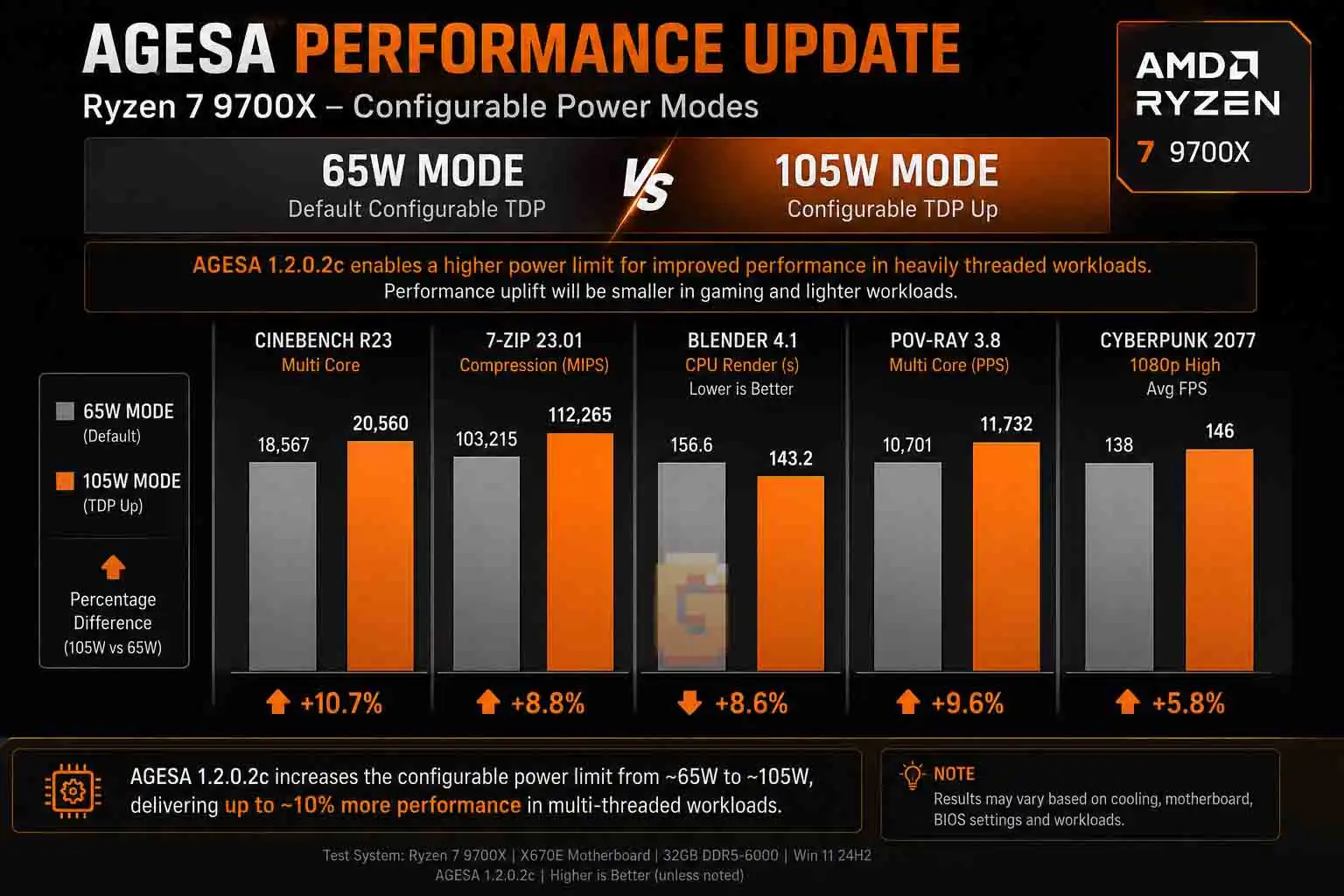
AGESA isn’t only about compatibility and security. It can also introduce performance-related platform changes. The Ryzen 7 9700X provides a particularly good example. When Ryzen 9000 launched, the Ryzen 7 9700X was configured with a 65W TDP. AMD later introduced an official 105W configurable TDP option through AGESA PI 1.2.0.2.
Reports following the update showed that the higher power limit could produce performance improvements of around 10% in some workloads. The exact improvement depends on the workload, cooling, motherboard configuration and other system conditions, so that figure should not be interpreted as a universal 10% performance increase.
That was significant because users didn’t need a different processor. They needed updated firmware.
What did the 105W mode change?
The higher configurable power target allowed the processor to operate with a larger power envelope in workloads that could take advantage of it.
AMD’s AGESA PI 1.2.0.2 update officially introduced the 105W option, and motherboard vendors subsequently incorporated the capability into their BIOS releases. Reports around the update measured roughly a 10% improvement in heavily threaded workloads, although the benefit varied by workload and was much smaller in gaming. That distinction is important.
The firmware update didn’t make every application 10% faster. Instead, it changed the CPU’s supported power configuration, allowing workloads that were power-limited to extract more performance. This is a perfect example of why “BIOS update” doesn’t necessarily mean “bug fixes.” Sometimes firmware changes the operating envelope of the hardware.
That’s a different lever from Precision Boost Overdrive, which tunes how aggressively your specific chip boosts within whatever power ceiling AGESA has already enabled — see our breakdown of AMD PBO explained for how the two settings actually interact.
Why New CPUs and RAM Sometimes Need an AGESA Update First
AGESA is also important when AMD introduces new processors or platform changes because the motherboard firmware needs to know how to initialize and configure the new hardware.
AMD explicitly notes that a BIOS update may be required when a motherboard does not already support a newer Ryzen desktop processor. This is one reason CPU compatibility lists aren’t always as simple as “AM5 equals every AM5 CPU.” The socket is only one part of the equation.
CPU support
A motherboard may physically have the correct socket but still require a newer BIOS before a particular Ryzen processor will boot correctly. This is especially relevant when buying a CPU for an older motherboard. You can have the correct socket, chipset and physical installation while still facing a firmware compatibility problem.
Memory support
AGESA also participates in memory initialization and training. That matters because modern DDR5 platforms have considerably more complex memory behavior than the old days of simply choosing a frequency and being done with it.
BIOS updates can improve memory compatibility, training behavior and support for particular memory configurations. This is one reason an AMD user experiencing memory instability shouldn’t automatically assume that the RAM itself is defective. Firmware can be part of the equation.
Should You Actually Update Your BIOS/AGESA?
Yes when the update solves a problem you have, adds hardware support you need, fixes an important security issue, or provides a meaningful improvement. If your system is perfectly stable and the update offers nothing relevant to you, waiting for a mature release can also be a reasonable choice. This is where the answer becomes more nuanced.
You don’t need to install every BIOS update the moment it appears. But you also shouldn’t adopt the opposite philosophy of “never update BIOS.”
Update sooner when the changelog matters to you
A BIOS update deserves higher priority when it includes:
- Support for your new CPU
- Important security fixes
- Memory compatibility or stability fixes
- A meaningful performance or power-management improvement
- A fix for USB, PCIe, storage or other hardware behavior affecting your system
These are the updates where there is a clear reason to take the risk of flashing firmware.
Waiting can make sense for optional updates
If your computer is completely stable and a new BIOS only contains minor changes that don’t affect your configuration, there is less urgency. This is particularly true with beta BIOS releases. A beta BIOS can contain valuable fixes, but it has not necessarily gone through the same validation as the final release.
The 2026 ASUS TSME restoration is a good illustration: early beta BIOS versions brought the feature back, while users who prioritize stability may reasonably prefer to wait for the final firmware release.
Don’t update blindly
Before flashing, check three things:
- Read the changelog. Look specifically for AGESA version changes, security fixes, CPU support, memory changes and known issues.
- Check your current BIOS version. You don’t want to solve a problem that you don’t actually have.
- Save your important BIOS settings. A BIOS update can reset configuration, so settings such as EXPO, fan curves, boot configuration and other customizations may need to be checked afterward.
AMD’s own BIOS guidance recommends obtaining the appropriate BIOS from the motherboard manufacturer’s support resources and explains situations where a BIOS update may be necessary.
How to Actually Stay on Top of AGESA Updates
You don’t need to become a firmware researcher to keep your AMD system current. The easiest approach is to watch your motherboard manufacturer’s BIOS page and pay attention to the AGESA version mentioned in each release. Don’t just look at the BIOS version number.
For example, a BIOS changelog might say:
AGESA ComboAM5 PI 1.2.0.2
or:
AGESA ComboAM5 PI 1.3.0.1b Patch A
That number tells you something about the AMD firmware component being integrated into the motherboard BIOS. It can be much more informative than a generic line saying “improve system stability.”
The simple AMD BIOS decision framework
Think about updates in three categories.
| Priority | Update When You See… | Example From This Article |
|---|---|---|
| Update now | Security fixes, new CPU support, memory stability fixes, or a fix for a problem you’re actually having | The TSME restoration (AGESA 1.3.0.1b Patch A) |
| Update when convenient | Meaningful memory improvements, useful performance features, or capabilities you actually want | The Ryzen 7 9700X 105W unlock (AGESA PI 1.2.0.2) |
| Wait | Optional beta firmware with no benefit relevant to your system | The early ASUS TSME beta builds, before the stable release landed |
That approach gives you something better than either extreme. You don’t blindly update everything. And you don’t blindly ignore firmware either.
FAQ
What is AGESA and why does it matter?
AGESA is AMD’s low-level firmware software used during platform initialization. Motherboard manufacturers integrate it into BIOS/UEFI updates, allowing firmware releases to change CPU compatibility, memory behavior, power features, and certain security functions.
Should I update my AGESA BIOS?
Update your BIOS when the release provides a meaningful benefit for your system. Prioritize CPU support, security fixes, stability fixes, memory improvements, or features you actually need. If nothing applies and your system is stable, waiting for a mature release is reasonable.
Does AGESA improve CPU performance?
AGESA can improve performance in some circumstances. The Ryzen 7 9700X’s 105W configurable TDP support introduced through AGESA PI 1.2.0.2 is one example, although performance gains depend heavily on the workload.
Can an AGESA update remove a feature?
Yes, firmware changes can alter the availability of platform features. The 2026 TSME situation showed that an AGESA update could make a previously available hardware security feature unavailable on affected consumer Ryzen systems.
Is AGESA only important for Ryzen 9000?
No. AGESA is relevant across AMD platforms that use it. Its exact capabilities and versioning depend on the processor and platform generation, but the general principle remains: motherboard firmware can contain AMD-provided code that controls important low-level platform behavior.
That’s especially true on HEDT platforms — our comparison of Threadripper vs Threadripper PRO vs EPYC covers how those chips push power delivery even harder, which makes the firmware governing their operating envelope just as important as it is here.
The Bottom Line
If you’ve ever wondered “what is AGESA and why does it matter?”, the simplest answer is this:
AGESA is one of the critical firmware layers that allows an AMD motherboard to initialize and configure the processor and platform correctly.
Its importance goes well beyond CPU compatibility. AGESA updates can influence:
- CPU support
- DDR5 memory compatibility and training
- Power-management behavior
- Performance features
- Platform stability
- Security functionality
The Ryzen 7 9700X’s 105W cTDP update showed that firmware can unlock a meaningful new operating mode without replacing the CPU. The 2026 TSME controversy showed the other side of the equation: firmware can also change security functionality in ways users may not immediately notice. That is the real AGESA importance for amd users.
You don’t need to obsess over every AGESA revision. But the next time your motherboard manufacturer releases a BIOS update, don’t dismiss the AGESA line as meaningless technical jargon. Check what changed, decide whether it matters to your hardware, and then make an informed choice about updating. For an AMD system, firmware is part of the platform—and sometimes it can be just as important as the hardware sitting underneath it.
References
AMD — AGESA Interface Specification
AMD — BIOS Updates for AMD Ryzen Desktop Systems
AMD — How to Update Motherboard BIOS
Ars Technica — Users cry foul after AMD stripped memory crypto from its consumer CPUs
Tom’s Hardware — AMD boosts Zen 5 official warrantied TDP to 105W
Tom’s Hardware — ASUS beta BIOS updates restore Ryzen 9000 memory encryption