

Threadripper vs Threadripper PRO vs EPYC: What’s the Difference
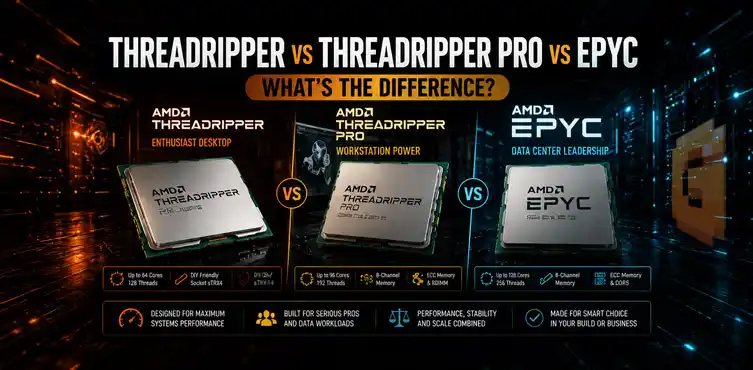

Threadripper, Threadripper PRO, and EPYC share the same Zen chiplet approach but serve different markets. Standard Threadripper (Zen 5 9000 series on TRX50) offers high clocks with 4-channel memory for enthusiasts. Threadripper PRO adds 8-channel DDR5, 128 PCIe 5.0 lanes, and strong Windows support for workstations. EPYC delivers 12 memory channels per socket and higher scalability for servers. The right choice depends on your OS, memory needs, and workload scale.
Threadripper, Threadripper PRO, and EPYC are all built on AMD’s Zen chiplet architecture. Threadripper PRO and EPYC’s standard Zen 5 SKUs share the same compute dies; EPYC’s highest-core-count models use a denser Zen 5c die instead. Standard Threadripper currently runs on Zen 5 as well with the 9000 series. The differences come down to how AMD configures those chiplets for three different markets — which is why comparing their spec sheets without understanding the platform context produces more confusion than clarity.
Same Zen Silicon, Three Different Products: How AMD Does It
AMD uses the same Zen compute dies across these lines, with variations in the I/O die configuration, enabled features, and platform validation. Firmware plays a role in that platform validation too — our breakdown of why AGESA matters for AMD users covers how BIOS updates can change CPU support and enabled features even after a chip has shipped.
- Threadripper targets high-end desktop and workstation users who want strong single-thread performance in a familiar environment.
- Threadripper PRO unlocks more professional workstation features on an enhanced platform.
- EPYC focuses on server demands with maximum core density, memory bandwidth, and multi-socket scalability.
This shared silicon foundation explains why the CPUs can deliver similar raw multi-threaded performance yet behave very differently in real systems. Platform-level decisions around memory controllers, PCIe lanes, and RAS features create the practical gaps.
Boost Clocks, Core Count, and Memory Channels Compared
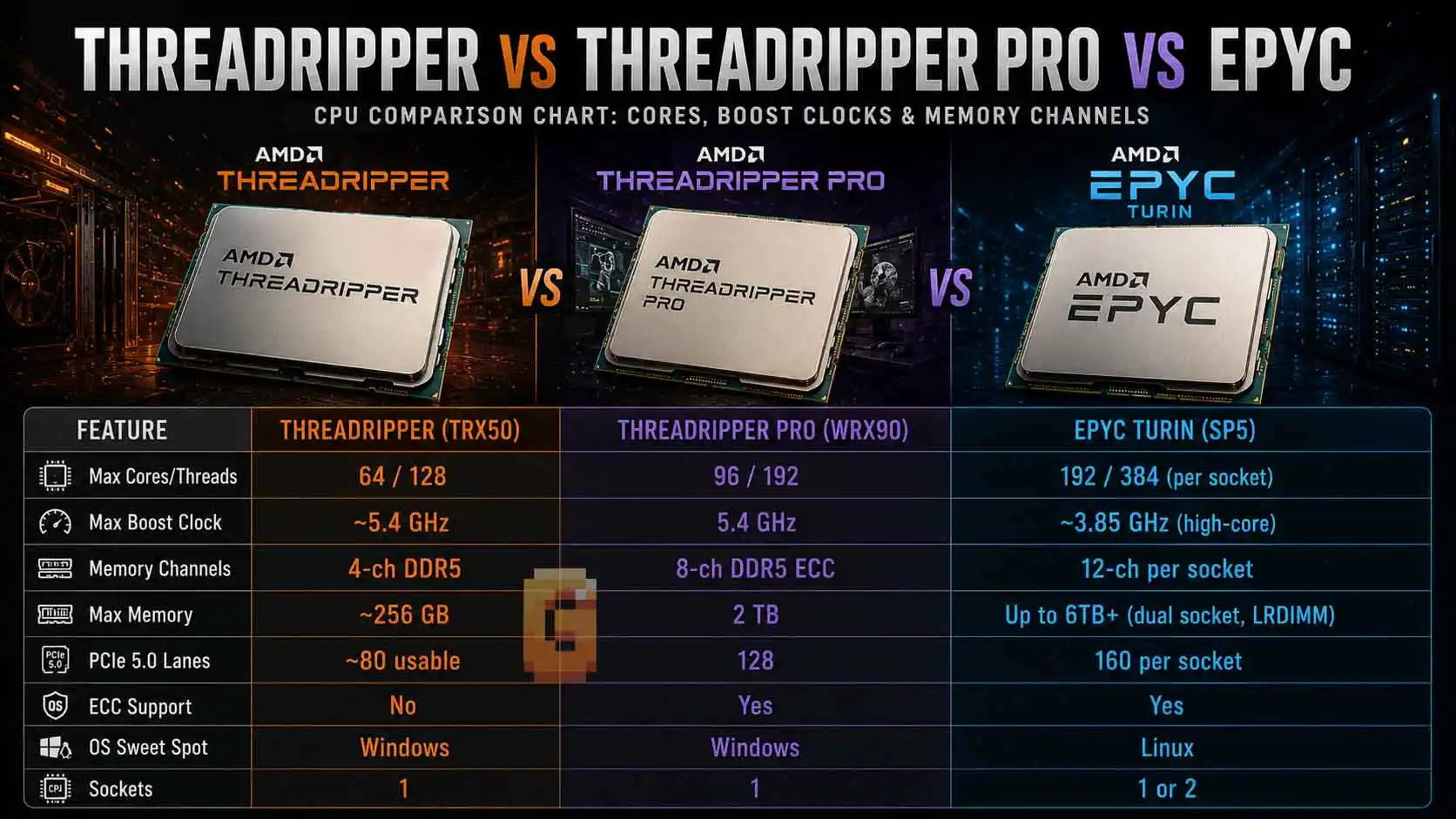
Standard Threadripper on the TRX50 platform (9000 series, Zen 5) tops out at 64 cores and 128 threads. These CPUs deliver high boost clocks reaching up to around 5.4 GHz, use 4-channel DDR5 memory with ECC support, and provide up to 92 PCIe lanes total (with 88 usable PCIe 5.0 lanes from the CPU). This makes them a strong choice for enthusiasts and creators who prioritize clock speed and don’t need extreme memory or I/O expandability.
Threadripper PRO models, such as the flagship 9995WX, push further with up to 96 cores and 192 threads while reaching boost clocks up to 5.4 GHz. They support 8-channel DDR5 with ECC and deliver 128 PCIe 5.0 lanes. The extra channels and lanes benefit professional applications that handle large datasets or multiple high-speed devices.
EPYC 9005 series processors (Turin) offer the highest core counts per socket, scaling well beyond 96 cores on certain SKUs. Boost clocks for these high-core models vary quite a bit by core count: around 4.5 GHz at 96 cores (9655), 4.1 GHz at 128 cores (9755), and 3.7 GHz at the 192-core flagship (9965) — clock speed trending down as core count climbs, prioritizing sustained all-core throughput over peak single-core speed.
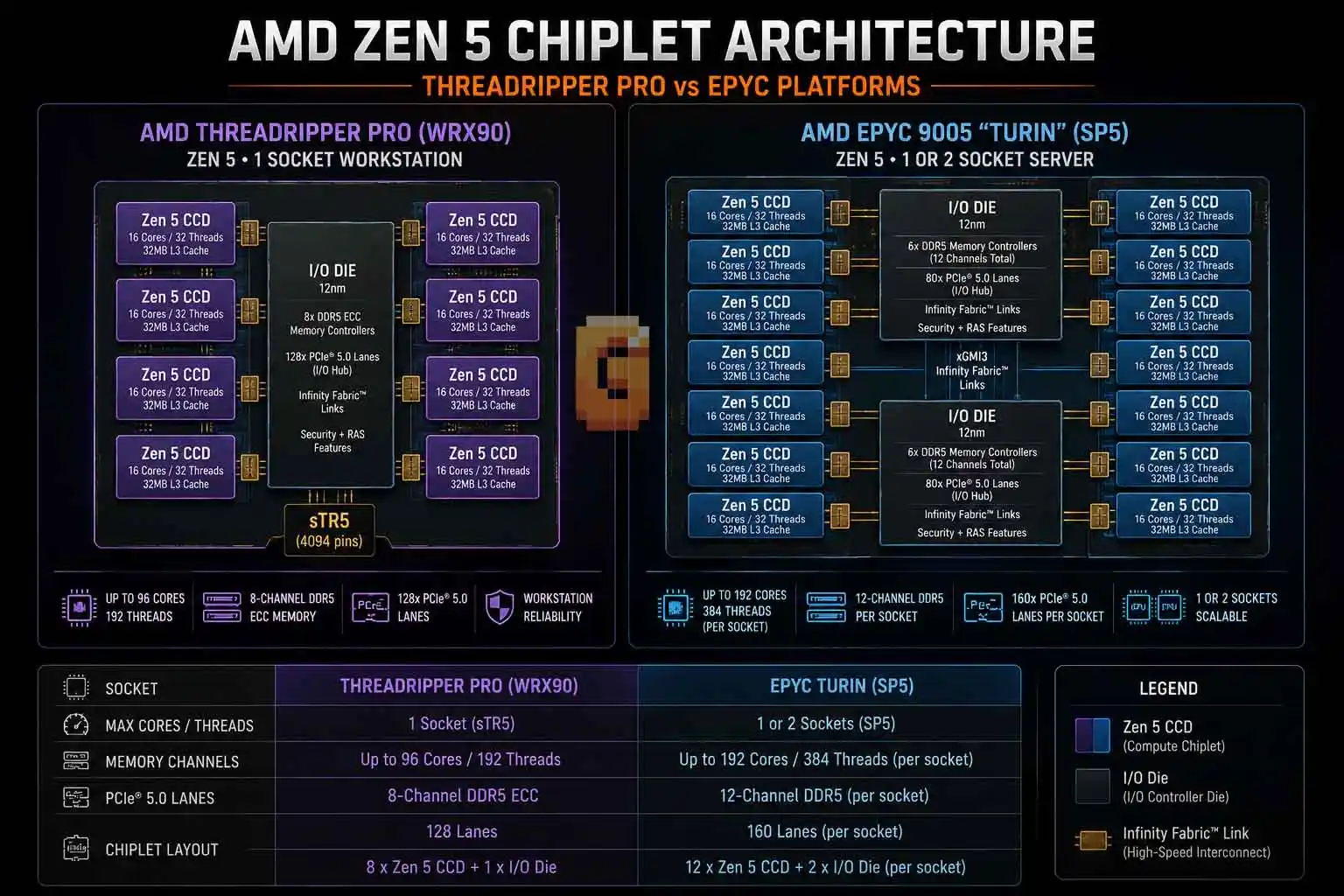
Memory channels create one of the clearest distinctions. Standard Threadripper uses 4-channel DDR5. Threadripper PRO steps up to 8-channel DDR5 with ECC support. EPYC provides 12 channels per socket, enabling up to 24 channels in a dual-socket system. Single-socket EPYC bandwidth reaches approximately 576 GB/s at theoretical peak — dual-socket configurations scale to roughly 1,150 GB/s, which is decisive for memory-bound workloads like large-scale AI inference and scientific simulation.
PCIe lane counts follow a related but distinct pattern. Standard Threadripper offers up to 92 total lanes (88 usable PCIe 5.0). Threadripper PRO 9995WX delivers 128 PCIe 5.0 lanes, and EPYC provides 128 PCIe 5.0 lanes per socket, scaling up to 160 total in certain dual-socket configurations. This gives servers more room for dense GPU arrays and high-speed storage.
| Feature | Threadripper (TRX50) | Threadripper PRO (WRX90) | EPYC Turin (SP5) |
| Max Cores/Threads | 64 / 128 | 96 / 192 | 192 / 384 (per socket) |
| Max Boost Clock | ~5.4 GHz | 5.4 GHz | 3.7~4.5 GHz (varies by SKU) |
| Memory Channels | 4-ch DDR5 | 8-ch DDR5 ECC | 12-ch per socket |
| Max Memory | ~1 TB | 2 TB | 6 TB per socket (~12 TB dual-socket) |
| PCIe 5.0 Lanes | 88 usable | 128 | 128 per socket (up to 160 dual-socket) |
| ECC Support | Yes | Yes | Yes |
| OS Sweet Spot | Windows | Windows | Linux |
| Sockets | 1 | 1 | 1 or 2 |
These hardware differences directly impact real-world behavior in applications like 3D rendering, simulations, AI inference, and virtualization. Running a 96-core chip at sustained all-core boost for hours also puts real strain on the motherboard’s power delivery — our breakdown of why VRM heatsinks matter covers what’s actually keeping those voltage regulators stable under that kind of load.
Windows vs Linux: The OS Compatibility You Need to Know
Threadripper and Threadripper PRO offer full, seamless Windows 11 support out of the box, including Pro for Workstations edition. This makes them the practical choice for most creative professionals and engineers who rely on Windows-native software.
EPYC is officially supported on Windows Server (2019, 2022, and 2025) as well as Linux, but Linux remains the dominant choice in EPYC deployments — AMD’s tuning guides, ISV certifications, and cloud provider images are built primarily around Linux distributions.
For users whose tools and workflows live in Windows, this compatibility difference often becomes the deciding factor between Threadripper PRO and EPYC.
Who Should Actually Choose EPYC Over Threadripper PRO?
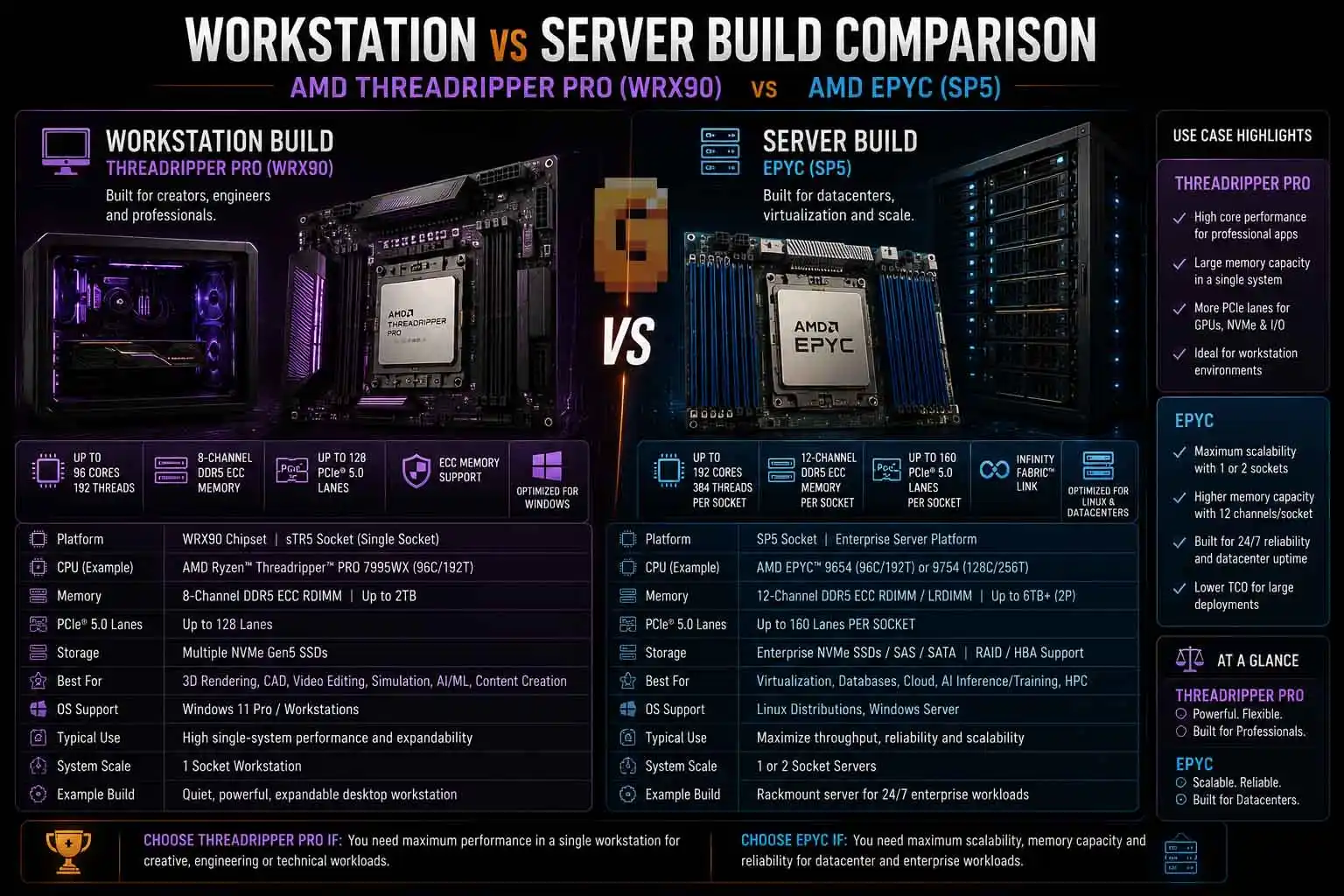
Most workstation users — VFX artists, CAD engineers, video editors, and 3D creators — get better results with Threadripper or Threadripper PRO. These platforms deliver higher single-thread speeds, simpler builds, and native Windows compatibility without server-class complexity.
EPYC becomes the stronger option when workloads demand extreme memory capacity, maximum core scaling through dual sockets, or the highest I/O bandwidth for large-scale virtualization, scientific computing, or dense AI inference clusters. EPYC motherboards are server-class engineering products, not consumer ATX boards.
For the majority of professional desktop workloads, Threadripper PRO strikes the better balance.
FAQ
What is the main difference between Threadripper and Threadripper PRO?
Standard Threadripper uses 4-channel memory and fewer PCIe lanes for enthusiast builds. Threadripper PRO adds 8-channel DDR5 with ECC and more PCIe 5.0 lanes for demanding professional workstations.
Can EPYC be used in a regular workstation chassis?
It is possible with compatible server boards, but EPYC systems require larger server-oriented motherboards, different cooling solutions, and often face OS compatibility hurdles.
Which has more PCIe lanes, Threadripper PRO or EPYC?
EPYC provides 128 PCIe 5.0 lanes per socket, scaling to up to 160 total in certain dual-socket configurations — compared to 128 total on flagship Threadripper PRO models.
Does standard Threadripper support ECC memory?
Yes. Standard Threadripper on TRX50 officially supports ECC memory, enabled by default. What differentiates it from the PRO series is memory channel count (4 vs. 8) and PCIe lanes, not ECC support.
How do boost clocks differ across the three platforms?
Threadripper and Threadripper PRO reach higher peak boost clocks around 5.4 GHz across the current lineup for better single-threaded performance, while high-core EPYC models focus on lower but more consistent all-core speeds. On the Threadripper and Threadripper PRO side, that peak boost behavior is governed by the same Precision Boost Overdrive logic covered in our PBO guide, just with a lot more thermal and power headroom to play with.
Wrapping It Up
Threadripper vs Threadripper PRO vs EPYC comes down to matching the platform to your real needs. Standard Threadripper works well for high-clock enthusiast builds. Threadripper PRO delivers the sweet spot for most high-end workstation users with strong clocks, solid expandability, and easy Windows operation. EPYC dominates when raw server scalability, memory bandwidth, and core density matter most.
Consider your primary software, operating system preference, memory requirements, and expansion plans. That single decision framework removes most of the confusion.
Ok this is exactly the comparison I needed lol finally get why EPYC and Threadripper PRO feel so different even though they’re literally the same Zen silicon underneath. And that 1TB/s+ dual-socket bandwidth number is wild, no wonder EPYC just eats AI workloads for breakfast.