

HDMI 2.0 vs DisplayPort 1.4: Which Should You Use for Gaming

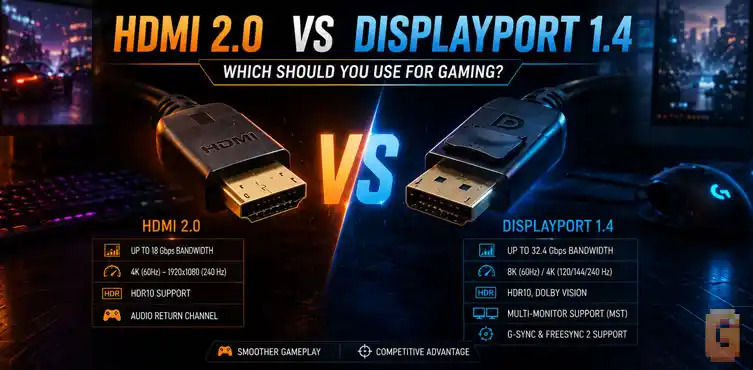

If you’re choosing between HDMI 2.0 and DisplayPort 1.4 for a PC gaming monitor, DisplayPort 1.4 is usually the better choice because it offers much higher bandwidth, supports Display Stream Compression (DSC), and provides broader adaptive sync compatibility. HDMI 2.0 still works well for 4K 60Hz gaming, TVs, and many everyday setups, but it reaches its limits much sooner.
Choosing the right display cable seems simple until you start comparing specifications. HDMI 2.0 and DisplayPort 1.4 were introduced around the same era, yet they deliver very different experiences depending on what you’re connecting. That cable is the final handoff in a much longer pipeline — see our breakdown of how video game frames are rendered for everything that happens between your GPU and that connector.
For many gamers, the decision isn’t about buying the newest monitor on the market. It’s about figuring out which cable should connect an existing graphics card to an existing display. That’s exactly why HDMI 2.0 vs DisplayPort 1.4 is still a relevant comparison.
Although HDMI 2.1 and DisplayPort 2.1 have become common on new premium hardware, millions of gaming PCs still rely on GPUs from the RTX 30 series and Radeon RX 6000 generation. Those graphics cards continue to power excellent gaming systems, and they present a practical question that surprisingly few comparison sources answer.
Should you plug your monitor into HDMI or DisplayPort? The answer depends on more than a simple bandwidth number.
Three real-world questions
Most sources comparing these standards repeat the same specification tables. They rarely explain what those numbers actually mean when you’re sitting in front of your own PC.
This guide focuses on three real-world questions;
- Why does DisplayPort 1.4 outperform HDMI 2.0 despite both being older standards?
- Which connection should RTX 30 and RX 6000 owners actually use, especially with multiple monitors?
- How do adaptive sync technologies like G-Sync and FreeSync change the decision?
We’ll also explain the one feature that completely changes the comparison: Display Stream Compression (DSC).
HDMI 2.0 vs DisplayPort 1.4: What’s the biggest difference?
The biggest difference is bandwidth. DisplayPort 1.4 provides significantly more available bandwidth than HDMI 2.0 and adds support for Display Stream Compression, allowing it to drive much higher resolutions and refresh rates. Everything else flows from that one advantage.
At first glance, both standards seem fairly close because they arrived during roughly the same hardware generation. But once you look beyond release dates, they begin serving different audiences.
HDMI was designed to become the universal connection for televisions, media players, game consoles, AV receivers, and consumer electronics. DisplayPort was created primarily for computers. That design goal still shapes how each standard performs today.
- If your priority is connecting a gaming monitor to a desktop PC, DisplayPort generally offers more flexibility.
- If you’re connecting to a television, home theater receiver, or console, HDMI remains the standard connection.
Those different priorities explain many of the feature differences we’ll cover throughout this guide.
Bandwidth Compared: 18Gbps vs 32.4Gbps (and Why DSC Matters)
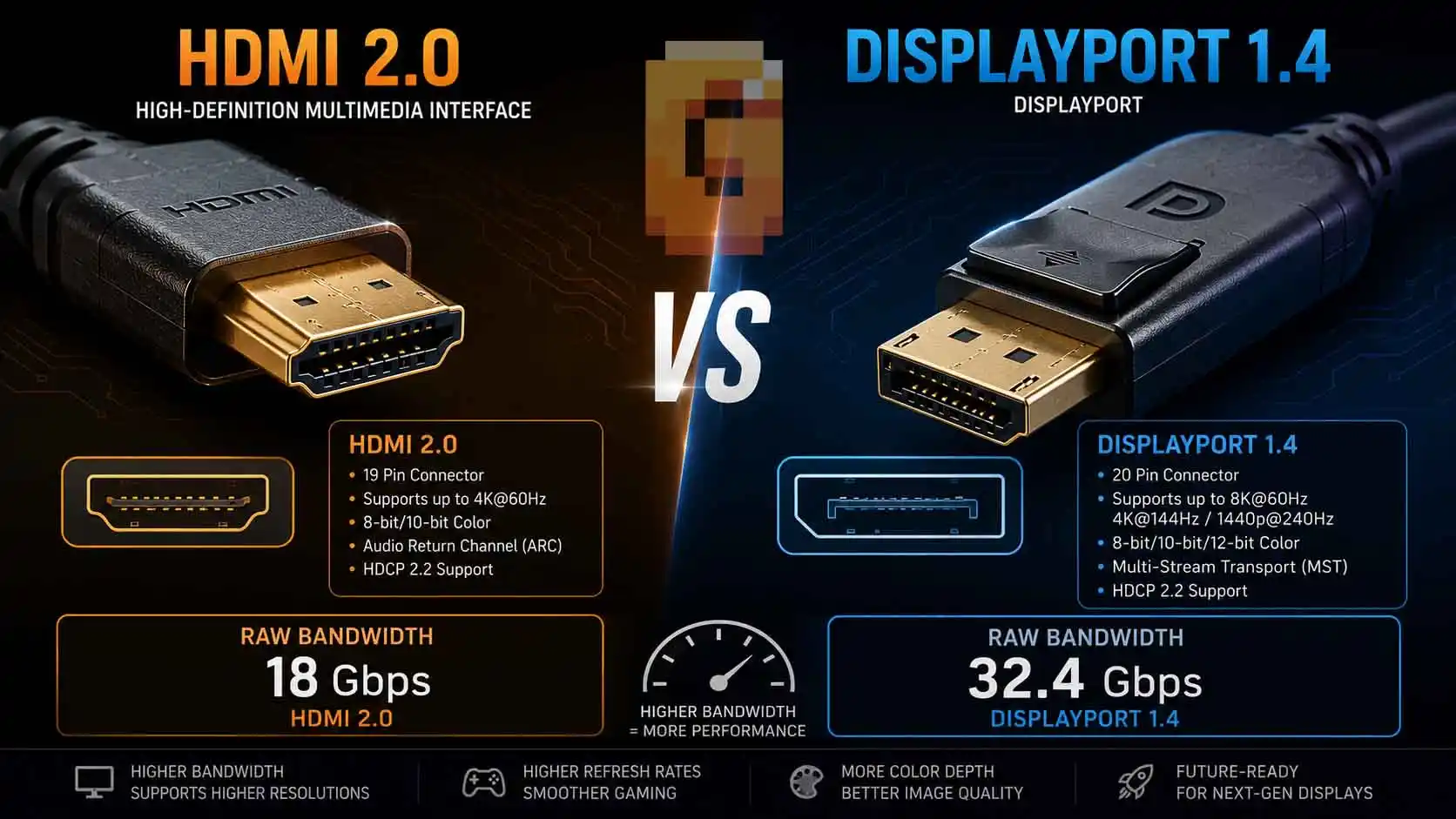
DisplayPort 1.4 offers almost twice the raw bandwidth of HDMI 2.0. More importantly, it supports Display Stream Compression (DSC), which dramatically increases what that bandwidth can realistically deliver. This is the part almost every comparison skips.
Many sources simply present a table showing:
- HDMI 2.0: 18 Gbps
- DisplayPort 1.4: 32.4 Gbps
But that doesn’t explain why DisplayPort 1.4 can power displays that seem impossible based on the numbers alone. Understanding DSC makes the entire comparison much clearer.
HDMI 2.0 bandwidth explained
HDMI 2.0 increased bandwidth substantially compared to HDMI 1.4. With its maximum bandwidth of 18 Gbps, HDMI 2.0 comfortably supports:
- 1080p at very high refresh rates
- 1440p high-refresh gaming up to approximately 165Hz (8-bit color)
- 4K at 60Hz
For many people, that’s still perfectly adequate. If you own a 4K 60Hz television or monitor, HDMI 2.0 can deliver an excellent experience. The limitation appears once refresh rates begin increasing. Higher resolutions require transmitting far more image data every second. Eventually, HDMI 2.0 simply runs out of available bandwidth. That is why gamers chasing higher refresh rates eventually moved toward either HDMI 2.1 or DisplayPort.
DisplayPort 1.4 bandwidth explained
DisplayPort 1.4 raises raw bandwidth to 32.4 Gbps. That’s already a considerable improvement over HDMI 2.0. However, raw bandwidth alone isn’t what makes DisplayPort 1.4 so capable.
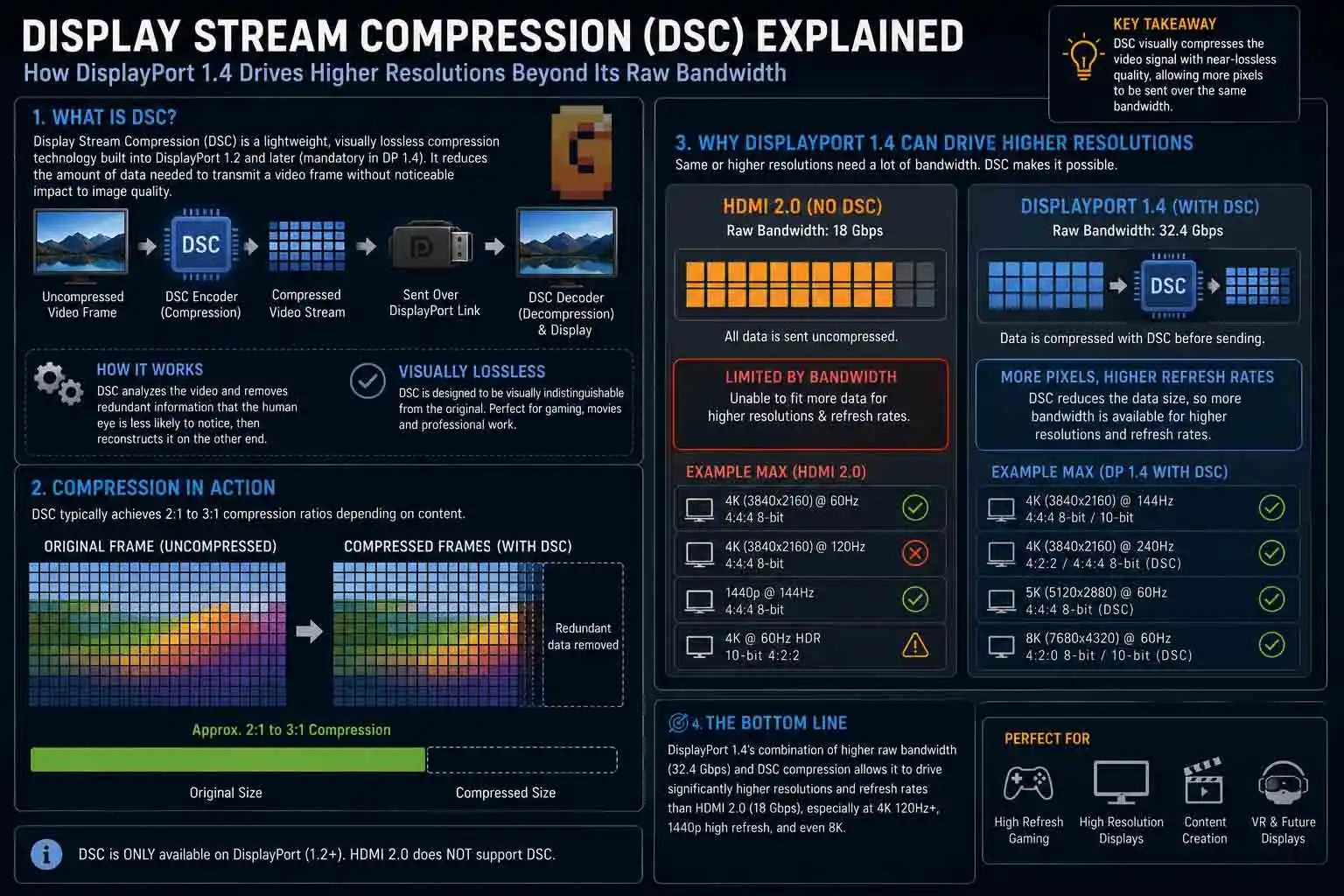
The real advantage comes from Display Stream Compression, commonly shortened to DSC. DSC is a visually lossless compression technology standardized by VESA.
Instead of sending every pixel completely uncompressed, DisplayPort can intelligently compress the video stream before transmission and decompress it at the display. To the viewer, the image is intended to remain visually indistinguishable from an uncompressed signal. The practical result is enormous.
Although DisplayPort 1.4’s physical connection remains limited to 32.4 Gbps, DSC allows it to carry workloads that would otherwise require dramatically more bandwidth. That’s why DisplayPort 1.4 is commonly associated with gaming experiences like 4K 144Hz, even though its raw bandwidth alone wouldn’t normally make that possible. This is the single biggest reason DisplayPort 1.4 continues to outperform HDMI 2.0 in many PC gaming scenarios.
Why DSC matters more than the bandwidth number
Many buyers stop comparing after reading the specification sheet. That often leads to confusion. Someone sees:
- HDMI 2.0
- DisplayPort 1.4
Both released years ago. Both digital. Both capable of carrying video and audio. So why do gamers consistently recommend DisplayPort?
The answer isn’t simply “because it has more bandwidth.”
It’s because DisplayPort combines higher bandwidth with DSC, allowing much more demanding display modes than HDMI 2.0 can realistically achieve. Without understanding DSC, the specification numbers don’t tell the whole story. That’s why DisplayPort 1.4 has remained relevant long after newer standards appeared.
Why this comparison still matters
It would be easy to dismiss HDMI 2.0 and DisplayPort 1.4 as yesterday’s technology. That would also ignore how people actually upgrade their PCs.
Most gamers don’t replace every component at once. Graphics cards, monitors, and displays often stay in service for years.
As a result, many systems in use today still rely on these two interfaces. The market is gradually shifting toward HDMI 2.1 and DisplayPort 2.1, but that transition doesn’t make older hardware disappear overnight.
In fact, many users upgrading only their monitor or only their graphics card still need to understand the strengths and limitations of HDMI 2.0 versus DisplayPort 1.4. That’s exactly why this comparison remains useful. The goal isn’t to pretend newer standards don’t exist. It’s to help people make the best decision with the hardware they already own.
What Each Can Actually Drive: Resolution and Refresh Rate Limits
The simple answer is that DisplayPort 1.4 can handle more demanding display modes than HDMI 2.0. That’s especially true once higher refresh rates, HDR, and DSC enter the picture.
Bandwidth numbers are useful, but they don’t tell you what you’ll actually experience when you connect your monitor. The practical limits are what matter.
HDMI 2.0 4K 60Hz gaming
For many gamers, HDMI 2.0 is fundamentally a 4K 60Hz interface. That’s not a criticism. It reflects what the standard was designed to deliver. If your monitor or TV runs at 4K 60Hz, HDMI 2.0 provides enough bandwidth for an excellent gaming experience. That makes it perfectly suitable for:
- Story-driven single-player games
- Strategy games
- Casual PC gaming
- Productivity
- Watching HDR movies (depending on display support)
Where HDMI 2.0 begins to struggle is when refresh rates increase.
Modern gaming monitors commonly offer refresh rates well beyond 60Hz, especially at 1440p and 4K. Once you start targeting those higher refresh rates, HDMI 2.0 quickly reaches its bandwidth ceiling. This is one reason many gaming monitors include DisplayPort as the preferred PC connection.
DisplayPort 1.4 4K 144Hz
DisplayPort 1.4 was designed with high-performance PC displays in mind. Its higher bandwidth already gives it more room than HDMI 2.0.
When DSC is available and supported by both the GPU and monitor, DisplayPort 1.4 becomes capable of driving display modes that would otherwise exceed its raw bandwidth. That’s why you’ll often see DisplayPort 1.4 associated with:
- High-refresh 1440p gaming
- 4K high-refresh gaming
- HDR gaming at demanding resolutions
The important point isn’t that every DisplayPort 1.4 device automatically supports every possible combination. Actual capabilities depend on both the graphics card and the monitor. But compared with HDMI 2.0, DisplayPort 1.4 provides much more headroom for modern gaming displays.
Resolution isn’t the whole story
Many buyers focus entirely on resolution. Refresh rate deserves equal attention. A jump from 60Hz to 144Hz often feels more noticeable in fast-paced games than moving from one resolution to another. Higher refresh rates can improve:
- Motion clarity
- Input responsiveness
- Overall gameplay smoothness
That’s why PC gamers frequently prioritize refresh rate alongside image quality. When a connection standard limits your refresh rate, it can become the bottleneck even if your GPU is capable of producing more frames. It’s the same logic covered in our breakdown of 1% low FPS — a bottleneck is a bottleneck, whether it’s your cable holding back the signal or your hardware struggling to keep up.
Quick comparison
| Feature | HDMI 2.0 | DisplayPort 1.4 |
|---|---|---|
| Raw bandwidth | 18 Gbps | 32.4 Gbps |
| Practical 4K gaming | Excellent at 60Hz | Higher refresh rates possible with DSC |
| High-refresh 1440p | Supported on many displays | Better overall headroom |
| Display Stream Compression | No | Yes |
| Designed primarily for | TVs and consumer electronics | PC monitors and gaming |
Rather than thinking of one standard as “old” and the other as “new,” it’s more accurate to think of them as serving different priorities.
HDMI 2.0 vs DisplayPort 1.4 Adaptive Sync: Which Gives You More Options?
For most PC gamers, DisplayPort 1.4 offers broader adaptive sync compatibility. HDMI 2.0 supports AMD FreeSync, while NVIDIA users should pay close attention to whether their monitor is officially G-Sync Compatible.
Adaptive sync has become one of the most important gaming display technologies. Instead of forcing your monitor to refresh at a fixed interval, adaptive sync allows the refresh rate to match the frame output of your graphics card. The result is smoother gameplay with reduced screen tearing.
Understanding FreeSync
AMD developed FreeSync around the Adaptive-Sync standard. Many gaming monitors support it today.
If you own an AMD graphics card and a compatible monitor, HDMI 2.0 may provide FreeSync support depending on the specific hardware. This is one reason HDMI 2.0 remains perfectly usable for many AMD gaming systems.
Understanding G-Sync
NVIDIA originally built G-Sync around dedicated monitor hardware. Over time, NVIDIA expanded support through the G-Sync Compatible program. These are FreeSync monitors that NVIDIA has tested and certified to work properly with GeForce graphics cards. This distinction matters. Not every FreeSync monitor automatically delivers the same experience with every NVIDIA GPU. Checking the monitor’s compatibility list remains worthwhile before making assumptions.
For the full picture of when G-Sync is actually worth turning on — and when it isn’t — our dedicated guide on when to enable G-Sync covers the setup details this comparison doesn’t have room for.
Why DisplayPort is usually recommended
DisplayPort has long been the preferred connection for adaptive sync on PCs. For gamers, that means:
- Wider compatibility across gaming monitors
- Better support for modern high-refresh displays
- Fewer limitations when pairing premium GPUs with premium monitors
If your monitor offers both HDMI 2.0 and DisplayPort 1.4, DisplayPort is generally the safer choice for maximizing adaptive sync support. This is especially true if you’re building a dedicated gaming PC rather than connecting to a television.
DisplayPort 1.4 generally provides the best adaptive sync experience for PC gaming because it supports both G-Sync and FreeSync ecosystems more broadly, while HDMI 2.0 compatibility depends more heavily on the specific monitor and GPU combination.
RTX 30 and RX 6000 Series Owners: Which Port Should You Use?
If you own an RTX 30 or Radeon RX 6000 graphics card, DisplayPort 1.4 will often be your primary monitor connection. That’s not because HDMI is bad, but because of how these GPUs are physically designed. This is one area that many sources overlook.
They assume readers are shopping for brand-new hardware. In reality, a huge number of gamers continue using GPUs from these generations. Those cards remain very capable for modern games. They also share an interesting characteristic.
The port layout most people already have
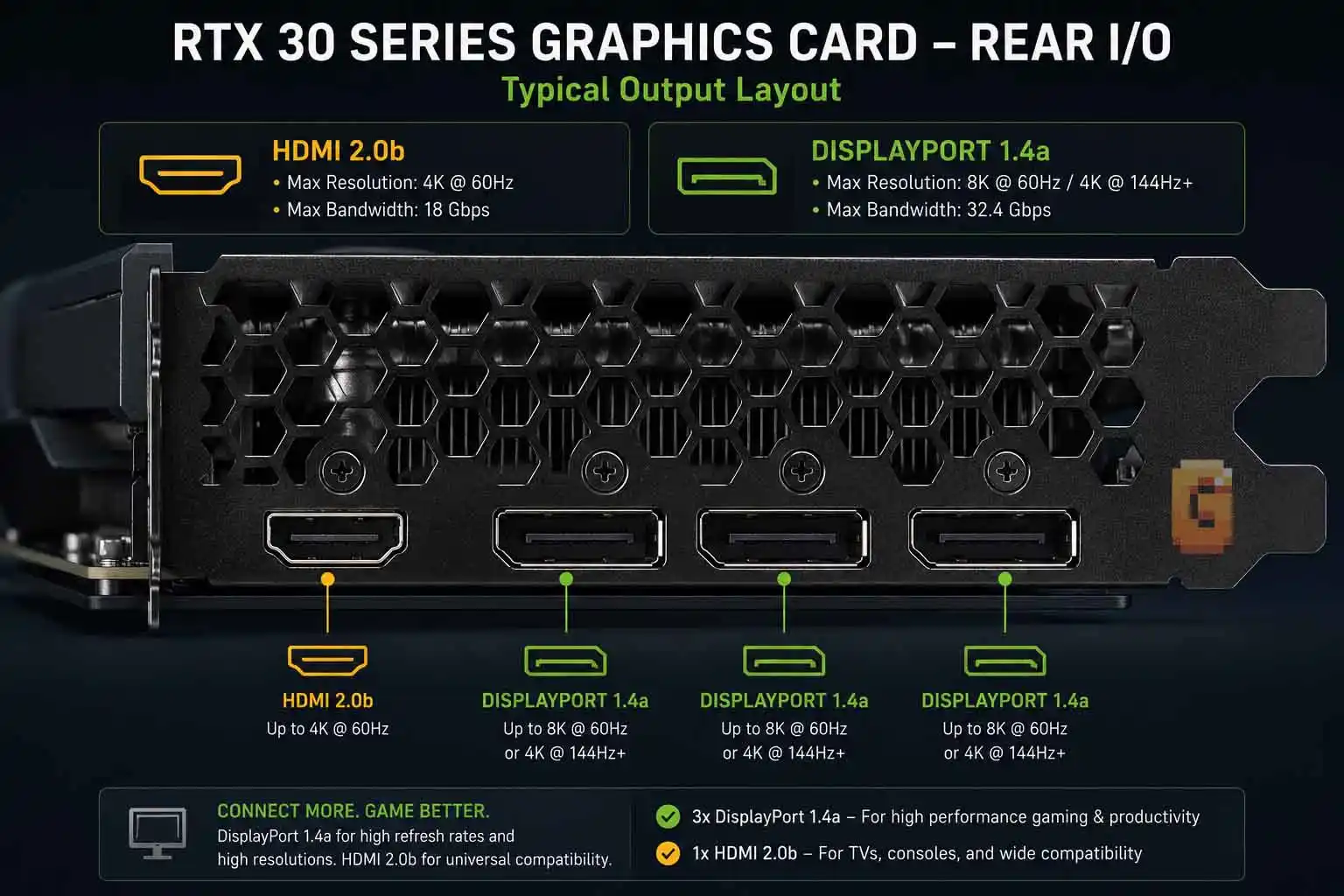
Many RTX 30 series and RX 6000 series graphics cards include:
- One HDMI 2.1 output
- Multiple DisplayPort 1.4 outputs
That creates a practical limitation. If you’re connecting:
- Two monitors
- Three monitors
- Four monitors
DisplayPort becomes the only available connection for most of those displays. It’s no longer simply a question of “Which cable is faster?”
It’s the only connector available for additional monitors. This is why DisplayPort remains such an important standard even as HDMI 2.1 becomes more common.
Multi-monitor gamers
High-refresh gaming on one monitor. Discord on another. Streaming controls on a third. Productivity windows on a fourth. This type of setup has become increasingly common. DisplayPort’s availability on existing graphics cards makes these configurations much easier.
For owners of RTX 30 and RX 6000 hardware, DisplayPort isn’t just the better gaming connection. It’s often the practical connection.
Upgrading only one component
Another common scenario involves gradual upgrades. Maybe you’ve bought:
- A newer gaming monitor
- A better graphics card
- A second display
But not everything at once. Understanding which ports already exist on your hardware helps avoid unnecessary adapters and compatibility headaches. That’s another reason this comparison still matters in 2026. Millions of systems continue mixing older and newer components.
What About HDMI 2.1? When Should You Upgrade Instead?
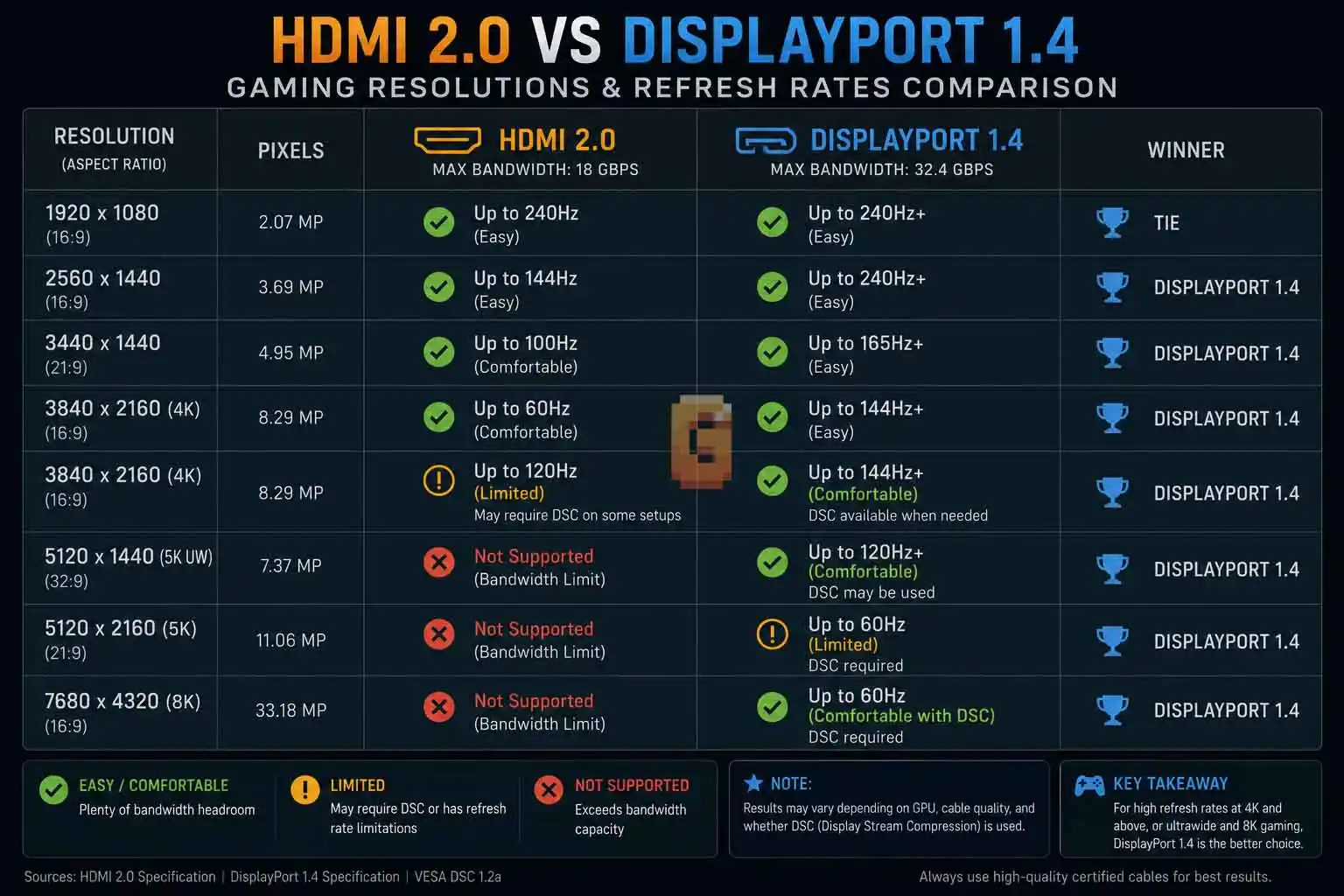
If both your graphics card and monitor support HDMI 2.1, it’s worth considering. HDMI 2.1 removes many of the bandwidth limitations that define HDMI 2.0. Ignoring HDMI 2.1 would make this comparison incomplete. Technology has moved forward. New gaming monitors increasingly include:
- HDMI 2.1
- DisplayPort 2.1
- Higher refresh rates
- Better HDR support
Likewise, modern graphics cards are gradually adopting newer display standards. That doesn’t make HDMI 2.0 obsolete. It simply changes where HDMI 2.0 fits.
When HDMI 2.0 is still enough
You probably don’t need to upgrade solely because your hardware includes HDMI 2.0 if:
- Your display is 4K 60Hz
- You mainly play slower-paced games
- You connect to a television
- Your monitor doesn’t support higher refresh rates anyway
In these situations, HDMI 2.0 continues to perform well.
When HDMI 2.1 becomes worthwhile
An upgrade becomes more attractive if you’re investing in newer display hardware that exceeds HDMI 2.0’s capabilities. For example:
- Higher refresh rates
- More demanding HDR gaming
- Features designed around newer display standards
The important point is context. A cable cannot unlock features your monitor or GPU doesn’t support. Likewise, buying a newer cable alone won’t transform older hardware into a next-generation display pipeline. Always consider the entire chain:
- Graphics card
- Cable
- Monitor
The weakest link determines the final result.
HDMI 2.0 vs DisplayPort 1.4: Which Should You Actually Use?
For most PC gamers using a monitor, DisplayPort 1.4 is the better choice. It offers higher bandwidth, supports Display Stream Compression (DSC), and provides broader adaptive sync compatibility than HDMI 2.0. That doesn’t mean HDMI 2.0 is a poor standard. It simply targets different use cases.
If your display is a television or a 4K 60Hz monitor, HDMI 2.0 still delivers an excellent experience for gaming, media consumption, and everyday productivity.
If you’re pairing a desktop PC with a high-refresh gaming monitor, DisplayPort 1.4 is usually the connection that allows your hardware to perform closer to its full potential.
The decision becomes even easier if your graphics card includes multiple DisplayPort outputs but only a single HDMI port. That scenario is extremely common among RTX 30 series and Radeon RX 6000 graphics cards, making DisplayPort the practical choice for secondary and tertiary monitors.
Quick recommendations
Choose DisplayPort 1.4 if you:
- Primarily game on a desktop PC
- Own a high-refresh gaming monitor
- Want the benefits of Display Stream Compression (DSC)
- Use adaptive sync technologies such as G-Sync or FreeSync
- Run a dual-, triple-, or quad-monitor setup
- Own an RTX 30 series or Radeon RX 6000 graphics card with multiple DisplayPort outputs
Choose HDMI 2.0 if you:
- Connect your PC to a television
- Use a 4K 60Hz display
- Watch movies or streaming content as much as you game
- Don’t need very high refresh rates
- Have hardware that only includes HDMI 2.0
The best cable isn’t determined by a specification sheet alone. It’s determined by your graphics card, your monitor, and how you actually use your system every day.
Key Takeaways
If you’re still deciding between HDMI 2.0 and DisplayPort 1.4, remember these points:
- DisplayPort 1.4 offers substantially more bandwidth than HDMI 2.0.
- Display Stream Compression (DSC) is the biggest reason DisplayPort 1.4 supports much more demanding display modes than its raw bandwidth suggests.
- HDMI 2.0 remains an excellent choice for 4K 60Hz gaming and television use.
- DisplayPort 1.4 is generally the preferred connection for PC gaming monitors.
- RTX 30 series and Radeon RX 6000 owners often rely on DisplayPort simply because their graphics cards provide multiple DisplayPort outputs but only one HDMI output.
- If both your monitor and GPU support HDMI 2.1, it’s worth evaluating that newer standard instead of HDMI 2.0.
The comparison isn’t really about declaring one interface “good” and the other “bad.” It’s about understanding which one fits your hardware and gaming habits.
Frequently Asked Questions
Is DisplayPort 1.4 better than HDMI 2.0 for gaming?
Yes. DisplayPort 1.4 generally provides higher bandwidth, supports Display Stream Compression (DSC), and offers broader adaptive sync compatibility, making it the preferred connection for most PC gaming monitors.
Can HDMI 2.0 run 4K at 120Hz?
No, not generally. HDMI 2.0 is widely regarded as a 4K 60Hz interface for gaming. Higher 4K refresh rates typically require DisplayPort 1.4 with DSC or HDMI 2.1, depending on the hardware.
Why does DisplayPort 1.4 support higher refresh rates than HDMI 2.0?
Because it combines higher bandwidth with Display Stream Compression (DSC). DSC allows DisplayPort 1.4 to carry much more display data than its raw bandwidth alone would normally permit.
Should RTX 30 series owners use DisplayPort or HDMI?
DisplayPort is usually the better choice. Many RTX 30 series graphics cards include multiple DisplayPort 1.4 outputs but only one HDMI output, making DisplayPort the most practical connection for gaming monitors and multi-monitor setups.
Does HDMI 2.0 support G-Sync?
It depends. HDMI 2.0 can work with NVIDIA’s G-Sync Compatible ecosystem on supported monitors, while compatibility depends on the specific monitor and graphics card combination.
Final Thoughts
Even though HDMI 2.0 and DisplayPort 1.4 are both standards introduced nearly a decade ago, they’re still part of millions of gaming setups. That’s why this comparison remains relevant.
The biggest takeaway isn’t simply that DisplayPort has more bandwidth. It’s understanding why DisplayPort 1.4 performs so well. Display Stream Compression fundamentally changes what the interface can achieve, allowing it to deliver display modes that seem impossible if you only look at the raw bandwidth specification. It’s also important to remember the reality of existing hardware.
Many gamers aren’t building an entirely new PC. They’re upgrading one component at a time, often using graphics cards from the RTX 30 series or Radeon RX 6000 generation. Those systems typically provide multiple DisplayPort outputs and only a single HDMI output, making DisplayPort the natural choice for high-refresh and multi-monitor configurations.
If your setup revolves around a PC gaming monitor, DisplayPort 1.4 remains the better option in most cases.
If you’re connecting to a television or a 4K 60Hz display, HDMI 2.0 still delivers exactly what many users need.
The right answer depends less on which standard is newer and more on how your own hardware fits together.
If you’re planning your next display upgrade, explore how newer standards compare, learn when HDMI 2.1 or DisplayPort 2.1 makes sense, and make sure your graphics card, monitor, and cable all work together to deliver the experience you’re expecting.
References
VESA — Display Stream Compression (DSC): https://vesa.org/vesa-standards/display-stream-compression/
NVIDIA — G-SYNC Technologies Overview: https://www.nvidia.com/en-us/geforce/products/g-sync-monitors/
HDMI Licensing Administrator — HDMI Specifications: https://www.hdmi.org/spec20/
If I’m setting up dual monitors on my RTX 3070, can I use one HDMI and one DisplayPort cable without causing stuttering or sync issues? Or is it better to just buy two identical DisplayPort cables instead?
You can absolutely mix HDMI and DisplayPort cables without causing system stutters. However, using two DisplayPort cables is generally recommended to ensure consistent adaptive sync support and refresh rates across both displays.