Best WiFi Band for Gaming: 2.4 vs 5 vs 6GHz



For most gamers, 5 GHz is the best balance of range, reliability, and latency, while 6 GHz can be even better when your gaming device supports it and is close to the router. 2.4 GHz is mainly the fallback option when distance and walls make the higher-frequency bands unreliable.
If you’re trying to find the best wifi band for gaming: 2.4 vs 5 vs 6ghz, the obvious answer seems to be “6 GHz.” It’s newer, has more available spectrum, and is designed to provide faster, cleaner wireless connections. But gaming isn’t simply about choosing the highest number.
A 6 GHz connection that’s struggling through several walls can be worse than a strong 5 GHz connection. And if your console, laptop, or gaming PC doesn’t support 6 GHz, buying a 6 GHz router won’t magically make the device use it. That’s the part many Wi-Fi guides skip.
The real question isn’t “Which Wi-Fi band is fastest?” It’s “Which band gives my gaming device the most stable connection from where I actually play?”
That distinction matters because online gaming cares far more about latency, jitter, packet loss, and consistency than it does about having an enormous download speed.
What Each WiFi Band Actually Trades Off
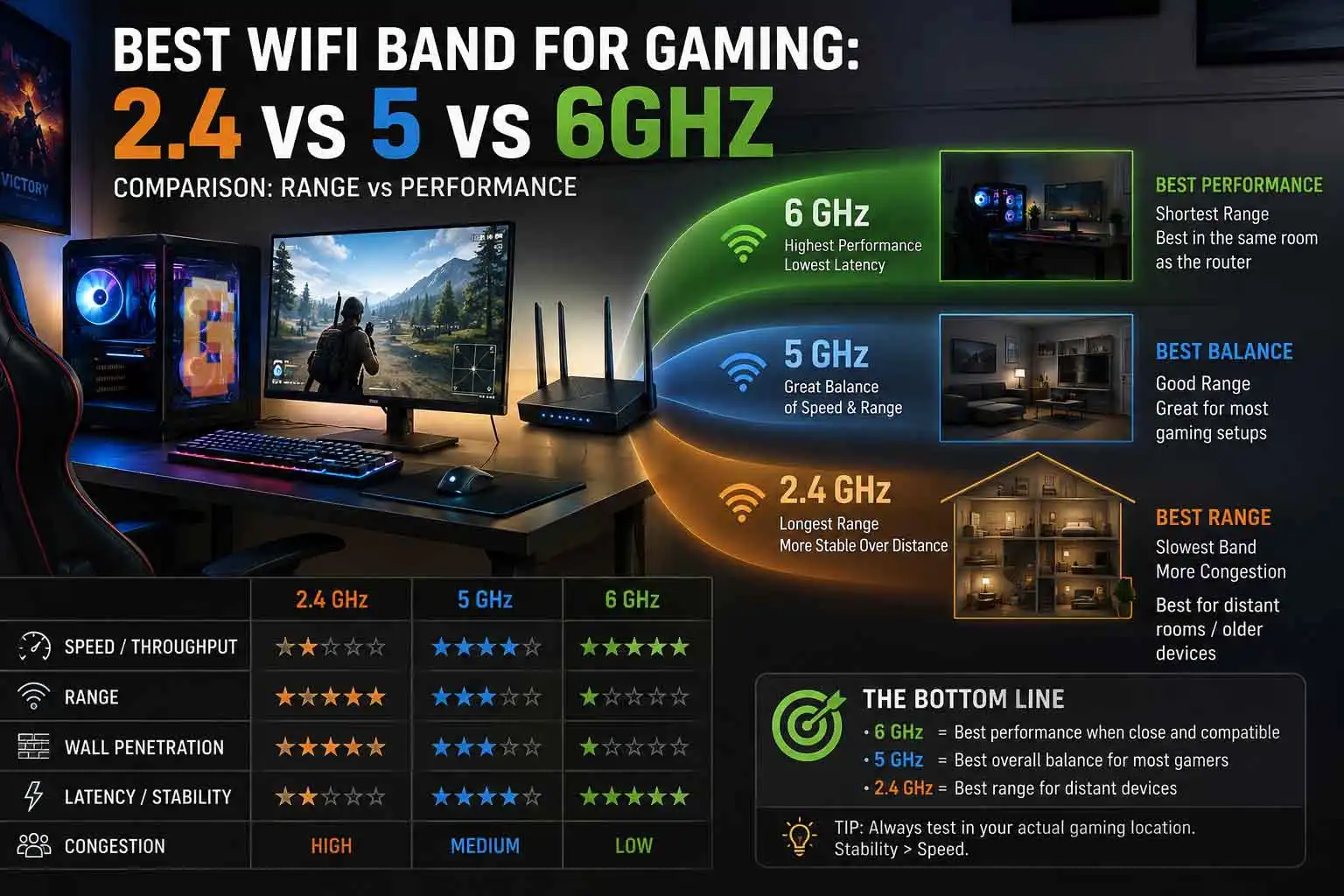
2.4 GHz prioritizes range, 5 GHz balances speed and coverage, and 6 GHz prioritizes clean spectrum and high performance at shorter distances. None of the three bands is automatically the best in every room.
Think of the frequencies as three different tools rather than three generations where the newest one always wins.
| Wi-Fi band | Main advantage | Main disadvantage | Gaming suitability |
|---|---|---|---|
| 2.4 GHz | Range and wall penetration | More congestion and lower throughput | Good when distance is the problem |
| 5 GHz | Excellent balance of speed and range | Less range than 2.4 GHz | Best default for most gamers |
| 6 GHz | Clean spectrum and high performance | Shorter range and weaker wall penetration | Best when close to router + compatible device |
The important thing is that these bands describe radio frequencies, not internet speeds.
A fast internet connection doesn’t automatically become low-latency just because you connect over 5 GHz or 6 GHz. Your router, wireless client, local interference, network congestion, ISP, and distance to the game server all contribute to the final result.
2.4 GHz: the range specialist
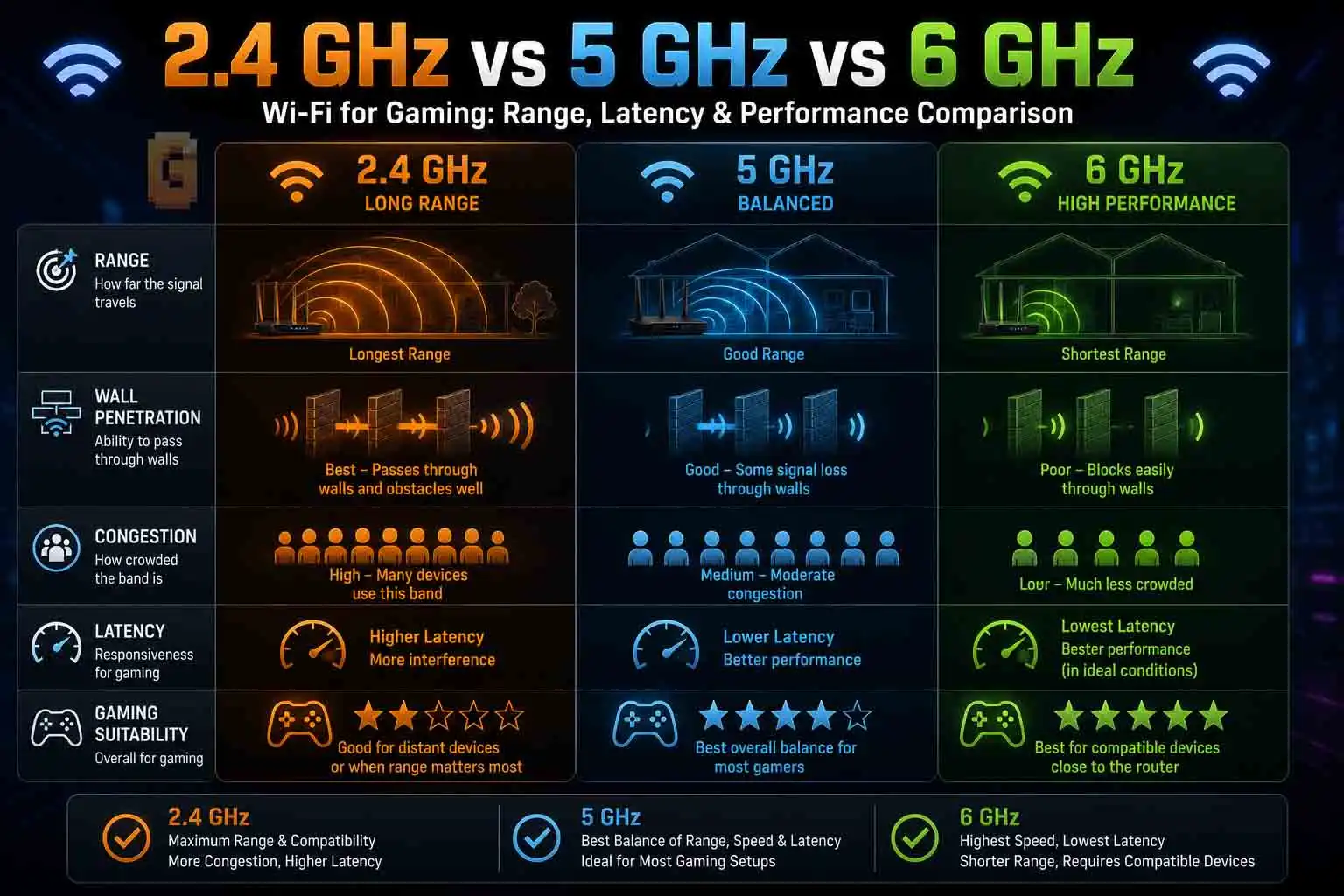
2.4 GHz has one huge advantage: it travels farther and generally penetrates obstacles better than 5 GHz and 6 GHz. That’s why it remains useful even in modern Wi-Fi 6E and Wi-Fi 7 networks.
If your gaming room is far from the router, or there are several walls between your PC and access point, 2.4 GHz can maintain a usable connection where 5 GHz or 6 GHz becomes weak. The problem is congestion.
The 2.4 GHz band has fewer usable non-overlapping channels, and it is heavily populated by older Wi-Fi devices and various household wireless devices. Microsoft also describes 2.4 GHz as having longer range and better obstacle penetration while being slower and more congested than 5 GHz. For gaming, that congestion can matter more than the headline speed.
You don’t need hundreds or thousands of megabits per second to send your character’s movement to a game server. What you need is a connection that doesn’t suddenly introduce latency spikes or packet loss.
5 GHz: the sweet spot
5 GHz is where most gamers should start. It offers substantially more performance than 2.4 GHz while still providing considerably better range and wall penetration than 6 GHz. That’s why a strong 5 GHz connection is often more useful than a weak 6 GHz connection.
Microsoft specifically recommends 5 GHz for higher-throughput activities such as streaming and gaming, while noting that 6 GHz can provide the best performance when you’re close to the router.
- For a gaming PC in the same room as the router, 5 GHz can be excellent.
- For a PC one room away, it’s still often excellent.
- For a PC several rooms away with multiple walls in between, the calculation starts changing.
6 GHz: the clean-spectrum option
6 GHz arrived with Wi-Fi 6E and is also used by Wi-Fi 7. Its biggest advantage isn’t simply “more speed.” The additional spectrum provides more room for modern Wi-Fi connections, with less congestion from older Wi-Fi equipment. That can be particularly useful in apartments, crowded neighborhoods, and homes where many wireless devices compete for airtime.
Microsoft describes 6 GHz as offering low congestion and potentially lower latency, while also warning that its range is shorter and its wall penetration is worse than the lower-frequency bands. So 6 GHz is extremely attractive for gaming — if the physical layout of your home cooperates.
How Much Does 6GHz Actually Help Gaming Latency?
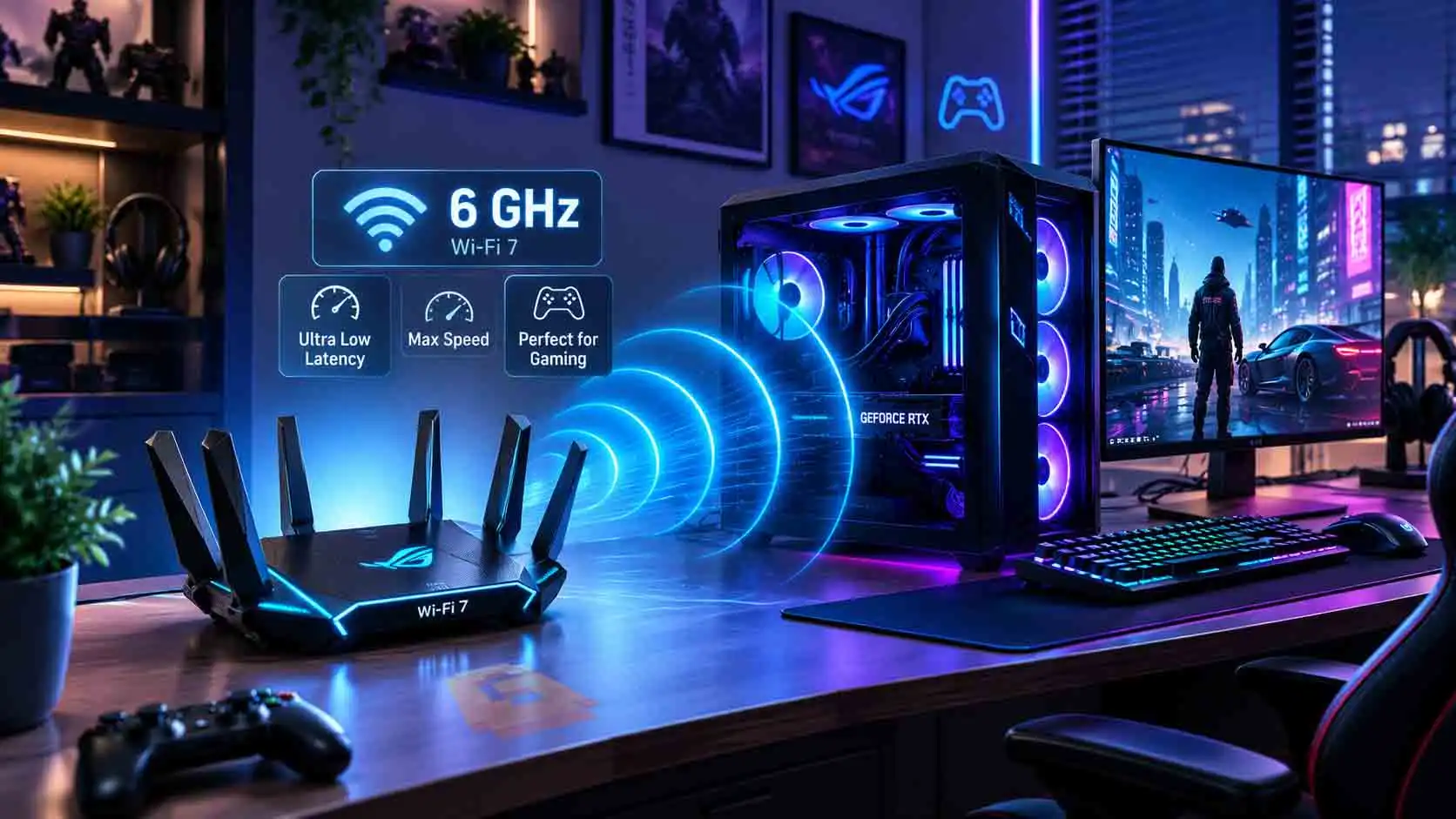
6 GHz can reduce wireless latency and improve consistency in the right environment, but there is no universal “6 GHz is X milliseconds faster” rule. This is one area where gaming articles often get too enthusiastic.
A specific tested figure of roughly 4 ms has been suggested as an information-gain point for this article, but without the original test methodology and source, that number shouldn’t be presented as a universal result — treat it as one data point, not a rule.
Router latency testing shows that wireless latency varies significantly between routers and network conditions. RTINGS’ 2026 research found median wireless latency ranging from 6 ms to 13 ms across its initial group of 22 routers, with jitter also varying substantially.
That tells us something important:
- The Wi-Fi band is only one part of the latency equation.
- Your internet ping isn’t just Wi-Fi latency
- Suppose your game shows 35 ms ping.
- That number doesn’t mean your Wi-Fi is adding 35 ms.
Your connection might look roughly like this:
Gaming PC → Wi-Fi router → ISP → internet routing → game server → back again
The wireless portion is only one component.
RTINGS specifically points out that the latency introduced by the router is only one part of the total latency experienced when connecting to an online game server. This is why changing from 5 GHz to 6 GHz doesn’t necessarily transform a 40 ms gaming connection into a 20 ms connection.
Where 6 GHz can make a real difference
6 GHz becomes particularly interesting when the problem is local wireless congestion.
Imagine your apartment has numerous nearby networks. Your 5 GHz network may have to share airtime with neighboring networks. A compatible 6 GHz device can operate in a much cleaner part of the spectrum. That can improve consistency and reduce contention, especially when the router and gaming device are close together.
Testing from Tom’s Hardware illustrates why the result depends heavily on the environment. In one Wi-Fi 6E router test, the tested router maintained very low ping across 2.4 GHz, 5 GHz, and 6 GHz, with measured pings of 1–4 ms under the test conditions. That’s a useful reality check.
6 GHz isn’t automatically lower latency simply because the frequency is higher. Its advantage is that it can provide a cleaner, wider, less congested wireless environment.
Check This Before You Touch Your Router Settings
Before switching your gaming device to 6 GHz, verify that the device actually supports the 6 GHz band. This sounds obvious, but it’s one of the biggest traps in Wi-Fi 6E and Wi-Fi 7 marketing.
A router can broadcast 6 GHz perfectly while your gaming device completely ignores it.
- Wi-Fi 6 and Wi-Fi 6E are also easy to confuse.
- Wi-Fi 6 does not automatically mean 6 GHz.
- Wi-Fi 6E extends Wi-Fi 6 into the 6 GHz band. Wi-Fi 7 can also operate in 6 GHz, alongside 2.4 GHz and 5 GHz.
Does my console support 6ghz wifi?
Some modern gaming devices support 6 GHz, but you should check the exact model rather than assuming that every current console does. This is becoming especially important because device support is changing.
For example, Apple’s current compatibility documentation shows that newer Macs, iPhones, and iPads support Wi-Fi 6E or Wi-Fi 7 and can use 6 GHz where permitted. Older models may support 5 GHz and 2.4 GHz but not 6 GHz.
Sony’s current specifications are another good example of why checking the exact model matters: the Sony PS5 Pro supports Wi-Fi 7, whereas you shouldn’t assume the same wireless capabilities from every PS5-family model.
Nintendo’s Switch 2, meanwhile, uses Wi-Fi 6 rather than the newer 6 GHz band.
The lesson is simple:
Don’t buy a 6 GHz router and assume your console will benefit from it. Check the client device first.
Your gaming PC may be a different story
Gaming PCs are often much easier to upgrade. If your motherboard or laptop has a compatible Wi-Fi 6E or Wi-Fi 7 adapter, you may be able to use 6 GHz.
- The adapter matters.
- The router matters.
- The operating system and drivers matter.
- And the regulatory availability of 6 GHz in your region matters too.
This is why the phrase “I have Wi-Fi 7” doesn’t tell you enough by itself. A Wi-Fi 7 router paired with an older Wi-Fi 5 gaming laptop is still going to behave like an older Wi-Fi client.
6GHz Range vs 2.4GHz and 5GHz Through Walls
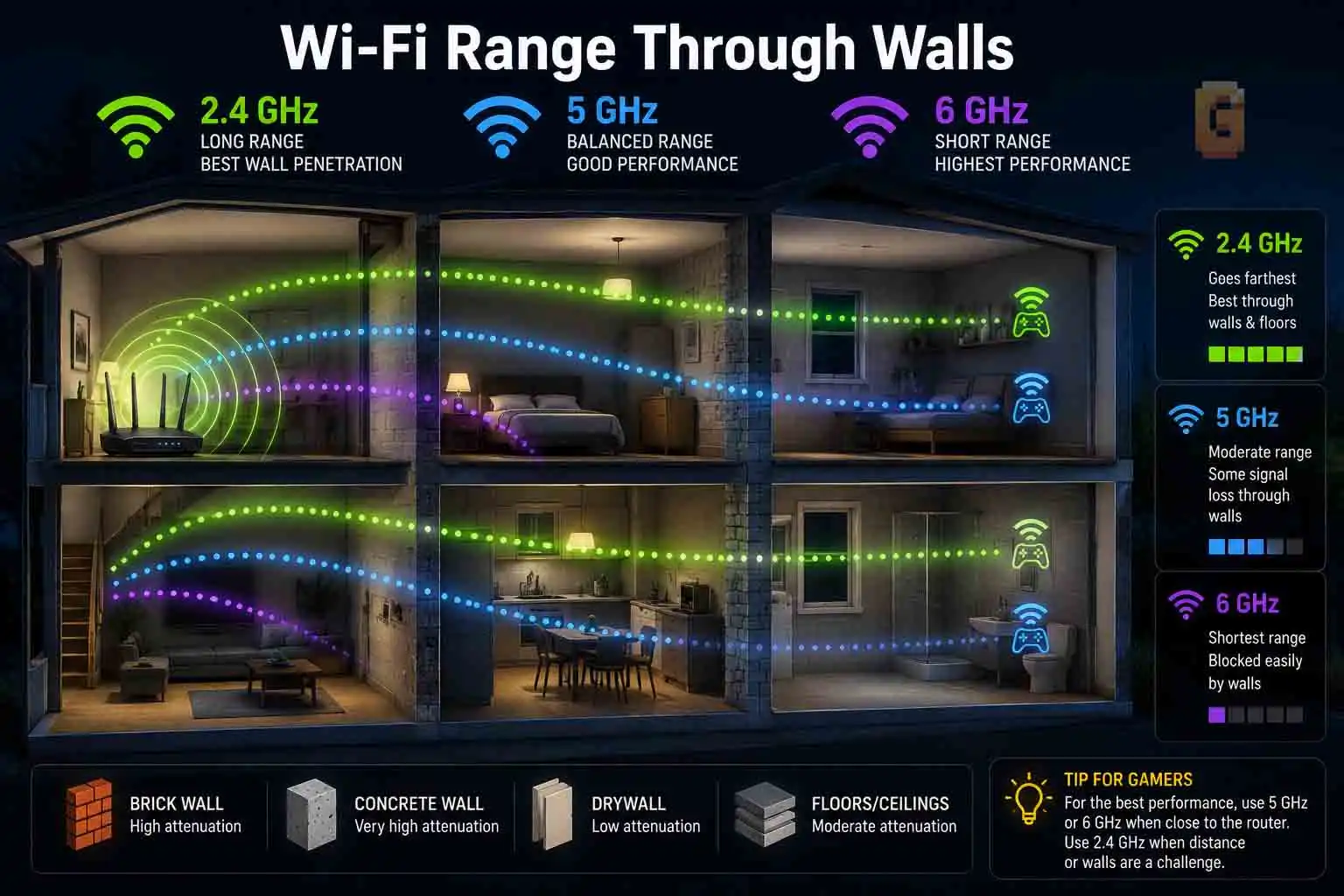
6 GHz has the shortest practical range of the three bands, and its performance can fall substantially faster as walls and distance are introduced. This is the biggest reason I wouldn’t tell every gamer to simply force their device onto 6 GHz. The higher frequency is more easily attenuated by obstacles.
Microsoft explicitly lists shorter range and poorer obstacle penetration as disadvantages of 6 GHz compared with the lower bands.
6ghz wifi range through walls
There isn’t one honest number of meters that tells you exactly how far 6 GHz will work through walls.
The result depends on the construction of the building, wall materials, router power, antenna placement, channel configuration, client hardware, interference, and regulatory limits. That’s why claims such as “6 GHz disappears after one room” should be treated as test-specific rather than a universal law.
A particular review may indeed find that its 6 GHz signal becomes effectively unusable outside the router’s room, but that exact result needs the original test methodology before being presented as a general rule — worth testing in your own space rather than assuming it applies everywhere. And there’s a good reason to be cautious.
The more useful takeaway is this:
The farther your gaming device is from the router, and the more obstacles are between them, the less attractive 6 GHz becomes.
Same room? 6 GHz becomes much more interesting
If your gaming PC sits in the same room as your router, the biggest weakness of 6 GHz largely becomes irrelevant. That’s the ideal scenario.
You get the cleaner spectrum without asking the signal to travel through half your house. This is where 6 GHz can make a lot of sense for a dedicated gaming PC. A separate 6 GHz SSID can also make testing easier because you can explicitly choose which band your gaming device uses.
One or two walls away?
This is where you should test rather than assume.
- 5 GHz might still be excellent.
- 6 GHz might still be excellent.
- Or 6 GHz might have deteriorated enough that 5 GHz is actually the better connection.
Your Wi-Fi signal strength, latency, jitter, and packet loss are more useful than simply knowing that your router supports 6 GHz.
Should I Disable 2.4GHz WiFi for Gaming?
No, you generally shouldn’t disable 2.4 GHz just because you’re gaming. Leaving it enabled doesn’t automatically make your 5 GHz or 6 GHz gaming connection worse. This is an important distinction.
If your router is broadcasting three bands, your gaming PC doesn’t suddenly receive interference from its own 2.4 GHz radio simply because that radio exists. In a properly configured modern router, the bands operate independently.
Why keep 2.4 GHz enabled?
Because some devices need it. Smart-home devices are a particularly common example. Older laptops, printers, smart plugs, cameras, IoT equipment, and various other devices may depend on 2.4 GHz. Disabling the band can create unnecessary compatibility problems without improving your gaming experience. Instead, use the band strategically.
- Put long-range and low-bandwidth devices on 2.4 GHz.
- Use 5 GHz for devices that need a good combination of performance and range.
- Use 6 GHz for compatible high-performance devices that are close enough to the router.
That’s much more useful than treating 2.4 GHz as something that must be eliminated.
2.4GHz vs 6GHz Specifically: When You’d Choose Between Just These Two
If you only have a choice between 2.4 GHz and 6 GHz, choose 6 GHz when the device is compatible and close to the router; choose 2.4 GHz when distance or walls make 6 GHz unreliable. This is essentially the extreme version of the same trade-off.
Choose 6 GHz when:
- Your gaming device supports Wi-Fi 6E or Wi-Fi 7.
- The router supports 6 GHz.
- Your gaming device is close to the router.
- You have significant Wi-Fi congestion.
- You want the cleanest available wireless environment.
- Your 6 GHz signal remains strong and stable.
Choose 2.4 GHz when:
- Your gaming device is far away.
- Several walls separate you from the router.
- 6 GHz becomes unstable.
- Your device doesn’t support 6 GHz.
- You need maximum coverage rather than maximum throughput.
The key point is that a stable 2.4 GHz connection can be preferable to a marginal 6 GHz connection. That sounds counterintuitive because 6 GHz is technically the newer and more capable option. But your game doesn’t care which Wi-Fi band has the bigger specification sheet. It cares whether packets arrive consistently.
What About 2.4GHz vs 5GHz vs 6GHz WiFi for Gaming?
For most homes, 5 GHz is the safest gaming recommendation, 6 GHz is the performance-focused option for compatible nearby devices, and 2.4 GHz is the range-focused fallback.
Here’s the practical hierarchy:
6 GHz — best in the right conditions
6 GHz is the most attractive option when your gaming device supports it and you’re reasonably close to the router. Its cleaner spectrum can be particularly useful in congested environments. But don’t confuse best potential with best everywhere. If the signal has to travel through multiple walls, its advantages can disappear.
5 GHz — best overall
For the average gamer, 5 GHz remains the easiest recommendation. It has a strong combination of:
- Good throughput
- Reasonable range
- Better wall penetration than 6 GHz
- Broad device compatibility
- Lower congestion than 2.4 GHz
If your gaming PC is one or two rooms away and 5 GHz is stable, there may be little reason to complicate your setup. This is also why simply owning a Wi-Fi 6E or Wi-Fi 7 router doesn’t mean you must use 6 GHz for everything.
2.4 GHz — best for difficult locations
2.4 GHz is the band you use when physics wins. If your router is downstairs and your gaming room is upstairs behind several walls, 2.4 GHz may maintain a stronger connection.
The downside is that congestion and limited channel availability can make it less desirable for latency-sensitive gaming.
What If You Already Own a Tri-Band Router?
You don’t need to buy a new router to experiment with the best gaming band; if you already have 2.4, 5, and 6 GHz available, test your existing network first. This is where many Wi-Fi buying guides miss the actual question. They immediately tell you to buy a new Wi-Fi 6E or Wi-Fi 7 router. But if your router already supports all three bands, the hardware purchase is irrelevant. Your job is configuration.
A practical setup
A sensible starting point is:
2.4 GHz:
Smart-home devices, older devices, distant devices.
5 GHz:
General-purpose devices, gaming devices that are farther away, and clients without 6 GHz support.
6 GHz:
Compatible gaming PCs, laptops, phones, and other high-performance clients located close to the router.
You can use separate SSIDs if you want complete control over which device uses which band. Microsoft recommends separate network names when you want to know exactly which band you’re connected to.
However, there is another approach. Some modern systems use one SSID and allow the router or client to make band-selection decisions automatically. Apple, for example, recommends a single SSID across 2.4 GHz, 5 GHz, and 6 GHz for compatible Wi-Fi 6E networks. So there’s no universal rule that separate SSIDs are always better.
Don’t optimize by speed alone
This is probably the most important practical advice in the entire article; Don’t connect your gaming PC to 6 GHz, run a speed test, see a huge number, and declare victory. Then check the thing that actually matters:
Does your game have stable ping?
Look at:
- Average latency
- Ping spikes
- Jitter
- Packet loss
- Connection stability
A 6 GHz connection that downloads games extremely quickly but occasionally spikes in latency isn’t necessarily better for competitive gaming than a stable 5 GHz connection.
Which Band Should You Actually Use?
For most gamers, start with 5 GHz. Move to 6 GHz if your device supports it, you’re close enough to the router, and testing shows a stable connection. Use 2.4 GHz when range and wall penetration matter more than maximum performance. That’s the answer I’d give rather than simply saying “6 GHz is best.”
Use 6 GHz if you’re:
Close to the router + using a compatible device + dealing with wireless congestion. That’s the sweet spot.
Use 5 GHz if you’re:
A moderate distance from the router + separated by some walls + looking for the best overall balance. This is the safest choice for most gaming setups.
Use 2.4 GHz if you’re:
Far away from the router + dealing with several walls + unable to maintain a strong 5 GHz/6 GHz connection. It’s not the exciting option, but sometimes it’s the correct one.
And if you can use Ethernet…
Use Ethernet. A wired connection removes the Wi-Fi radio link from the equation entirely. That doesn’t magically make the internet faster or eliminate latency between your home and the game server, but it removes one major source of wireless variability. RTINGS’ testing likewise emphasizes that wired connections remain the better option for latency when you have the choice.
The Bottom Line: 2.4 vs 5 vs 6 GHz for Gaming
Here’s the short version:
- 2.4 GHz: Best range, but generally the most congested.
- 5 GHz: Best overall balance and the default choice for most gamers.
- 6 GHz: Best potential for compatible devices close to the router.
- 6 GHz through multiple walls: Can deteriorate quickly, so test it rather than assuming it’s better.
- 6 GHz compatibility: Always check the exact gaming device before changing your setup.
- 2.4 GHz: Don’t disable it just because you game.
- Already own a tri-band router: Configure and test it before spending money on another router.
- Ethernet: Still the simplest choice when a cable is practical.
The biggest mistake is treating Wi-Fi bands like a simple performance ladder where 6 GHz > 5 GHz > 2.4 GHz in every situation. That’s not how wireless networking works.
The best wifi band for gaming: 2.4 vs 5 vs 6ghz depends on the combination of your device, router, distance, walls, interference, and network conditions. If you already have a tri-band router, the next step isn’t necessarily buying anything.
Check whether your gaming device supports 6 GHz, connect it to 5 GHz and 6 GHz separately, and compare latency, jitter, and packet loss from your actual gaming location. That test tells you much more than the Wi-Fi logo printed on the router box.
FAQ
Is 6 GHz Wi-Fi always better for gaming?
No, 6 GHz is not always better for gaming. It can provide lower congestion and excellent performance near the router, but its shorter range and poorer wall penetration can make 5 GHz the better choice farther away.
Does 6 GHz Wi-Fi reduce ping?
6 GHz can reduce wireless latency in some environments, but it does not guarantee lower in-game ping. Your router, local congestion, ISP routing, game server distance, and other factors also affect your final ping.
Should I put my gaming PC on 6 GHz?
Yes, if your PC supports 6 GHz and has a strong connection to the router. If 6 GHz becomes weak or unstable because of distance or walls, 5 GHz may provide a better gaming connection.
Should gaming devices use a separate Wi-Fi network?
A separate SSID can be useful when you want to force a gaming device onto a particular band. It isn’t mandatory, though, and some modern Wi-Fi systems work well with one SSID across multiple bands.
Is 2.4 GHz bad for online gaming?
No, 2.4 GHz isn’t inherently bad for gaming. Its longer range can make it useful when higher-frequency bands become weak, although congestion and limited channel availability can make 5 GHz preferable when the signal is strong.
References
Microsoft Support — Wi-Fi and your home layout: Covers the practical differences between 2.4 GHz, 5 GHz, and 6 GHz, including range, wall penetration, congestion, and gaming use. Microsoft Support: Wi-Fi and your home layout
RTINGS — Wi-Fi Latency: Detailed 2026 testing examining wireless latency, jitter, router behavior, distance, and the difference between wireless and wired connections. RTINGS: Wi-Fi Latency
Apple Support — Using Wi-Fi 6E networks with Apple devices: Current compatibility information and configuration guidance for 6 GHz Wi-Fi 6E networks. Apple Support: Use Wi-Fi 6E networks with Apple devices