

E-Ink Display: How It Works, Why It Matters and Valve’s Inkterface

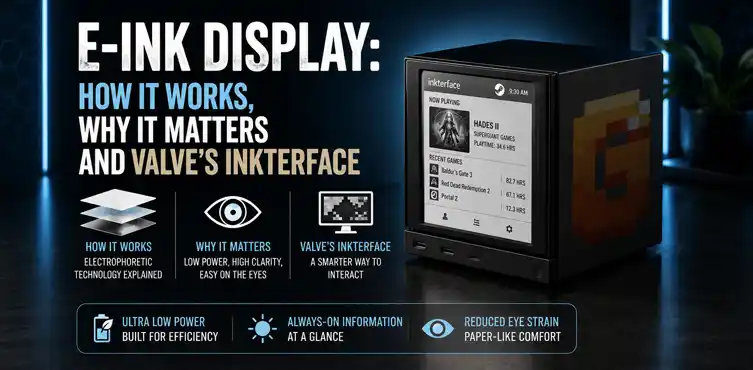

An e-ink display uses tiny charged particles in microcapsules to create paper-like images that stay visible with zero power once drawn. Valve just open-sourced the full Inkterface project — a complete DIY e-ink faceplate for the Steam Machine that shows live system stats. Here’s how the technology works, why it’s exciting and how to build the official version.
Valve recently dropped something unexpected. They open-sourced the complete Inkterface project on GitLab under the MIT license, giving everyone the 3D files, firmware, BOM, and instructions to build their own e-ink front panel for the Steam Machine. At launch they said they wouldn’t sell this accessory — now anyone can make one.
So what makes e-ink special enough for Valve to support a whole open-source project around it?
What Is an E-Ink Display and How Does It Work?
An e-ink display, also called electronic paper, works through electrophoresis. Tiny capsules contain charged black and white pigment particles in a clear fluid. Apply a small electric field and the particles move to the top or bottom, forming visible pixels.
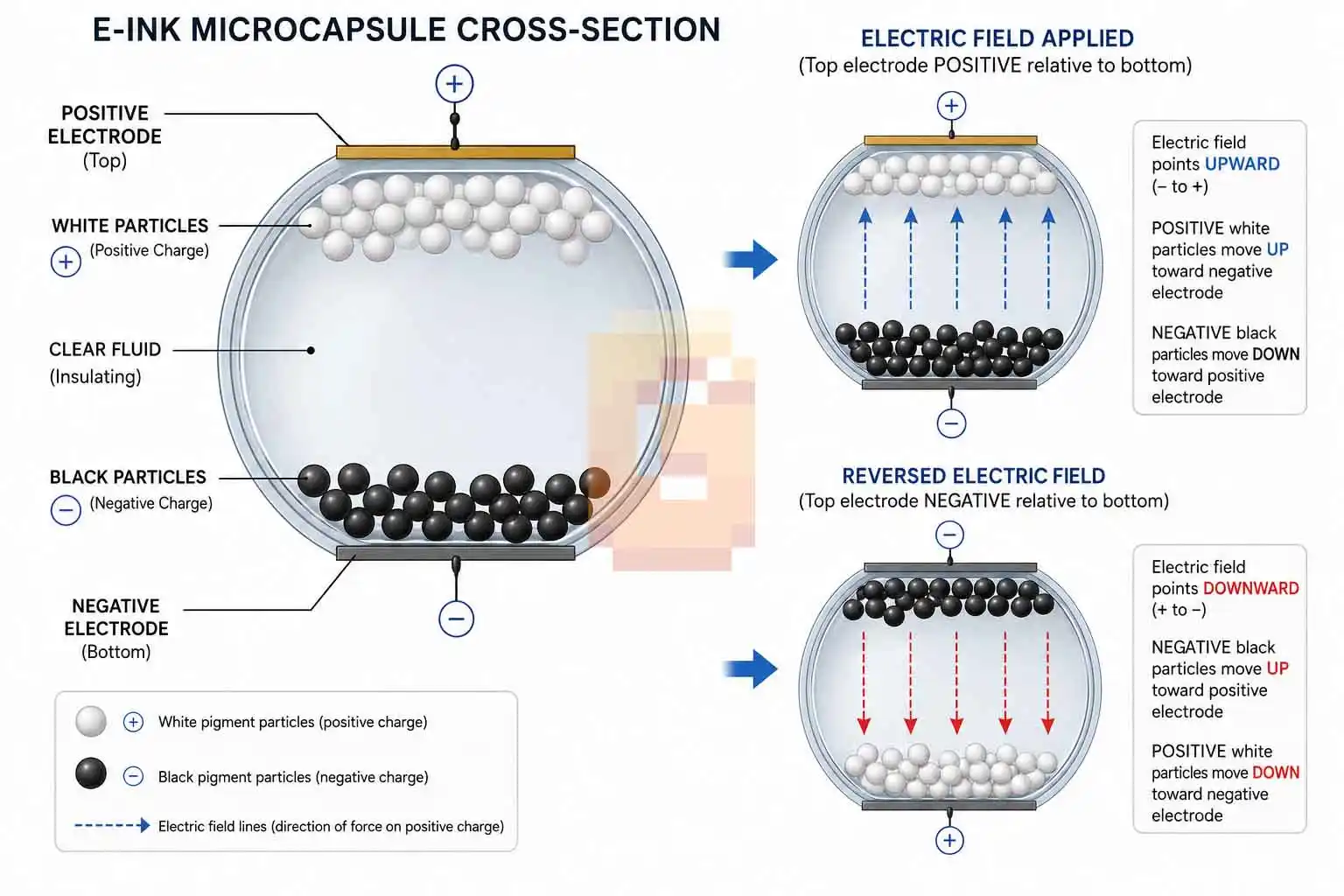
The real magic is bistability. Once the image is set, it stays there with no power at all. The screen only consumes energy when changing what’s displayed.
The bistability principle — why it holds an image with no power
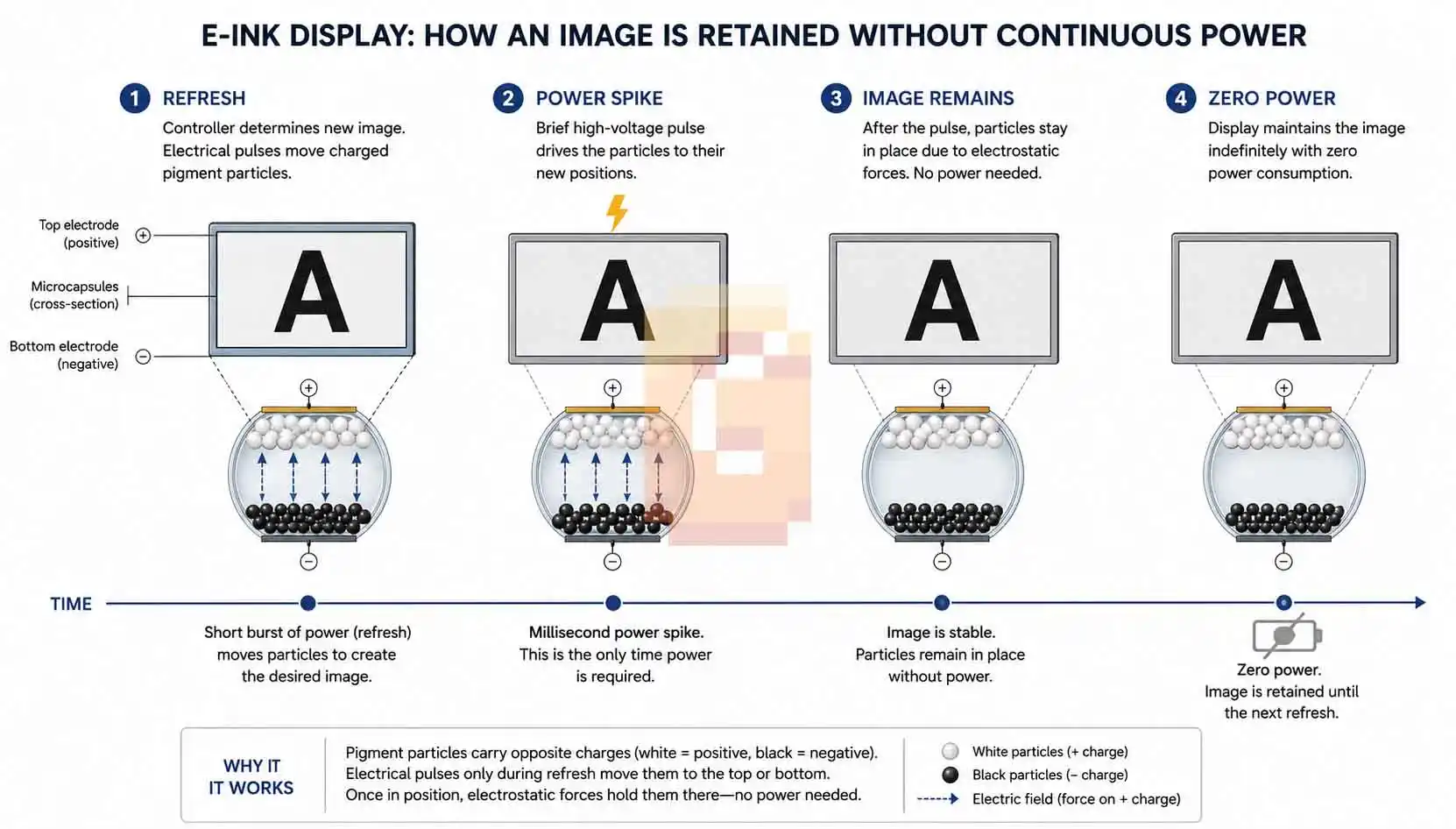
This zero-standby-power behavior is why Kindles can go weeks between charges. It’s perfect for always-visible information that doesn’t update constantly.
How it’s different from LCD and OLED (reflective vs emissive)
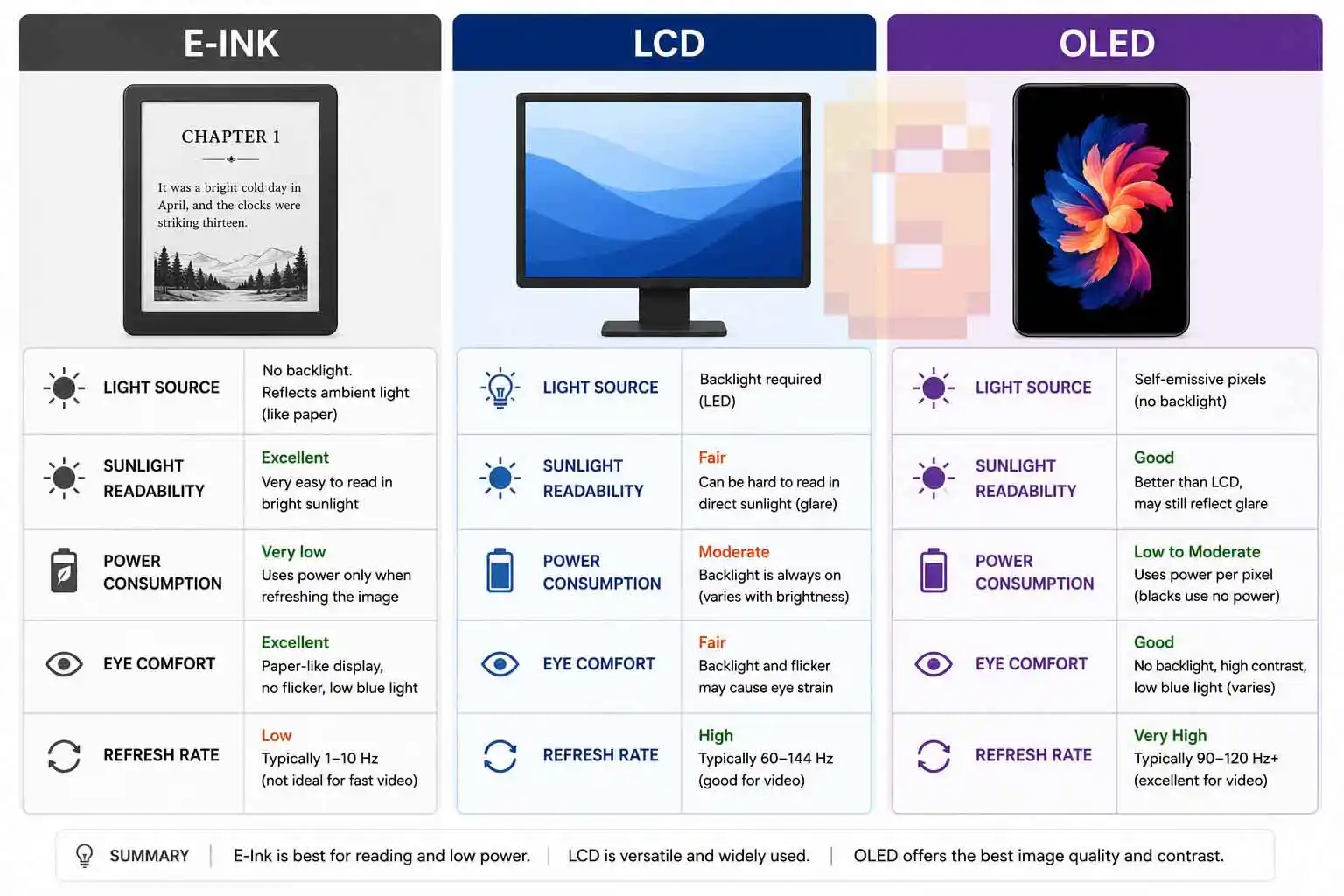
E-ink is reflective — it bounces ambient light like real paper. LCD and OLED emit their own light. This makes e-ink readable in bright sunlight and far easier on the eyes for static content.
The Advantages of E-Ink Displays
The biggest advantage is ultra-low power use. It draws almost nothing except during refreshes, which is why it fits perfectly into a living-room console like the Steam Machine.
Sunlight readability stands out too. No backlight means no glare, just crisp contrast that improves as the room gets brighter. It’s also gentle for long viewing. No PWM flicker and no constant blue light emission reduce eye strain compared to glowing panels.
The matte, paper-like finish feels premium and natural for status displays or custom artwork.
Where E-Ink Falls Short
Refresh rates remain relatively slow. Full updates can take hundreds of milliseconds, so it’s not suitable for video or fast gaming. Color reproduction has improved but still lags behind OLED or LCD in vibrancy and speed. Early panels were strictly monochrome. Higher costs for larger or faster panels used to limit adoption, options are getting more affordable today.
These trade-offs explain why e-ink thrives in specific, thoughtful applications rather than replacing every screen.
Where E-Ink Is Used Today — and Where It’s Going
E-readers remain the killer app. Devices like the Kindle deliver weeks of battery life and a comfortable reading experience that feels like paper. Retailers use electronic shelf labels for real-time price changes with minimal power and wireless updates.
Surprising applications
BMW famously demonstrated color e-ink wraps that can change a car’s appearance on demand. Other uses include smart cards, IoT sensors, and automotive dashboards where always-on visibility matters more than refresh speed.
Gaming hardware — Valve Steam Machine Inkterface
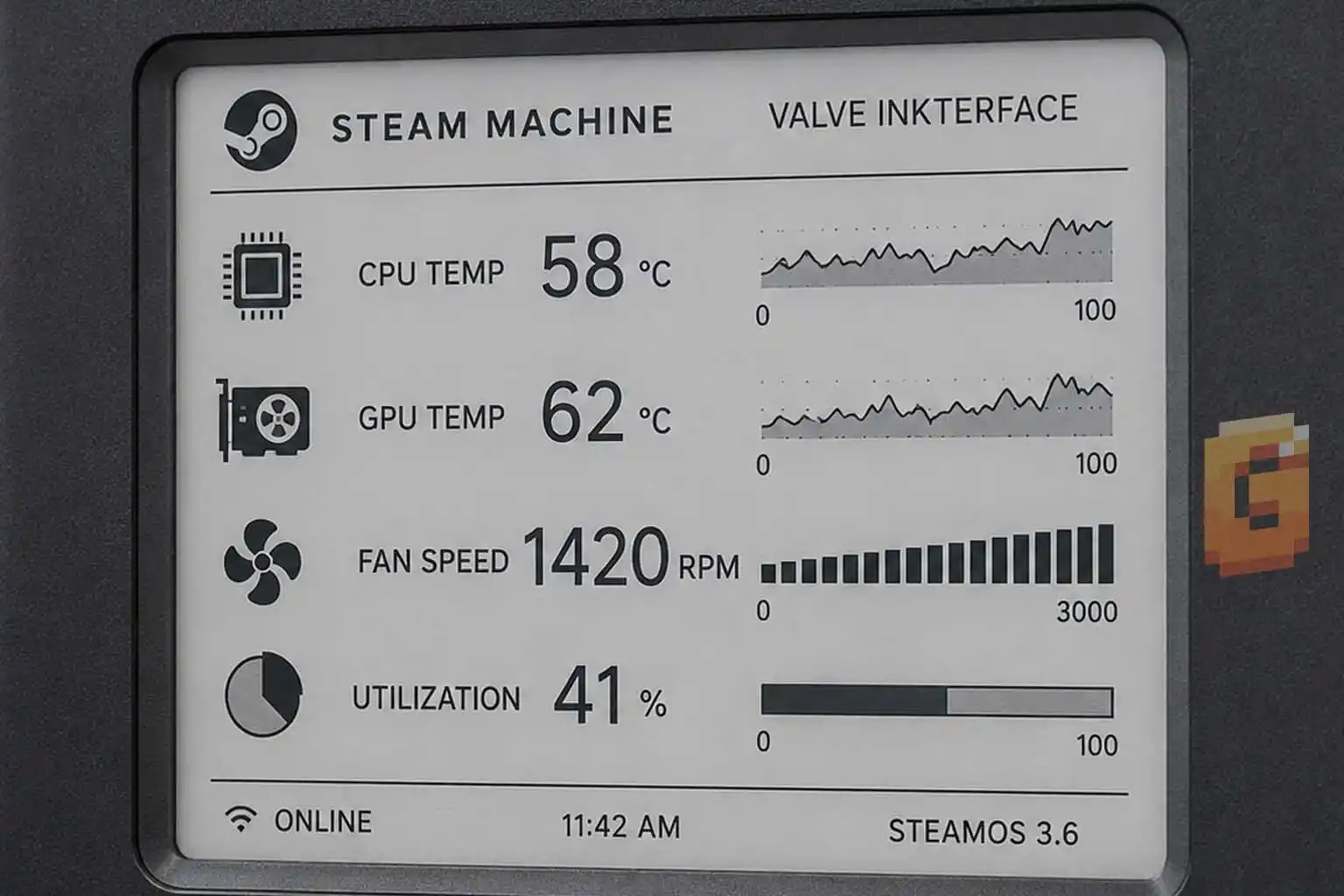
Valve’s Inkterface turns the Steam Machine’s modular magnetic faceplate into a live dashboard showing CPU/GPU temperatures, fan speeds, and other system metrics. The large panel and low power draw make it ideal for a console you leave running in the living room.
The Current State of E-Ink — It’s Not the Kindle You Remember
E-ink has advanced significantly since the early Kindle days. Modern panels like Gallery 3 offer much faster grayscale refresh rates — around 350ms in some implementations. Color variants such as Kaleido 3, Gallery 3 color, and Spectra 6 now deliver usable color for practical applications.
Companies like Modos have pushed boundaries with prototypes reaching 75Hz, making limited video and light gaming possible on e-ink. Dasung sells color e-ink monitors you can buy today for productivity work.
The technology has matured. It’s no longer just for slow-reading devices — it’s entering more dynamic niches.
Inside the Inkterface — Valve’s Official Open-Source E-Ink Faceplate
Valve released everything you need on their SteamOS GitLab: full CAD files, firmware, assembly instructions, and even a video guide. This is a finished, ready-to-build project rather than an early prototype.
What the Inkterface displays
It shows real-time hardware telemetry — CPU and GPU temps, fan speeds, utilization, and more. You can also load custom images or themes since the panel supports simple graphics.
What you need to build one (official BOM)
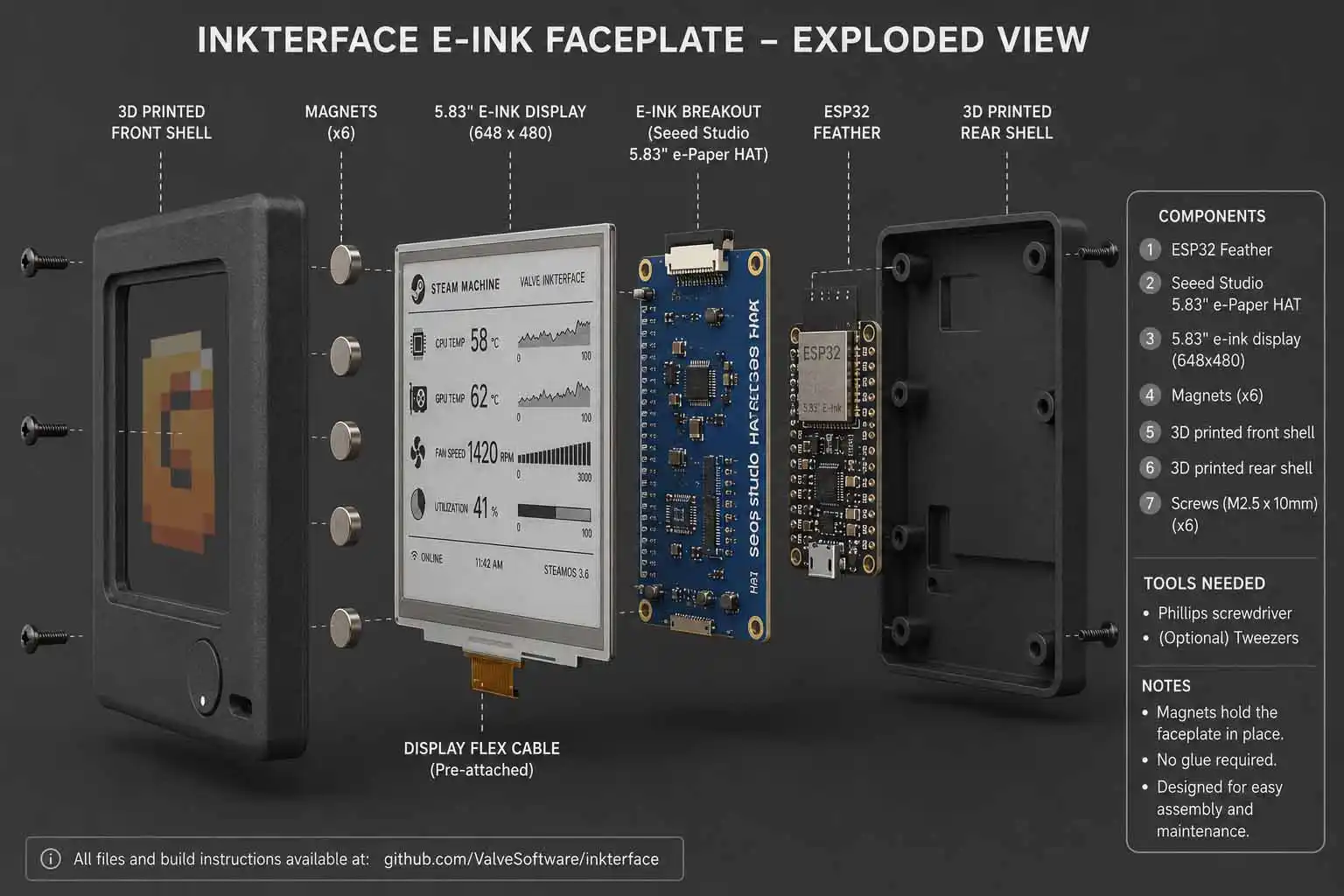
The full bill of materials is available directly on Valve’s Inkterface GitLab page. The confirmed electronic components are
- Adafruit ESP32 Feather with 2MB PSRAM
- Adafruit eInk Breakout Friend
- Adafruit 5.83-inch monochrome eInk panel (648×480 resolution)
Mounting hardware consists of M2.5 machine screws and small neodymium magnets for the magnetic faceplate attachment — check the GitLab BOM for exact counts and dimensions before ordering, as these are the parts most likely to vary between print revisions of the faceplate design.
How it connects and works
The ESP32 communicates wirelessly via Bluetooth with a companion Linux app on the Steam Machine. No tricky pogo pins or wired chassis connections are needed. The magnetic faceplate snaps on and off easily, just like Valve’s other official covers.
Is it worth building?
If you have basic soldering skills, a 3D printer (or access to one), and enjoy modding, this is a very achievable project. Valve’s documentation makes it straightforward for makers. Beginners may want to wait for pre-built options.
JSAUX is already developing a commercial e-ink faceplate for the Steam Machine launching later in 2026 — a good alternative if you prefer plug-and-play.
Should You Care About E-Ink right now?
E-ink isn’t trying to replace your gaming monitor. It solves specific problems better than anything else: always-on information panels, ultra-low power, and excellent readability in any lighting.
Valve’s Inkterface is a textbook example of the right technology for the job. It gives your Steam Machine a unique, glanceable personality without adding heat, noise, or battery drain.
FAQ
What is the Valve Inkterface exactly?
It is Valve’s official open-source e-ink faceplate project for the Steam Machine that displays live system stats on a 5.83″ panel.
How does the Inkterface get data from the Steam Machine?
The ESP32 inside the faceplate connects wirelessly via Bluetooth to a companion app running on SteamOS.
Does Valve sell the Inkterface?
No. Valve explicitly said they would not sell it, which is why they open-sourced the full project instead.
What’s the difference between building the Inkterface and waiting for JSAUX?
Building gives you full customization and the satisfaction of DIY. JSAUX’s version will be pre-assembled and easier for non-makers.
Can the e-ink panel show custom images or game art?
Yes. The open-source firmware supports custom bitmaps and themes beyond just system monitoring.
Wrapping It Up
An e-ink display brings bistable, reflective, paper-like performance that shines for always-visible, low-power applications. Valve’s open-source Inkterface perfectly demonstrates this in a gaming context — a large status panel that looks great on your Steam Machine without constant power draw.
Whether you build the official project, wait for JSAUX’s commercial take, or just appreciate the tech, e-ink continues to carve out smart niches.
Head over to Valve’s GitLab repo and start your build if you’re ready. What would you display on your own Inkterface?
References
– Official Inkterface Project
– GamingOnLinux coverage of the open-source release
– Adafruit product documentation for the 5.83″ eInk panel and ESP32 Feather

This is one of the clearest e-ink explainers I’ve come across.Huge respect to Valve for open-sourcing the entire Inkterface build instead of locking it behind a paid accessory. The BOM breakdown and the explanation of how the ESP32 talks to SteamOS over Bluetooth make this feel genuinely buildable rather than just a tease. Bookmarking this for whenever my Steam Machine finally shows up!