AIO Water Cooler Advantages and Disadvantages

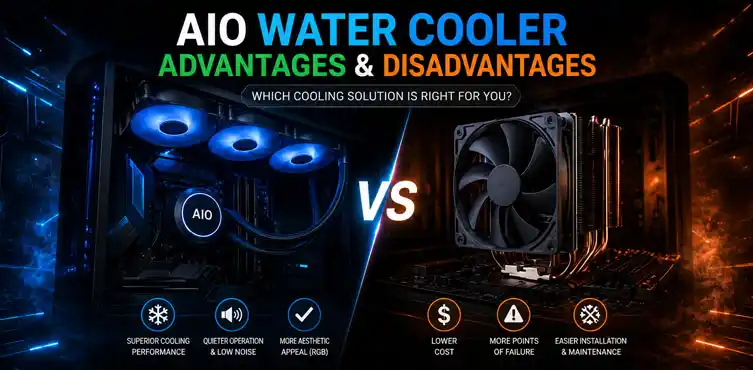

AIO water coolers usually provide better cooling for high-power CPUs, free up space around the CPU socket, and can run quieter under heavy loads. However, they’re more expensive, introduce additional failure points, and aren’t necessary for every processor. For many mainstream CPUs, a good air cooler remains the smarter value.
If you’re comparing CPU cooling solutions, you’ve probably noticed one thing: everyone says AIO liquid coolers are “better,” but very few articles explain when that actually matters. That’s exactly what this guide covers.
We’ll break down the real AIO water cooler advantages and disadvantages, explain which CPUs genuinely benefit from liquid cooling, discuss why small form factor PCs change the equation entirely, and help you decide whether an AIO is worth your money—or whether an air cooler is the better purchase.
Most people searching for CPU coolers are trying to answer three practical questions:
- Will an AIO actually cool my CPU better?
- Is liquid cooling worth paying extra for?
- Should I skip an AIO and buy an air cooler instead?
We’ll answer each one honestly instead of assuming liquid cooling is automatically the best choice.
AIO Water Cooler Advantages: Where They Beat Air Cooling
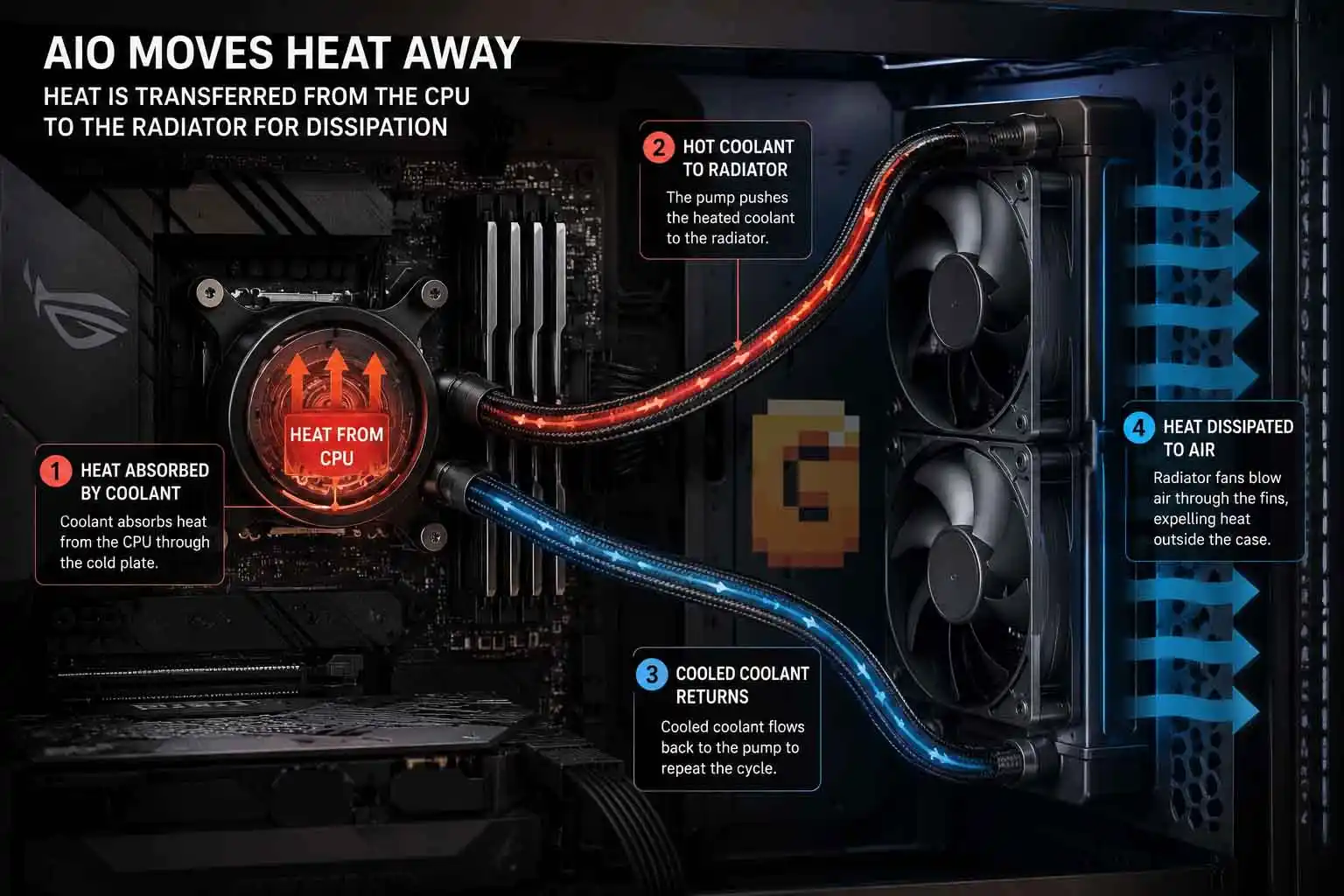
Yes, AIO water coolers generally cool high-performance processors better than traditional air coolers. That doesn’t mean they’re automatically the best option for everyone. Their strengths become much more noticeable under sustained heavy workloads or when paired with CPUs that generate a significant amount of heat.
Better Heat Dissipation
The biggest advantage of an AIO is how it moves heat away from the processor. Instead of concentrating all the heat inside a large heatsink directly above the CPU, the pump circulates coolant through tubes to a radiator mounted elsewhere in the case. The radiator then spreads that heat across a much larger surface area. This makes it easier to remove heat during long gaming sessions, rendering workloads, compiling software, or video editing.
Improved Performance During Heavy Loads
One of the biggest reasons enthusiasts buy an AIO is sustained cooling performance. When the CPU stays cooler over longer periods, it has more thermal headroom before approaching its temperature limits. This is especially valuable during workloads that keep every core busy rather than short bursts of activity.
Better Support for High-End CPUs
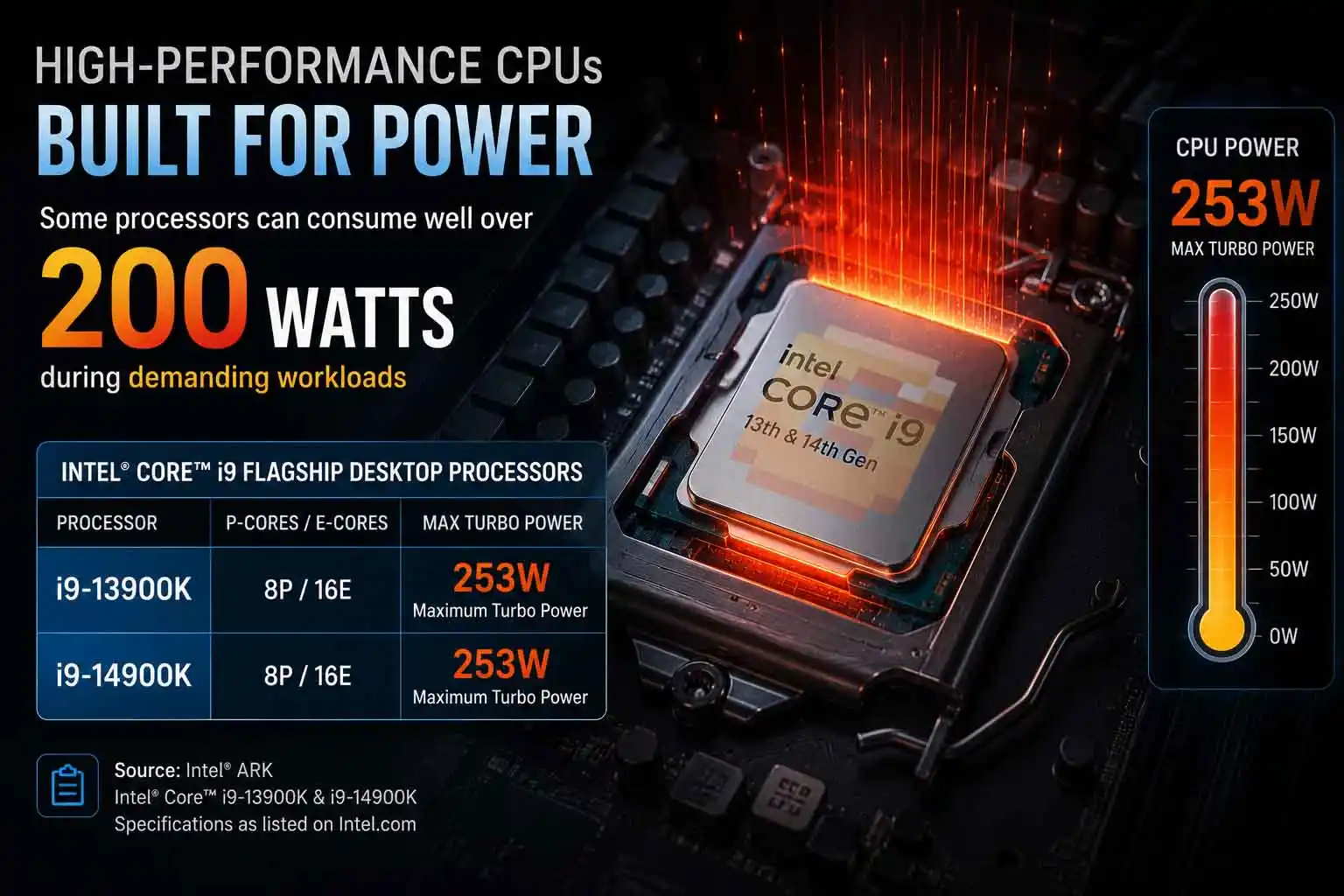
Modern flagship processors can generate enormous amounts of heat. Examples include:
- Intel Core i9 13th-generation processors
- Intel Core i9 14th-generation processors
- AMD Ryzen 9 7000 series
- AMD Ryzen 9 9000 series
Some of these processors can consume well over 200 watts during demanding workloads, with certain Intel models — including the i9-13900K and i9-14900K — rated at up to 253W Maximum Turbo Power according to Intel’s official ARK specifications.
This is where premium 280mm and 360mm AIO coolers begin to separate themselves from even excellent dual-tower air coolers. For these processors, choosing an AIO often becomes a performance decision rather than simply an aesthetic one. Keeping a chip like that fed with clean, stable power matters just as much as keeping it cool — see our breakdown of why VRM heatsinks matter for the electrical side of the same high-power-CPU equation.
Quieter Under Heavy Workloads
Many people assume liquid coolers are always quieter. That’s only partially true. During light desktop use, both air coolers and AIOs can be nearly silent.
Under sustained heavy CPU loads, however, a larger radiator has more cooling surface available, meaning radiator fans often don’t need to spin as aggressively as smaller heatsink fans. The result can be lower overall noise during demanding tasks.
More Space Around the CPU Socket
Large dual-tower air coolers can dominate the inside of a PC. An AIO replaces that massive heatsink with a compact pump block sitting directly on the CPU. This provides several benefits:
- Easier access to motherboard components
- Better RAM compatibility
- Cleaner cable routing
- Less visual clutter
Builders who enjoy clean-looking systems often appreciate this just as much as the cooling itself.
AIO Water Cooler Disadvantages: What They Don’t Tell You
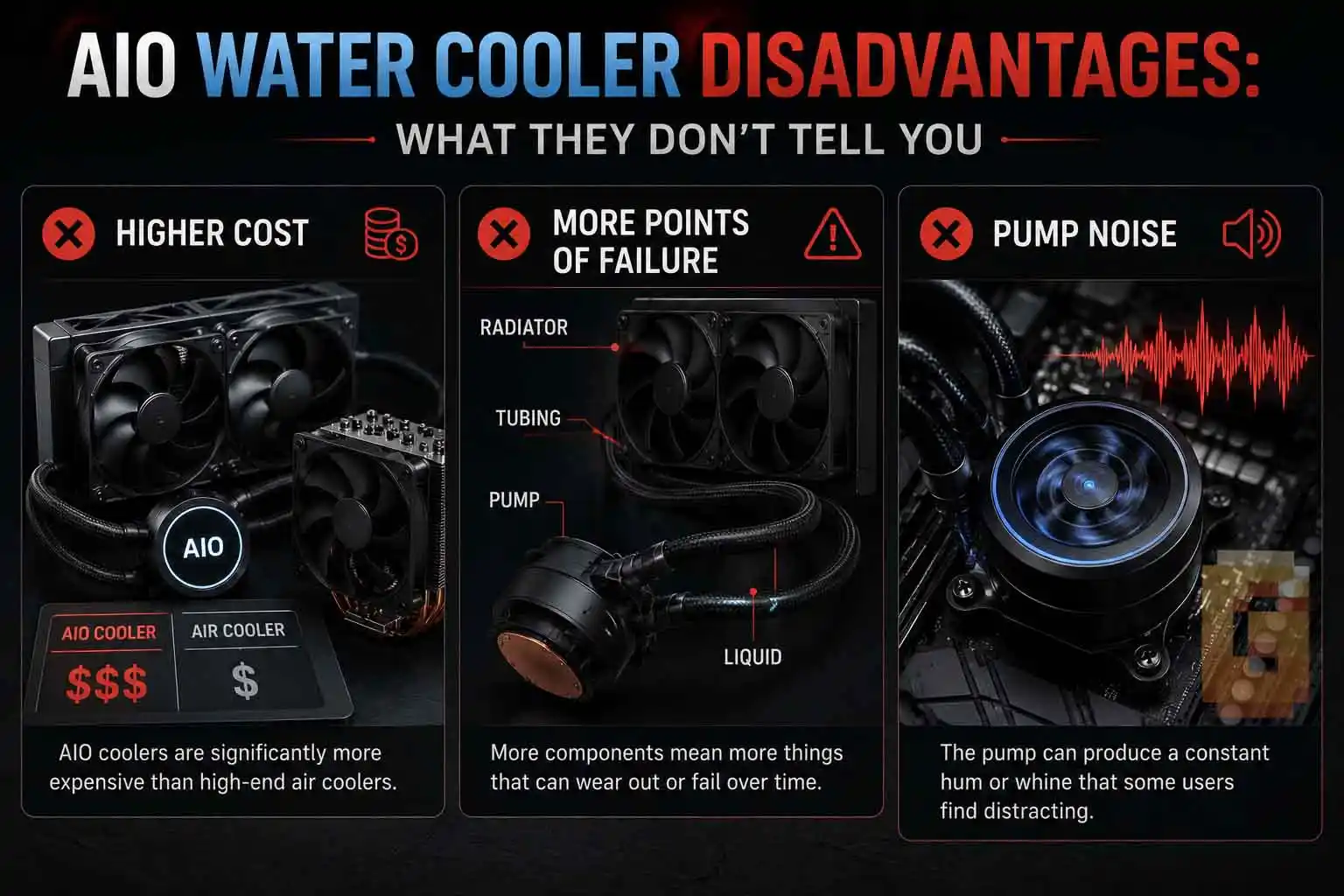
AIOs aren’t perfect. In fact, there are several reasons why an air cooler may actually be the better purchase.
Higher Cost
Liquid cooling almost always costs more. You’re paying for:
- Pump
- Radiator
- Tubing
- Additional engineering
- More complex manufacturing
If your processor doesn’t actually need that extra cooling capacity, the additional expense may provide little real-world benefit.
More Points of Failure
An air cooler is mechanically simple. Most consist of:
- Metal heatsink
- Heat pipes
- One or two fans
An AIO adds additional components, including:
- Pump
- Liquid
- Tubing
- Radiator
While modern AIOs are generally reliable, there are simply more components that could eventually fail.
Pump Noise
Air coolers only have fan noise. AIOs have fan noise plus pump noise. Good pumps are usually very quiet, but they never become completely silent. Some users are particularly sensitive to the faint hum or high-frequency tone certain pumps can produce.
Installation Takes Longer
Installing an air cooler is usually straightforward. Installing an AIO often requires:
- Mounting the radiator
- Positioning tubing
- Finding optimal airflow direction
- Managing additional fan cables
It’s not difficult, but it generally involves more planning.
Which CPUs Actually Need an AIO? (And Which Don’t)
Not every processor benefits equally from liquid cooling. This is one of the biggest misconceptions repeated across the internet.
CPUs That Commonly Benefit
High-end desktop processors often produce enough heat to justify premium liquid cooling. Examples include:
- Intel Core i9 13th-generation
- Intel Core i9 14th-generation
- AMD Ryzen 9 7000 series
- AMD Ryzen 9 9000 series
These CPUs frequently run sustained multi-core workloads that push cooling systems much harder.
CPUs That Usually Don’t Need One
For many mainstream processors, a quality air cooler performs extremely well.
If you’re using a CPU below roughly the 125W class and aren’t pushing heavy productivity workloads every day, a premium dual-tower air cooler may deliver excellent temperatures while costing less. That’s why buying an AIO simply because it looks impressive isn’t always the best investment. Sometimes the smarter upgrade is spending that money on a faster GPU, more memory, or additional storage instead.
Most mainstream processors do not require an AIO. A quality air cooler is often enough unless you’re using a high-power CPU, performing heavy productivity workloads, or building inside a compact case with limited cooler clearance.
The One Scenario Where AIO Wins Every Time: Small Form Factor Cases
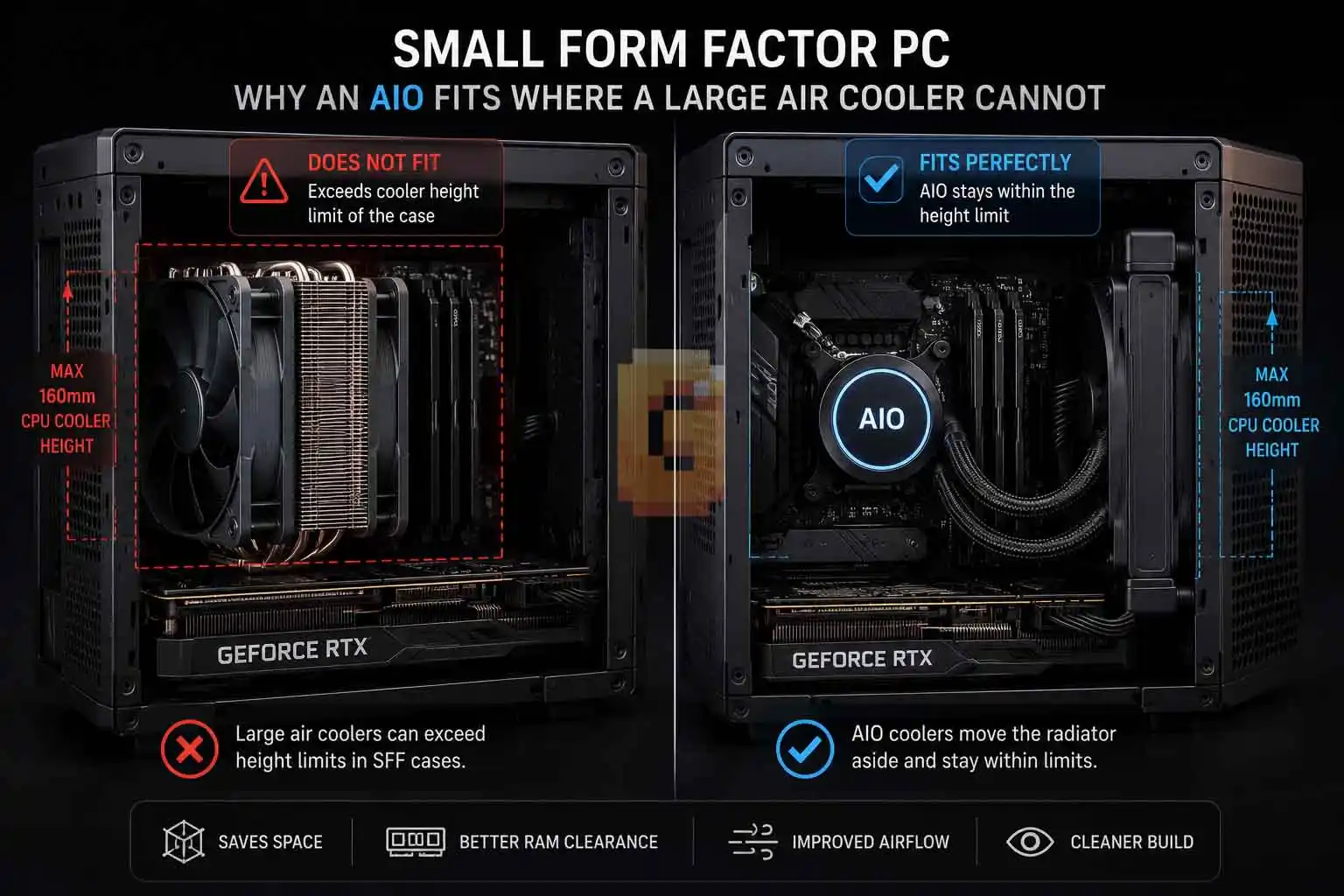
Small form factor systems completely change the conversation. Many compact ITX cases simply cannot fit massive dual-tower air coolers because of strict CPU cooler height limitations. Some cases support coolers under 160mm, while others impose even lower limits depending on the chassis design.
In these situations, a 240mm AIO often becomes the practical solution rather than a luxury upgrade. Instead of trying to squeeze a huge heatsink into a tiny enclosure, the radiator mounts elsewhere inside the case. For many compact builds, that makes liquid cooling the only realistic path to high-end CPU performance.
Small form factor PCs are one of the strongest reasons to choose an AIO. When a large tower cooler physically cannot fit inside the case, a radiator-mounted liquid cooler may be the only practical solution.
Air Cooler vs AIO: Which Is Better for Gaming?
For gaming alone, the answer depends more on your processor than your graphics card. Many games rarely keep every CPU core fully loaded for extended periods. That means a quality air cooler can often provide excellent gaming temperatures.
An AIO becomes more attractive if you also:
- Stream while gaming
- Edit video
- Render 3D projects
- Compile large software projects
- Frequently run sustained all-core workloads
Otherwise, gaming alone doesn’t automatically justify liquid cooling.
Should You Buy an AIO Water Cooler? A Decision Framework
Here’s a simple way to decide.
Choose an AIO if:
- You own a high-end processor with substantial thermal demands.
- You regularly perform long CPU-intensive workloads.
- You’re building inside a compact case with strict cooler height limits.
- You value a cleaner interior appearance around the CPU socket.
Choose an air cooler if:
- You’re using a mainstream processor.
- Budget matters.
- You prefer maximum mechanical simplicity.
- You want fewer components that may eventually require replacement.
For many PC builders, either option can be the correct choice depending on the hardware and intended workload.
FAQ
Is an AIO water cooler better than an air cooler?
Yes, for high-power CPUs and sustained workloads. For many mainstream processors, a quality air cooler delivers excellent performance while costing less.
Do AIO water coolers last longer than air coolers?
Not necessarily. Air coolers have fewer components, while AIOs include pumps and sealed liquid systems that may eventually wear out.
Is liquid cooling worth it for gaming?
Sometimes. If gaming is your primary workload and you’re using a mainstream CPU, an air cooler is often sufficient.
Can an AIO improve CPU performance?
Yes, indirectly. Lower temperatures can provide additional thermal headroom during sustained heavy workloads, helping powerful processors maintain higher performance.
Should I buy a 240mm or 360mm AIO?
It depends on your case compatibility and processor. Larger radiators generally provide greater cooling capacity but require more installation space.
Conclusion
Choosing between liquid cooling and air cooling isn’t about following trends—it’s about matching the cooler to your hardware and your workload.
The biggest AIO water cooler advantages and disadvantages become clear once you look beyond marketing. AIOs excel with powerful processors, sustained heavy workloads, and compact PC builds where large air coolers simply won’t fit. Air coolers, meanwhile, remain an outstanding choice for mainstream systems thanks to their lower cost, mechanical simplicity, and dependable performance.
Before making your decision, consider your CPU, your case, your budget, and the type of work or games you actually run. A cooler should solve a real problem—not just add visual appeal.
References
Intel ARK — https://ark.intel.com/
AMD Product Specifications — https://www.amd.com/en/products/processors/desktops/ryzen.html
Tom’s Hardware CPU Cooling Reviews — https://www.tomshardware.com/pc-components/cooling/reviews